


If you’re building a new PC or upgrading your current one, you may wonder if an ATX 3.1 PSU will work with your existing motherboard, graphics card, and PSU cables. The good news is that it usually will.
ATX 3.1 improves power delivery and introduces the 12V-2×6 connector while keeping compatibility with most desktop hardware. This guide explains what changed, what still works, and whether upgrading your power supply is the right choice.
What Is ATX 3.1?
ATX 3.1 is the newest desktop power supply standard created under the Intel ATX specification. It sets rules for how a PSU should deliver stable and reliable power to modern computer components.
The biggest update is the new 12V-2×6 graphics card power connector.
It replaces the earlier 12VHPWR connector with an improved design that creates a more reliable connection between the native PSU cable and the graphics card.
Another improvement is how an ATX 3.1 PSU handles transient power spikes, also called power excursions.
Modern graphics cards can briefly draw much more power than their average usage. ATX 3.1 is designed to manage these short bursts more safely.
Even with these updates, most connections remain unchanged.
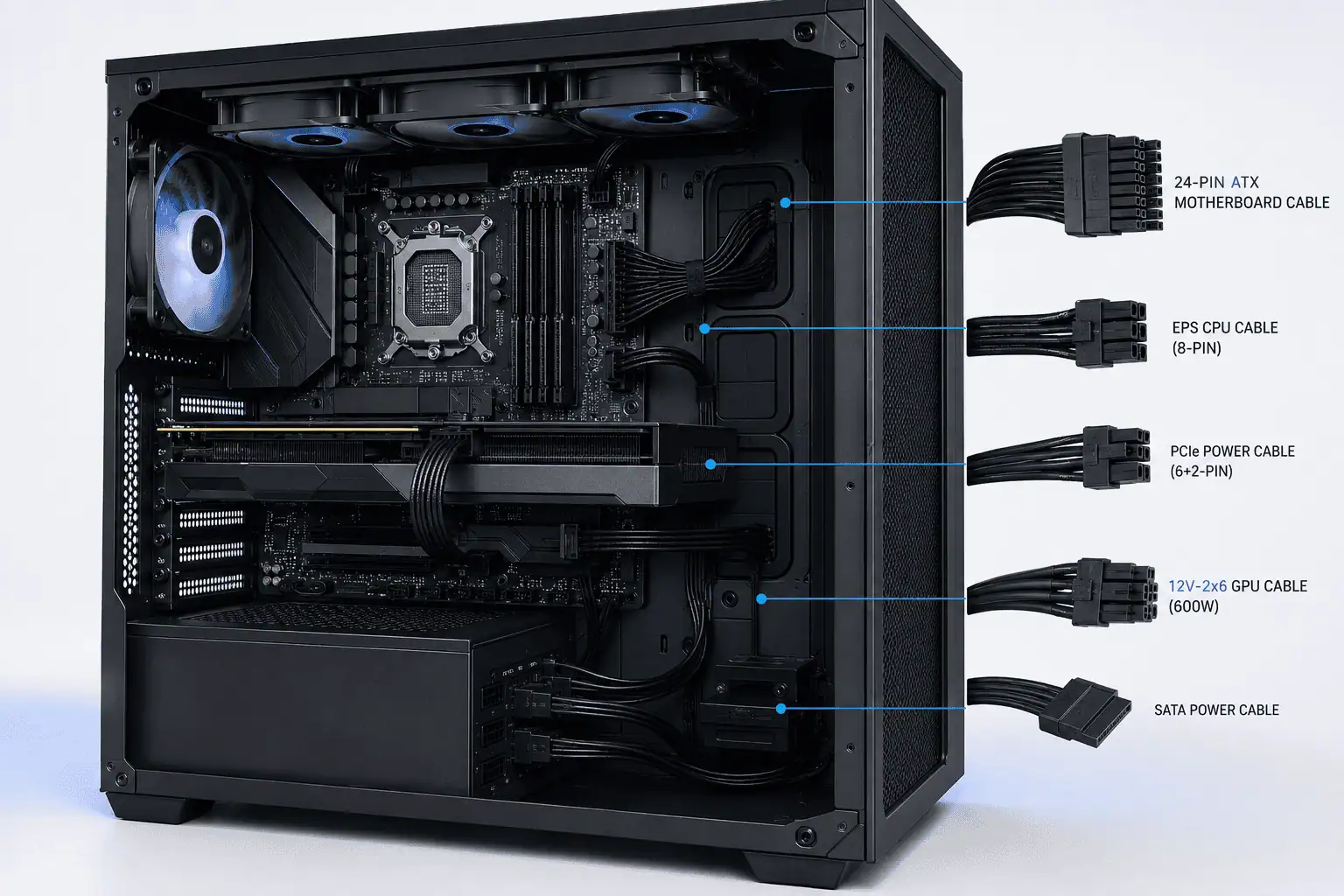
The standard 24-pin motherboard cable, EPS connector, SATA power cables, and traditional PCIe power cables still work the same way. That means an ATX 3.1 PSU is compatible with most existing desktop hardware.
For most users, ATX 3.1 is an upgrade in reliability rather than a complete redesign.
ATX 3.1 vs ATX 3.0: Should You Upgrade?
ATX 3.1 is an updated version of the ATX 3.0 PSU standard. It keeps everything that worked well in ATX 3.0 while improving the graphics card power connector and overall cable reliability.
The largest change is the move from 12VHPWR to 12V-2×6. Both connectors look very similar and are mechanically compatible, but the newer design improves contact between the cable and the graphics card.
This helps reduce problems caused by a connector that is not fully inserted.
ATX 3.1 also includes updated guidance for connector seating, making proper cable installation even more important.
A fully inserted connector provides a more stable electrical connection and helps reduce the risk of connection issues.
For most PC builders, there is very little difference during installation. The motherboard connector, CPU connector, and storage power cables all remain the same.
Should You Upgrade from an ATX 3.0 PSU?
Not always.
If you already own a reliable ATX 3.0 PSU that provides enough wattage for your hardware, you can continue using it. Many quality ATX 3.0 power supplies already support today’s high-performance graphics cards.
However, if you’re buying a new power supply, choosing an ATX 3.1 model is usually the better option.
It supports the latest connector design and prepares your system for future graphics cards without sacrificing backward compatibility.
Your decision should depend on three things:
- The age of your current PSU
- Your graphics card requirements
- Whether you plan to upgrade your PC in the near future
ATX 3.1 vs ATX 2.x
The biggest improvement comes when upgrading from an older ATX 2.x power supply.
Older ATX 2.x units were designed before today’s high-performance graphics cards became common. They usually rely on several traditional PCIe power cables instead of a native 12V-2×6 connection.
Modern graphics cards, including models like the RTX 4090 and RTX 5090, can produce large transient power spikes during demanding workloads. ATX 3.1 power supplies are built to handle these sudden changes more effectively.
Another benefit is support for the latest PCIe 5.0 and PCIe 5.1 graphics hardware. The updated connector follows guidance from PCI-SIG, helping improve connection reliability for newer GPUs.
If your current PSU is several years old and you’re planning to upgrade your graphics card, moving from ATX 2.x to ATX 3.1 is usually a worthwhile investment.
What Is 12V-2×6?

The 12V-2×6 connector is the latest GPU power connector used by many ATX 3.1 power supplies.
It is designed for modern graphics cards that require more power than older PCIe connectors can safely provide.
While it looks very similar to 12VHPWR, it includes improvements that help create a stronger and more reliable electrical connection.
The connector follows updated guidance from PCI-SIG for modern graphics hardware.
When installing the cable, always push it in until it is fully seated. Proper connector seating helps maintain a stable connection and reduces the chance of power problems.
You should also avoid making a sharp bend immediately after the connector. Good cable routing reduces stress on the cable and helps keep the connection secure over time.
Is 12V-2×6 the Same as 12VHPWR?
No, but they are closely related.
The 12V-2×6 connector is an updated version of 12VHPWR. It keeps the same basic design while improving how the connector contacts the graphics card.
Both connectors are mechanically compatible, but the newer version provides better long-term reliability when installed correctly.
If you’re buying a new power supply today, choosing one with a native 12V-2×6 cable is usually the better choice.
ATX 3.1 PSU Compatibility
One of the biggest reasons people search for this topic is to find out whether an ATX 3.1 PSU will work with their current PC.
In most cases, it will.
The Intel ATX 3.1 specification improves the power supply itself without changing the standard connectors used by most desktop components.
If your PC already uses standard ATX connectors, you can usually install an ATX 3.1 PSU without replacing your motherboard, processor, or storage drives.
Hardware Compatibility
An ATX 3.1 PSU works with virtually all standard ATX motherboards because the 24-pin motherboard connector has not changed.
Your processor also remains compatible because the EPS connector is the same as previous ATX standards.
Whether your system uses an Intel Core or AMD Ryzen processor, compatibility depends on having enough PSU wattage rather than the ATX version.
Storage devices such as SATA SSDs and hard drives continue using the same SATA power connectors. Existing cooling systems, RGB controllers, and fan hubs also remain compatible.
Modern graphics cards built around PCIe 5.0 and PCIe 5.1 standards benefit from the updated connector design, while older graphics cards using 6-pin or 8-pin PCIe power cables continue to work normally.
Does It Work with Older PCs?
Yes.
ATX 3.1 was designed with backward compatibility in mind.
If your older desktop uses a standard ATX motherboard and your new power supply provides enough wattage, upgrading is usually simple.
You can continue using your motherboard, processor, memory, storage devices, and many existing graphics cards.
Only very old systems with uncommon power connectors may require additional compatibility checks before upgrading.
Can You Reuse Modular PSU Cables?

This is one of the most important parts of ATX 3.1 PSU cable compatibility because using the wrong cable can damage your PC.
Many people think all modular PSU cables are the same. They are not.
The connectors that plug into your motherboard or graphics card follow standard designs.
However, the connector that plugs into the power supply does not. Every manufacturer can use a different PSU pinout or modular cable pinout.
Even two power supplies from the same brand may use different cable layouts. That is why you should never judge compatibility by appearance alone.
Always use the cables that came with your power supply unless the manufacturer clearly states that another cable is compatible.
Can You Use Modular Cables from Another Brand?
No.
Never use modular cables from another brand unless the manufacturer specifically confirms they are compatible.
Even if the connector fits, the internal wiring may be completely different. A mismatched cable can damage your motherboard, graphics card, storage drives, or the power supply itself.
Can You Reuse Cables from the Same Brand?
Sometimes.
Some manufacturers use the same cable design across several PSU models, while others change the PSU pinout between product generations.
Before reusing any modular cable, always check the manufacturer’s compatibility guide for your exact PSU model.
Native Cable vs Adapter

If your power supply includes a native PSU cable with a 12V-2×6 connector, use it whenever possible.
A native cable connects directly from the PSU to the graphics card. This creates fewer connection points and provides a cleaner installation.
Some graphics cards include adapter cables so they can work with older power supplies.
These adapters are safe when installed correctly, but a native cable is usually the better option because it reduces cable clutter and improves cable management.
Which Cables Come with an ATX 3.1 Power Supply?
The exact cable bundle depends on the PSU model, but most fully modular PSU models include everything needed for a modern PC.
Most ATX 3.1 power supplies include:
- 24-pin motherboard cable
- EPS connector for the CPU
- Traditional PCIe power cables for older graphics cards
- Native 12V-2×6 cable for supported GPUs
- SATA power cables for SSDs and hard drives
- Peripheral cables for older accessories
Always check the product specifications before buying because cable bundles can vary between manufacturers.
Common Upgrade Scenarios
The best power supply depends on the hardware you already own and the upgrades you plan to make.
Upgrading from an ATX 2.x PSU
If your current PSU is several years old, upgrading to ATX 3.1 is usually a smart move.
Older power supplies were not designed for today’s high-performance graphics cards. They may lack the required connectors and may struggle with large transient power spikes.
In most cases, you can replace only the power supply while keeping your motherboard, processor, memory, storage drives, and many existing graphics cards.
Using RTX 40 or RTX 50 Series Graphics Cards
If you are building a PC with an RTX 4090, RTX 5090, or another modern graphics card, an ATX 3.1 PSU is the recommended option.
Many of these GPUs are designed for the newer 12V-2×6 connector and can benefit from improved power delivery.
Before buying a power supply, always check the graphics card manufacturer’s recommended wattage and connector requirements.
Common Mistakes
Avoiding a few common mistakes can help protect your hardware and prevent expensive repairs.
Mixing Modular PSU Cables
This is the most common mistake.
Never mix modular cables from different manufacturers or different PSU models unless the manufacturer confirms they are compatible.
The cable may fit perfectly while using a completely different PSU pinout.
Not Fully Connecting the GPU Cable
Always push the graphics card power connector in until it is fully seated.
After installation, gently pull on the cable to make sure it is locked into place.
Proper connector seating creates a stable electrical connection and helps prevent power problems.
Bending the Cable Too Sharply
Avoid making a sharp bend immediately after the 12V-2×6 connector.
Leaving a short straight section reduces stress on the cable and helps improve long-term reliability.
Good cable routing also improves airflow and makes future upgrades easier.
Buying a PSU with Too Little Wattage
Compatibility is about more than connectors.
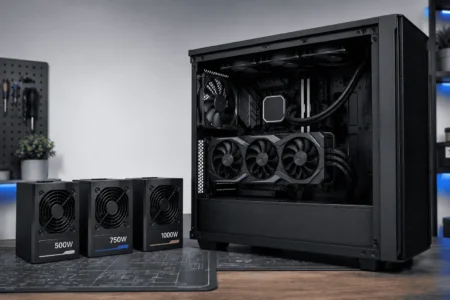
Your power supply must provide enough wattage for your processor, graphics card, storage devices, cooling system, and future upgrades.
Always leave some extra capacity so the PSU can handle heavy workloads comfortably.
How to Check Compatibility
Before buying a new power supply, spend a few minutes checking your current hardware.
Start by finding your PSU model on the label or original box.
Then visit the manufacturer’s website to confirm:
- ATX version
- Supported connectors
- Wattage
- Native 12V-2×6 support
- Modular cable compatibility
Next, compare your PSU with your graphics card’s power requirements.
If your power supply has enough wattage and the correct connectors, you may not need to upgrade.
Who Should Upgrade?
An ATX 3.1 PSU is a good choice if:
- You are building a new PC.
- Your current PSU is several years old.
- You plan to upgrade to a newer high-end graphics card.
- Your current power supply does not include the required GPU connector.
- You want the latest Intel ATX specification.
You may not need an upgrade if you already own a reliable ATX 3.0 PSU with enough wattage for your hardware. Many ATX 3.0 models continue to perform well with today’s systems.
Conclusion
ATX 3.1 PSU offers better support for modern graphics cards while remaining compatible with most existing PC hardware. If your current power supply still meets your system’s needs, you may not need an upgrade. However, if you’re building a new PC or replacing an older PSU, ATX 3.1 is a practical choice. Before reusing any modular cables, always confirm they are compatible with your exact PSU model. Understanding ATX 3.1 compatibility is just one part of organizing an entire PC, so it’s also worth understanding PC component cable management before starting your build.
FAQs
Can I use an ATX 3.1 PSU with an AMD Ryzen PC?
Yes. ATX 3.1 power supplies work with both AMD Ryzen and Intel systems as long as the motherboard uses standard ATX power connectors.
Do all ATX 3.1 power supplies include a 12V-2×6 cable?
No. Many do, but cable bundles vary by manufacturer and PSU model. Always check the product specifications before buying.
Can an ATX 3.1 PSU power older graphics cards?
Yes. Older graphics cards that use 6-pin or 8-pin PCIe power connectors work normally with an ATX 3.1 power supply.
Is a fully modular PSU required for ATX 3.1?
No. ATX 3.1 is a power supply standard, while fully modular is a cable design. You can find ATX 3.1 power supplies with different cable configurations.
Can I use cable extensions with an ATX 3.1 PSU?
Yes. High-quality cable extensions are generally safe because they connect to the end of your existing PSU cables instead of the PSU itself. Just make sure they match your connector type.