


If you’ve looked at a new graphics card or power supply recently, you’ve probably seen terms like PCIe 5.1, 12V-2×6, 12VHPWR, and ATX 3.1. They sound similar, but they don’t mean the same thing. Knowing the difference can save you from buying the wrong cable or incompatible hardware.
This guide explains what the PCIe 5.1 power connector is, how it relates to 12V-2×6, why it replaced 12VHPWR, and how to check if your graphics card and power supply support it. By the end, you’ll know exactly which connector your PC needs.
What Is the PCIe 5.1 Power Connector?
The PCIe 5.1 power connector is the latest power connection used by many modern graphics cards.
It was introduced to deliver more power safely through a single cable while supporting the increasing demands of today’s high-performance GPUs.
One important thing to understand is that PCIe 5.1 power connector is the name most people search for, but it is not the official name of the connector itself.
The physical connector is called 12V-2×6.
Because manufacturers often use both names on product pages, many builders assume they are different connectors. In most cases, they’re referring to the same hardware.
If you’re buying a recent graphics card, especially a flagship model, there’s a good chance it uses a 12V-2×6 connector.
What Does PCIe 5.1 Mean?
The term PCIe 5.1 comes from the PCIe CEM 5.1 (Card Electromechanical) specification developed by PCI-SIG, the industry organization responsible for developing and maintaining PCI Express standards used across modern computer hardware.
Unlike PCIe bandwidth standards, PCIe CEM 5.1 focuses on power delivery rather than graphics performance.
It defines how a graphics card receives external power, including connector requirements and communication with the power supply.
This means PCIe 5.1 does not make your games run faster or increase FPS. Instead, it provides a better standard for delivering power to modern GPUs that consume much more electricity than previous generations.
What Is 12V-2×6?
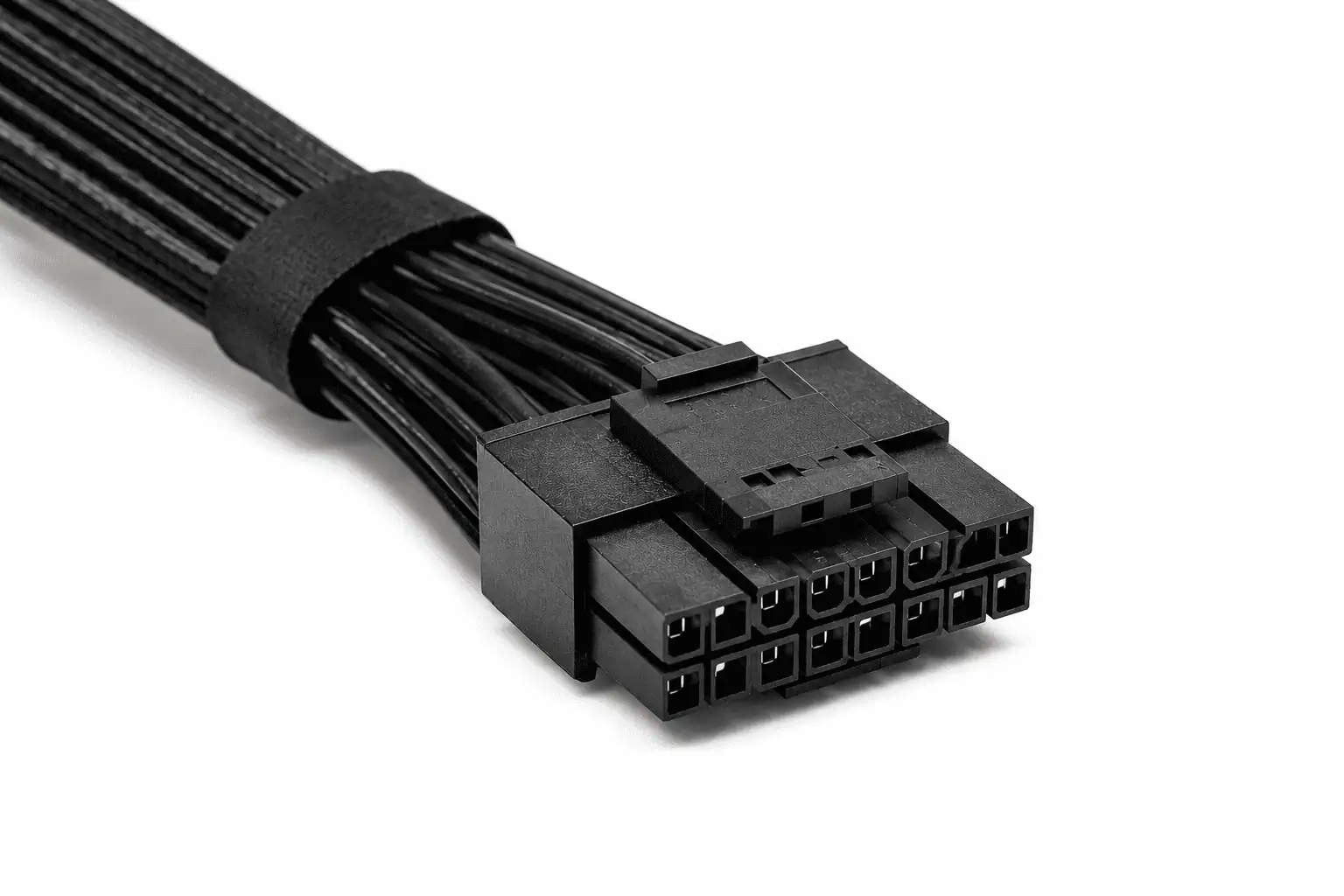
The 12V-2×6 connector is the physical cable that connects your power supply to your graphics card.
It replaces the older 12VHPWR connector while keeping a similar appearance and the same compact design.
Compared to older PCIe power connectors, the 12V-2×6 connector offers several advantages:
- Delivers up to 600 watts through a single cable.
- Replaces multiple 6-pin or 8-pin PCIe connectors.
- Improves electrical contact between the cable and GPU.
- Reduces cable clutter inside the PC case.
- Supports the latest high-performance graphics cards.
You may also see manufacturers describe it as:
- PCIe 5.1 cable
- PCIe Gen 5 cable
- PCIe Gen 5 power connector
- 16-pin GPU power cable
Although the names are different, they usually describe the same connector.
How Does ATX 3.1 Fit In?
Another term you’ll often see is ATX 3.1.
While PCIe CEM 5.1 defines the graphics card’s power connection, ATX 3.1 is Intel’s latest desktop power supply specification.
Think of it like this:
- PCIe CEM 5.1 defines how the graphics card receives power.
- ATX 3.1 defines how the power supply delivers that power.
The two standards work together to improve compatibility, reliability, and safety.
Compared to older ATX versions, ATX 3.1 also improves support for sudden changes in GPU power usage, making it better suited for today’s powerful graphics cards.
Many new ATX 3.1 power supplies include a native 12V-2×6 cable.
Now that you know what the PCIe 5.1 power connector is, the next question is why the industry replaced the previous design instead of continuing with the older connector.
Why Was 12V-2×6 Introduced?

Graphics cards have become much more powerful over the last few years. As performance increased, so did their power requirements.
Older GPUs could often run with one or two 8-pin PCIe power connectors. Today’s flagship graphics cards can draw much more power, especially during gaming, 3D rendering, video editing, and AI workloads.
To meet these higher power demands, the industry introduced the 12VHPWR connector. It allowed manufacturers to deliver significantly more power through a single cable instead of using three or four separate PCIe connectors.
Although the design solved one problem, it also revealed areas that could be improved.
Problems with 12VHPWR
Reports of overheated or melted connectors raised concerns among PC builders.
Investigations found that the connector itself was not usually the only cause. In many cases, the problem was related to installation or poor electrical contact.
Some of the most common causes included:
- The connector was not fully inserted.
- The cable was bent sharply near the connector.
- Loose connections increased electrical resistance.
- Poor contact created additional heat under heavy GPU loads.
These issues became more noticeable as newer graphics cards demanded higher and more consistent power.
Improvements in 12V-2×6
Instead of creating a completely new connector, engineers refined the existing design.
The result was the 12V-2×6 connector, introduced alongside the PCIe CEM 5.1 and ATX 3.1 standards.
The updated connector includes several improvements:
- Longer power terminals for better electrical contact.
- Shorter sense pins that help detect a secure connection.
- Lower contact resistance.
- Better support for short bursts of high power, known as transient power spikes or power excursions.
- More reliable power delivery during demanding workloads.
These improvements were designed to increase reliability while keeping the connector familiar for manufacturers and PC builders.
Now that you know why the connector changed, let’s look at how it actually works and why features like power pins and sense pins play an important role in delivering up to 600W safely through a single cable.
How the PCIe 5.1 Power Connector Works

Now that you know why the connector was introduced, let’s look at how it delivers power to your graphics card.
The PCIe 5.1 power connector, officially called 12V-2×6, combines high power delivery and communication into one compact 16-pin connector. Instead of using several 8-pin PCIe cables, everything is handled through a single connection.
This makes installation cleaner while providing enough power for today’s most demanding GPUs.
Power Pins
The connector includes 12 larger power pins.
These pins carry electricity from the power supply directly to the graphics card.
Unlike older connectors that split power across several cables, the 12V-2×6 design delivers everything through one connection. This helps reduce cable clutter and simplifies overall PC component cable management inside the PC case.
For builders, this means:
- Fewer cables to connect.
- Cleaner cable routing.
- Less clutter around the graphics card.
- Easier installation in modern PC cases.
Although the connector can deliver a large amount of power, the graphics card only uses the amount it needs.
Sense Pins
Above the 12 power pins are 4 smaller sense pins.
These pins do not supply electricity.
Instead, they allow the graphics card and power supply to communicate before heavy power is delivered.
The sense pins help the GPU:
- Detect the cable correctly.
- Confirm the connector is fully inserted.
- Identify the available power level.
- Improve connection reliability.
This communication is one of the biggest improvements in the newer design because it helps ensure the graphics card receives power through a secure connection.
600W Support
One of the biggest advantages of the PCIe 5.1 power connector is its ability to deliver up to 600 watts through a single cable.
This removes the need for three or four separate PCIe power cables on many flagship graphics cards.
However, it’s important to remember that 600W is the maximum supported power, not the amount every graphics card uses.
For example:
- An RTX 5070 may draw much less than 600W.
- An RTX 5080 or RTX 5090 can draw significantly more power under heavy workloads.
The connector is designed to handle these demands while maintaining stable power delivery.
Compatibility
One of the most common questions is whether your current hardware supports the PCIe 5.1 power connector.
The answer depends on two components:
- Your graphics card.
- Your power supply.
Let’s look at both.
Supported Graphics Cards
The PCIe 5.1 power connector is mainly found on newer NVIDIA graphics cards with higher power requirements.
Common examples include:
- NVIDIA GeForce RTX 5090
- NVIDIA GeForce RTX 5080
- NVIDIA GeForce RTX 5070 Ti
- NVIDIA GeForce RTX 5070
Although most current graphics cards that use the 12V-2×6 connector are NVIDIA models, future AMD graphics cards may also adopt the connector depending on their power requirements.
Some RTX 40 Series graphics cards also use the earlier 12VHPWR connector or the newer 12V-2×6 connector, depending on the model and manufacturing date.
Most older graphics cards continue to use standard 6-pin or 8-pin PCIe power connectors.
Before buying a new cable or power supply, always check your graphics card’s specifications.
Supported Power Supplies
Most modern ATX 3.1 power supplies include a native 12V-2×6 cable.
Many ATX 3.0 models also support the connector. Depending on the manufacturer, they may include:
- A native 12V-2×6 cable.
- A compatible replacement cable.
- Support for an approved adapter.
If you’re using an older ATX 2.x power supply, your graphics card may include an adapter that converts multiple 8-pin PCIe connectors into one 12V-2×6 connector.
One important rule should always be followed:
Never assume modular PSU cables are interchangeable, even if the connectors look identical.
Even if two cables look identical, their internal wiring may be different. Always use a cable approved for your exact power supply model.
Should You Upgrade?
Not everyone needs a PCIe 5.1 power connector.
Whether you should upgrade depends on your hardware.
A PCIe 5.1 connector is worth considering if you are:
- Building a new gaming PC.
- Buying a graphics card with a 12V-2×6 connector.
- Upgrading to an ATX 3.1 power supply.
- Planning to keep your system for several years.
You probably don’t need to upgrade if:
- Your graphics card still uses 6-pin or 8-pin PCIe connectors.
- Your current PSU provides enough power.
- Your graphics card includes a manufacturer-approved adapter.
- You’re not upgrading your GPU anytime soon.
If your current system works well, there’s no reason to replace hardware only because a newer connector exists.
PCIe 5.1 Cable Types
Not every PCIe 5.1 cable serves the same purpose.
Some connect directly to the power supply, while others extend or convert an existing cable.
Knowing the difference helps you choose the right option.
Native Cable
A native cable connects directly from the power supply to the graphics card.
This is the simplest solution because it:
- Uses a single direct connection.
- Reduces cable clutter.
- Improves cable management.
- Removes the need for extra adapters.
Most new ATX 3.1 power supplies include a native 12V-2×6 cable.
Replacement Cable
A replacement cable also connects directly to the power supply, replacing the original modular cable.
Replacement cables are not universal.
Before buying one, make sure it is designed specifically for your PSU model.
Using the wrong replacement cable can damage your graphics card or power supply.
Extension Cable
An extension cable connects to the end of an existing PCIe power cable.
It does not plug directly into the power supply.
Many PC builders use extension cables to:
- Improve cable routing.
- Match a custom color theme.
- Create a cleaner-looking build.
Choose an extension cable that is rated for the power requirements of your graphics card.
Adapter Cable
An adapter cable converts multiple standard PCIe power connectors into one 12V-2×6 connector.
Many graphics cards include an official adapter in the box.
If your existing power supply has enough wattage but doesn’t include a native cable, a manufacturer-approved adapter is usually a safe solution.
For a brand-new PC build, however, a native cable remains the cleaner and simpler choice.
In the final part of this guide, we’ll look at how to install the connector correctly, the mistakes you should avoid, and answer the most common questions about the PCIe 5.1 power connector.
Installation and Safety

Installing a PCIe 5.1 power connector is straightforward, but proper installation is important. Most connection problems happen because the cable is not installed correctly, not because the connector is faulty.
Taking a few extra minutes during installation helps ensure stable power delivery and protects your hardware.
Installation
Follow these steps to install the connector correctly:
- Turn off your PC and unplug the power cable.
- Align the 12V-2×6 connector with the graphics card.
- Push the connector in firmly until the locking clip clicks into place.
- Check that there is no visible gap between the connector and the graphics card.
- Route the cable with a gentle curve instead of bending it sharply near the connector.
This helps prevent cable strain on GPU power connectors, which is one of the most common causes of poor electrical contact.
After installation, inspect the connection one more time before turning on your PC.
Common Mistakes
Most reported connector issues can be avoided by following a few simple practices.
Avoid these common mistakes:
- Leaving the connector partially inserted.
- Bending the cable too close to the connector.
- Using a modular replacement cable that is not designed for your PSU.
- Pulling the cable instead of the connector when disconnecting it.
- Ignoring the compatibility information provided by your PSU manufacturer.
If you replace your PSU cable, always buy one that is specifically designed for your exact power supply model.
Conclusion
The PCIe 5.1 power connector, officially called 12V-2×6, is the latest standard for powering modern graphics cards. Before upgrading, check whether your graphics card and power supply support it, and always use a compatible cable or manufacturer-approved adapter. Choosing the right connector ensures reliable power delivery, safer installation, and a smoother PC building experience.
FAQs
Is the PCIe 5.1 power connector backward compatible?
Yes. The connector is physically compatible with supported graphics cards, but whether you can use it depends on your power supply, cable type, and the manufacturer’s compatibility guidelines.
Can AMD graphics cards use the PCIe 5.1 power connector?
Yes, if the graphics card is designed with a 12V-2×6 connector. Connector support depends on the GPU model, not the graphics card brand.
What cable gauge is recommended for a PCIe 5.1 power connector?
Most high-quality PCIe 5.1 cables use 16 AWG wires because they can safely handle the higher current required by modern graphics cards.
Can I reuse my old PCIe power cables with a 12V-2×6 graphics card?
Only if you’re using a manufacturer-approved adapter or a compatible replacement cable for your exact PSU model. Never connect an incompatible modular PSU cable.
Does every ATX 3.1 power supply include a 12V-2×6 cable?
Most ATX 3.1 power supplies do, but not every model includes one. Always check the product specifications before buying.