


If you are building a PC and have an extra CPU power cable, you may wonder if it can power your graphics card. The connectors can look very similar, especially when both have eight pins.
No, you should not use a CPU/EPS power cable for a GPU. A CPU cable and a PCIe GPU cable have different wiring and are made for different power connectors. Use the PCIe cable supplied with your PSU for a GPU with PCIe power inputs.
CPU Cable vs PCIe Cable: What Is the Difference?
The main difference is where each cable is meant to deliver power.
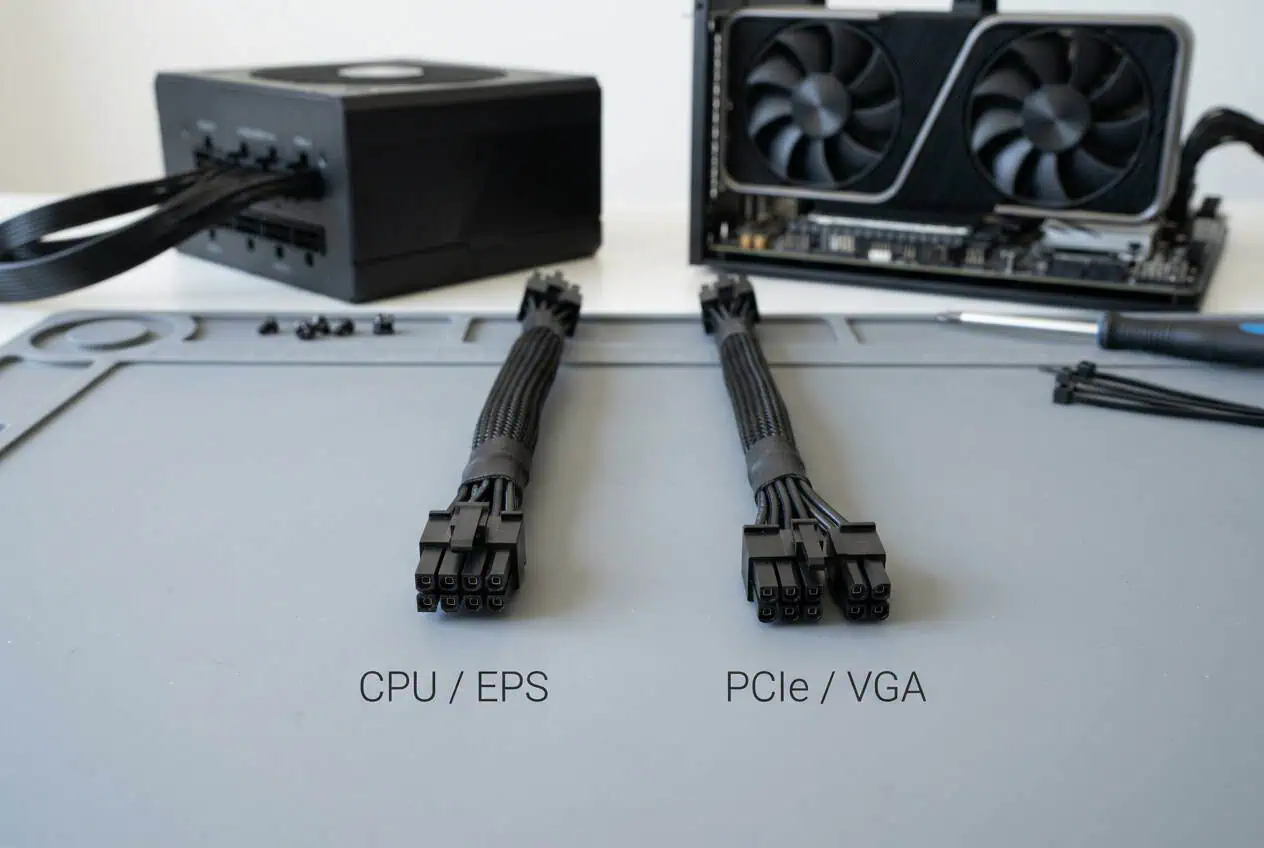
A CPU/EPS cable connects the power supply to the CPU power socket on the motherboard. A PCIe cable connects the power supply to a graphics card or another PCIe add-in card.
Both can carry 12V power, but that does not make them interchangeable.
The connector pins are arranged differently. The keying is also different, which helps stop the wrong connector from being inserted into the wrong socket.
What Is a CPU/EPS Cable?
A CPU power cable is also called an EPS12V cable.
It normally has a 4+4-pin connector at the motherboard end. You connect this cable to the CPU power socket near the top of the motherboard.
Look for labels such as:
- CPU
- EPS
- EPS12V
Some power supplies may use a label such as CPU/PCIe on the PSU side. This does not mean that the cable itself can be used for either component.
Always check the cable end that connects to the component.
What Is a PCIe GPU Cable?
A PCIe power cable is made for graphics cards and other PCIe add-in cards.
A common older GPU power cable uses a 6+2-pin connector. The two extra pins can join the six-pin section to make an 8-pin PCIe connector.
Look for labels such as:
- PCIe
- PCI-E
- VGA
The cable should connect to the matching PCIe power socket on your graphics card.
Why Can’t You Use an 8-Pin CPU Cable for a GPU?

This is where many PC builders get confused.
An 8-pin CPU cable and an 8-pin PCIe cable can look similar, but the pins do different jobs.
The number of pins is not enough to identify the cable.
The CPU/EPS connector and PCIe connector have different pin layouts and keying. Intel’s power-supply guidance lists the CPU and PCIe connectors as separate connector types and states that their pin locations and mechanical keying differ.
So do not choose a cable because it has eight pins.
Check the label and the connector type instead.
CPU Cable vs GPU Cable: The Easy Rule
Use this simple rule when connecting your PC:
CPU/EPS cable → CPU power socket on the motherboard
PCIe/VGA cable → GPU power socket
If your graphics card needs PCIe power, use the PCIe cable supplied with your power supply.
If your motherboard needs CPU power, use the CPU/EPS cable.
What Happens If You Use the Wrong PSU Cable?
Using the wrong cable can cause more than a failed boot.
A cable may look like it fits while its wiring does not match the device or PSU connection.
That can cause incorrect power delivery and may damage hardware.
If you think you connected the wrong cable, turn off the PC and disconnect it from AC power before checking the connection.
Do not keep switching the PC on to see if the cable works.
Check the cable label and your PSU manual before reconnecting it.
Never Mix Modular PSU Cables

There is another issue that can cause serious problems: using a modular cable from another PSU.
Modular PSU cables are not universal.
A cable from an older power supply may fit into the new PSU but have a different PSU-side pinout.
This is why you should use the cables that came with your current PSU.
If you need a replacement, make sure the cable is listed as compatible with your exact PSU model.
The same rule applies even if both power supplies come from the same brand.
Different PSU series can use different cable pinouts.
What If Your GPU Needs Two or Three Power Cables?
Some graphics cards have two or three PCIe power sockets.
If your GPU has multiple sockets, use the PCIe power cables specified by the GPU and PSU manufacturer.
Do not fill an empty GPU socket with a CPU/EPS cable.
If your PSU has several PCIe cables, connect the required PCIe cables to the graphics card according to the GPU and PSU instructions.
The correct setup depends on the GPU, PSU, and cable arrangement.
Do not guess based on connector size.
What About New GPUs With a 16-Pin Connector?
Newer graphics cards may use a 12V-2×6 power connector instead of several older 6+2-pin PCIe connectors.
PCI-SIG introduced 12V-2×6 as a newer PCIe power connector, and its specification supports high-power graphics and other add-in cards.
If your GPU uses 12V-2×6, use the native cable supplied or approved for your PSU and GPU.
Do not try to replace it with a CPU/EPS cable.
Also make sure the connector is fully inserted and follow the GPU and PSU maker’s cable-routing instructions.
Can You Use a CPU-to-PCIe Adapter?
It is better to use the correct PCIe cable made for your PSU.
Do not use a random CPU-to-PCIe adapter just because the connectors fit.
A cable or adapter changes the connection between the PSU and the GPU, so its wiring must be correct for the PSU and GPU.
If you are missing a PCIe cable, check whether the PSU maker offers a replacement cable for your exact PSU model.
A proper replacement cable is a much better choice than guessing with an unknown adapter.
How to Tell Which PSU Cable You Have
Quick Cable Check
- Look for CPU, EPS, or EPS12V for CPU power.
- Look for PCIe, PCI-E, or VGA for GPU power.
- A 4+4-pin connector is commonly used for CPU power.
- A 6+2-pin connector is commonly used for older GPU power sockets.
- Do not identify a cable by pin count alone.
- For modular PSUs, use only cables confirmed for your exact PSU model.
If you have several loose PSU cables in front of you, start with the label.
A CPU/EPS cable usually has a 4+4-pin connector for the motherboard.
A PCIe cable commonly has a 6+2-pin connector for a traditional GPU power socket.
You can also check the writing printed on the cable.
CPU, EPS, or EPS12V means it is intended for CPU power.
PCIe, PCI-E, or VGA means it is intended for GPU or PCIe card power.
Do not rely on the connector shape alone.
If the label is missing or unclear, check the PSU manual or the cable documentation.
What If the PSU Port Says CPU/PCIe?
This label can cause another common mistake.
Some modular PSUs have PSU-side ports marked CPU/PCIe.
That label describes the PSU port. It does not mean that every cable can be connected to every component.
The cable still needs to match the component on the other end.
Use the CPU/EPS cable for the motherboard CPU power socket.
Use the PCIe/VGA cable for the GPU.
If the PSU manual says a specific PSU port supports both cable types, follow that manual.
Can a PCIe Cable Be Used for CPU Power?
No.
A PCIe cable should not replace a CPU/EPS cable.
The motherboard CPU power socket expects the correct EPS connection.
The PCIe cable is made for a graphics card or another PCIe add-in card.
The simple rule is still:
CPU/EPS → motherboard CPU power
PCIe/VGA → GPU power
Do not swap them because both connectors may appear to have eight pins.
What If the CPU Cable Fits the GPU?
Do not use it.
A connector that appears to fit does not prove that the cable is electrically correct.
With PC power cables, the internal wiring matters as much as the physical connector.
This is especially important with modular power supplies because the PSU-side wiring can vary between models.
If you are unsure about a cable, stop and identify it before connecting it.
Can You Use a Cable From Another PSU?
Only if the PSU manufacturer confirms that the cable is compatible with your exact PSU model.
Do not assume that cables from the same brand are always interchangeable.
The PSU-side connector may look the same while the pinout is different.
Using the wrong modular PSU cable can send power through the wrong pins.
That can damage the PSU or connected PC hardware.
What Should You Do If You Already Used the Wrong Cable?
If you connected a CPU cable to a GPU or mixed modular PSU cables, shut the PC down.
Turn off the PSU and disconnect the AC power cable.
Remove the questionable cable and check the cable labels.
Look for:
- Burn marks
- Melted plastic
- Discolored connectors
- Bent contacts
- Loose pins
- Damaged insulation
- A burning smell
If you see damage, do not reuse the cable or connector.
Replace the damaged part with a compatible cable and check the affected hardware before using the PC again.
If there is no visible damage, you should still verify every cable before powering the system back on.
How to Avoid CPU and GPU Cable Mistakes
The easiest way to avoid this problem is to identify every cable before installing it.
Keep your CPU/EPS cables separate from your PCIe cables.
If your PSU has removable cables, keep the original cable set with the PSU.
Do not mix cables from different power supplies in the same box.
When buying replacement or custom PSU cables, give the seller the exact PSU model.
Do not buy a cable based only on the brand name or connector shape.
A clean cable setup is useful, but correct wiring comes before appearance.
Conclusion
You cannot safely use a standard CPU/EPS power cable as a GPU power cable. The two cables may look similar, but their connectors and wiring are different. Use a PCIe/VGA cable for a GPU, an EPS cable for CPU power, and only use modular PSU cables confirmed for your exact PSU model. If your GPU uses 12V-2×6, use the correct cable or approved adapter for that GPU and PSU.
FAQs
Can I use an 8-pin CPU cable on an 8-pin GPU?
No. An 8-pin CPU/EPS cable and an 8-pin PCIe cable have different wiring and pin layouts, even though they may look similar.
Can I use a PCIe cable in the CPU power socket?
No. The CPU power socket requires a compatible EPS/CPU cable. A PCIe cable is made for a GPU or other PCIe add-in card.
Are CPU and PCIe PSU cables interchangeable?
No. They are different cable types with different wiring. Always use the cable intended for the connector on your motherboard or graphics card.
Can I use a different brand’s modular PSU cable?
Only if the cable manufacturer confirms compatibility with your exact PSU model. Modular cables can have different PSU-side pinouts, even between different PSU brands or models.
Does an 8-pin connector always mean it is a PCIe cable?
No. An 8-pin connector can be used for different purposes. Check the cable label, connector type, and PSU documentation instead of identifying a cable by the number of pins alone.