


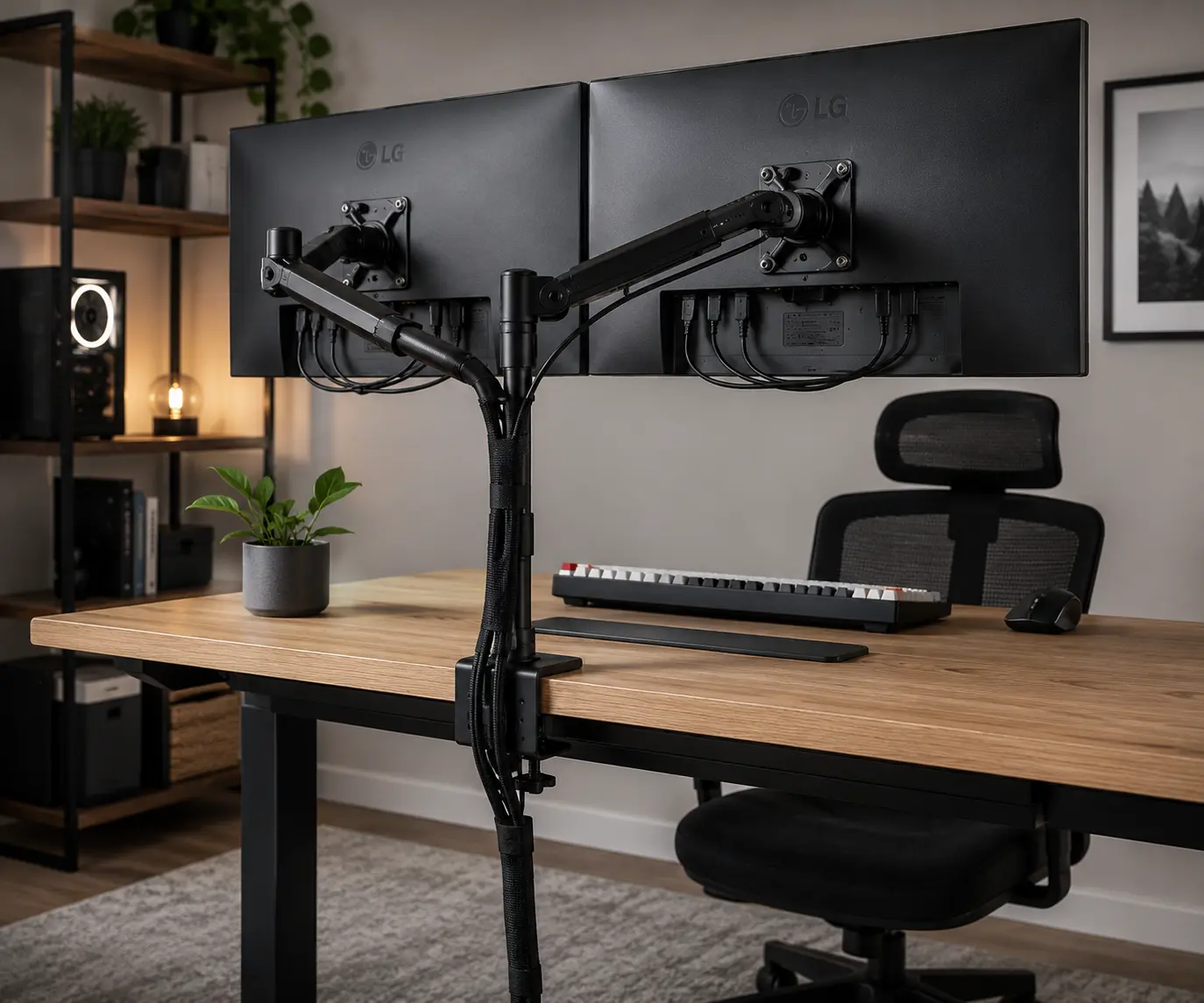
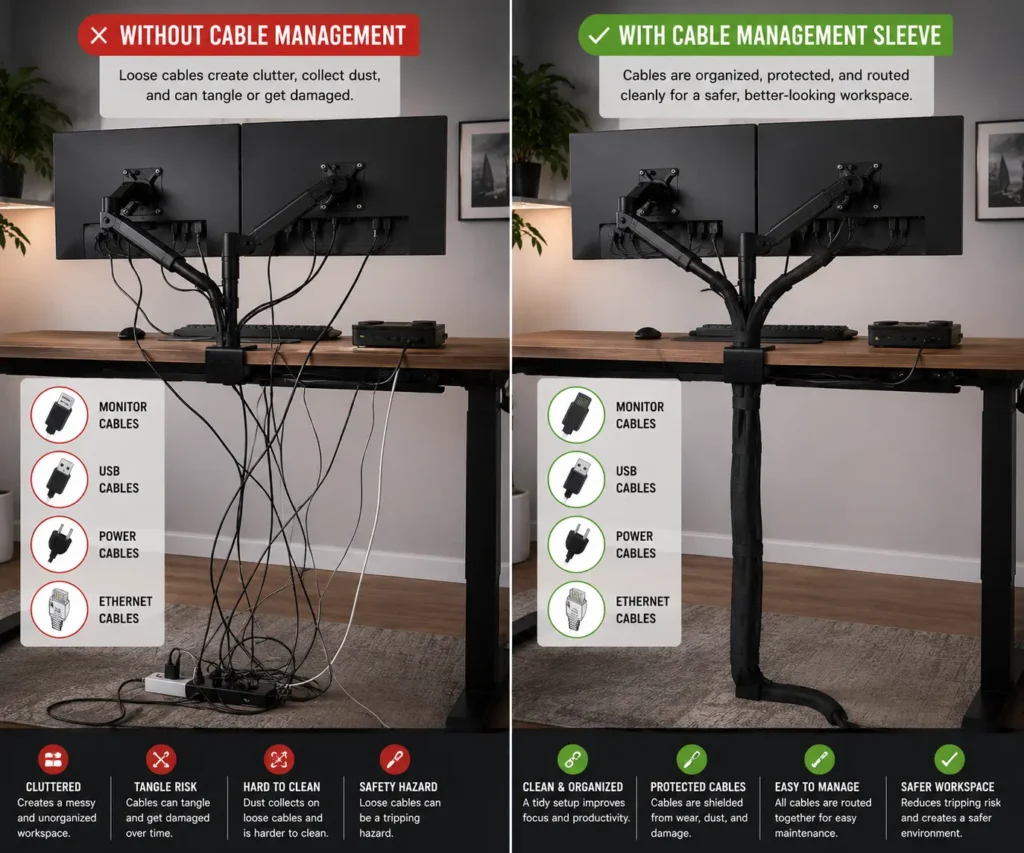
If your PC desk is filled with tangled monitor cables, power cables, and USB cables, you’re not alone. Cable clutter can make a gaming setup, home office, or professional workstation look messy while making cable routing, cleaning, and upgrades more difficult.
Cable management sleeves are one of the simplest cable management accessories for keeping a cable bundle organized. They improve cable organization, add cable protection, and create cleaner wire management. Whether you choose a neoprene, braided, or PET sleeve, selecting the right one depends on your setup, cable count, and future upgrade plans.
What Are Cable Management Sleeves?
Cable management sleeves are flexible covers that hold multiple cables together. Instead of having many loose wires running across your desk, you place them inside a sleeve to create one organized cable bundle.
Think of a cable sleeve as a cover for your cables. It wraps around the wires and keeps them grouped together.
Cable sleeves come in different materials and sizes. Some are made from neoprene. Others use braided mesh, zipper designs, or expandable fabric.
Most cable management sleeves work with:
- Monitor cables
- Power cables
- USB cables
- Ethernet cables
- Audio cables
- Charging cables
Because they hold several cables together, they help improve cable organization and reduce desk clutter.
How Cable Sleeves Work
Cable sleeves are simple to use.
First, gather the cables you want to organize. Next, place the cables inside the sleeve. Then route the sleeve behind your desk, monitor arm, or workstation.
Instead of managing many separate wires, you only manage one organized cable bundle.
Cable sleeves can be used:
- Behind monitors
- Under desks
- Along monitor arms
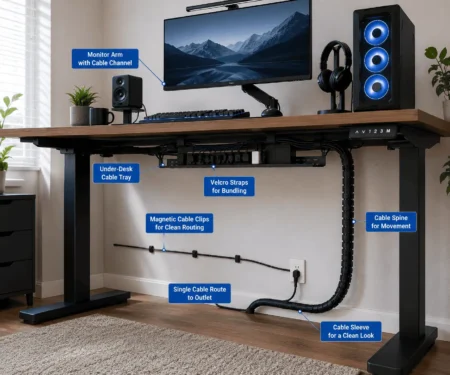
- Beside standing desks
- Around gaming setups
This simple change can make a workspace look much cleaner.
Benefits of Using Cable Management Sleeves
Cable management sleeves offer several benefits for PC users.
Cleaner Desk Appearance
One of the biggest benefits is a cleaner look.
Loose cables often create visual clutter. A cable sleeve hides much of that mess and helps your desk look more organized.
Better Cable Protection
Cables can rub against desk edges or furniture.
Over time, this may cause wear on the outer cable jacket. A cable sleeve adds a layer of protection around the cable bundle.
Easier Cleaning
Dust often collects around loose cables.
When cables are grouped together, there are fewer wires to clean around. This makes regular desk cleaning easier.
Reduced Cable Tangling
Loose cables often twist around each other.
Cable management sleeves keep cables together and reduce tangles. This makes troubleshooting and upgrades easier.
Improved Cable Routing
Grouped cables are easier to route behind furniture and equipment.
This is especially helpful for dual-monitor setups and standing desks where cable movement needs to stay organized.
Types of Cable Management Sleeves for PC Setups
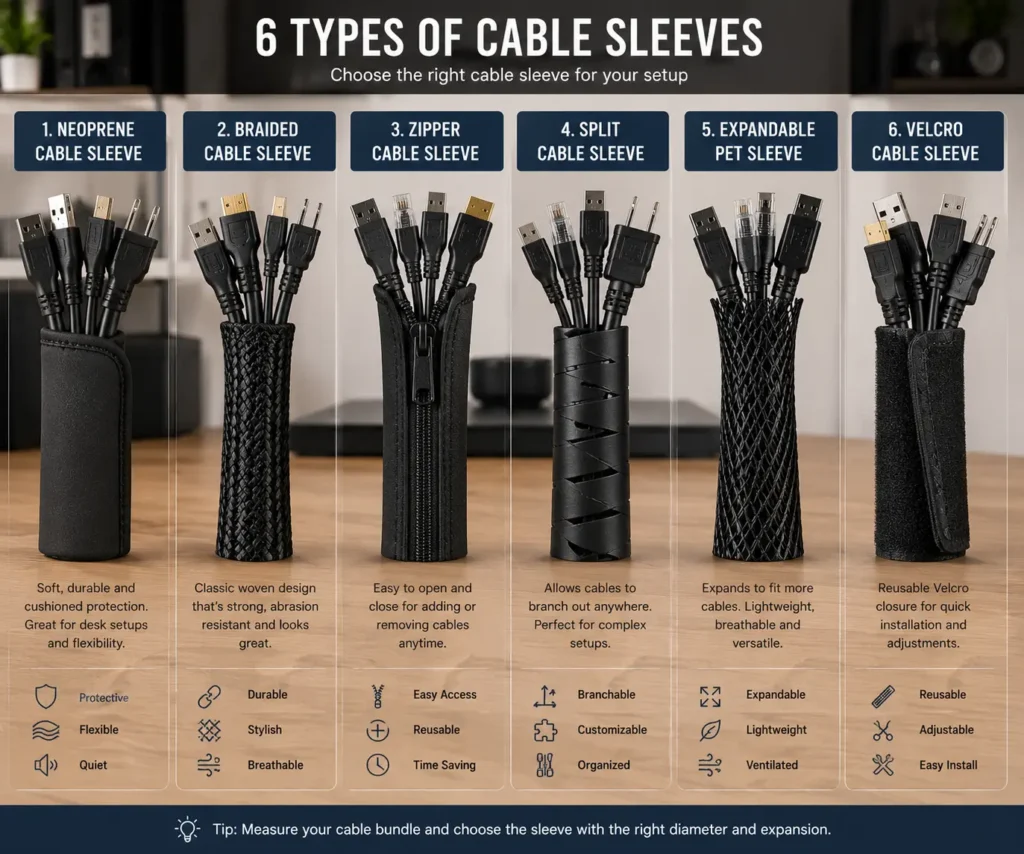
Not all cable sleeves are the same.
Each type has different strengths. Choosing the right one depends on your setup, cable count, and budget.
Neoprene Cable Sleeves
Neoprene cable sleeves are one of the most popular choices for PC setups.
They are soft, flexible, and easy to install. Many neoprene sleeves use a wrap-around design that makes it easy to add or remove cables later.
Pros:
- Flexible
- Affordable
- Easy to install
- Good for most desks
Best for:
- Home offices
- Gaming setups
- Dual-monitor workstations
Braided Cable Sleeves
Braided cable sleeves offer a more premium appearance.
They use woven material that expands when cables are inserted. Many PC builders use braided sleeves for custom desktop builds.
Pros:
- Professional appearance
- Lightweight
- Durable
- Better airflow than solid sleeves
Best for:
- Gaming PCs
- Custom PC builds
- Enthusiast setups
Zipper Cable Sleeves
Zipper cable sleeves include a zipper running along the side.
This design makes installation simple because you do not need to feed cables through the sleeve.
Pros:
- Easy installation
- Quick cable access
- Good for beginners
Best for:
- Large cable bundles
- Temporary setups
- Home offices
Split Cable Sleeves
Split cable sleeves have an opening along one side.
This allows cables to enter or exit at different points.
Pros:
- Easy cable access
- Flexible routing
- Fast upgrades
Best for:
- Frequently changing setups
- Workstations with many accessories
Expandable PET Sleeves
PET sleeves use expandable mesh material.
They expand to fit larger cable bundles and contract around smaller bundles.
Pros:
- Professional appearance
- Strong protection
- Flexible sizing
Best for:
- Custom PC builds
- Advanced cable management projects
Velcro Cable Sleeves
Some cable sleeves use built-in Velcro closures.
These sleeves are easy to open and close whenever cables need to be added or removed.
Pros:
- Reusable
- Easy maintenance
- Fast installation
Best for:
- Growing setups
- Frequent upgrades
Cable Sleeve Comparison Table
For most users, neoprene cable sleeves provide the best balance of cost, flexibility, and appearance.
How to Choose the Right Cable Sleeve Size
Choosing the correct size is important.
A sleeve that is too small may not fit all your cables. A sleeve that is too large can look bulky and untidy.
Count Your Cables First
Start by counting the cables you want to place inside the sleeve.
Typical PC setup cables include:
- Monitor cables
- Power cables
- USB cables
- Ethernet cables
- Speaker cables
Knowing the number of cables helps you choose the right diameter.
Measure Bundle Diameter
Gather the cables into one bundle.
Use a measuring tape or ruler to estimate the thickness of the group.
This measurement helps determine the sleeve size you need.
Consider Sleeve Length
Measure the distance the cable bundle must travel.
For example:
- PC to monitor
- Desk to floor
- Monitor arm to desktop
- Standing desk cable path
Always add a little extra length for flexibility.
Cable Sleeve Size Chart
If your setup may grow in the future, choose a slightly larger sleeve.
This gives you room to add new cables later without replacing the sleeve.
How to Install Cable Management Sleeves on a PC Setup
Installing cable management sleeves is simple. Most people can complete the job in less than 30 minutes.
A little planning before installation can help you achieve better results.
Tools You Need
You do not need many tools.
In most cases, you only need:
- Cable management sleeve
- Measuring tape
- Scissors
- Velcro cable ties
- Cable clips (optional)
If you use an expandable sleeve, a cable pulling tool may also help.
Prepare Your Cables
Before installing the sleeve, unplug any cables that can be safely disconnected.
Next, identify the cables you want to organize.
Common cables include:
- Monitor cables
- USB cables
- Power cables
- Ethernet cables
- Audio cables
Remove dust from the cables before placing them inside the sleeve.
This helps keep the installation clean.
Insert Cables Into the Sleeve
The installation method depends on the sleeve type.
For neoprene sleeves:
- Open the sleeve.
- Place the cables inside.
- Wrap the sleeve around the cables.
- Secure the closure.
For braided sleeves:
- Gather the cables together.
- Feed the cables through the sleeve.
- Adjust the sleeve position.
Take your time during this step. A neat cable bundle will look better later.
Secure and Route the Bundle
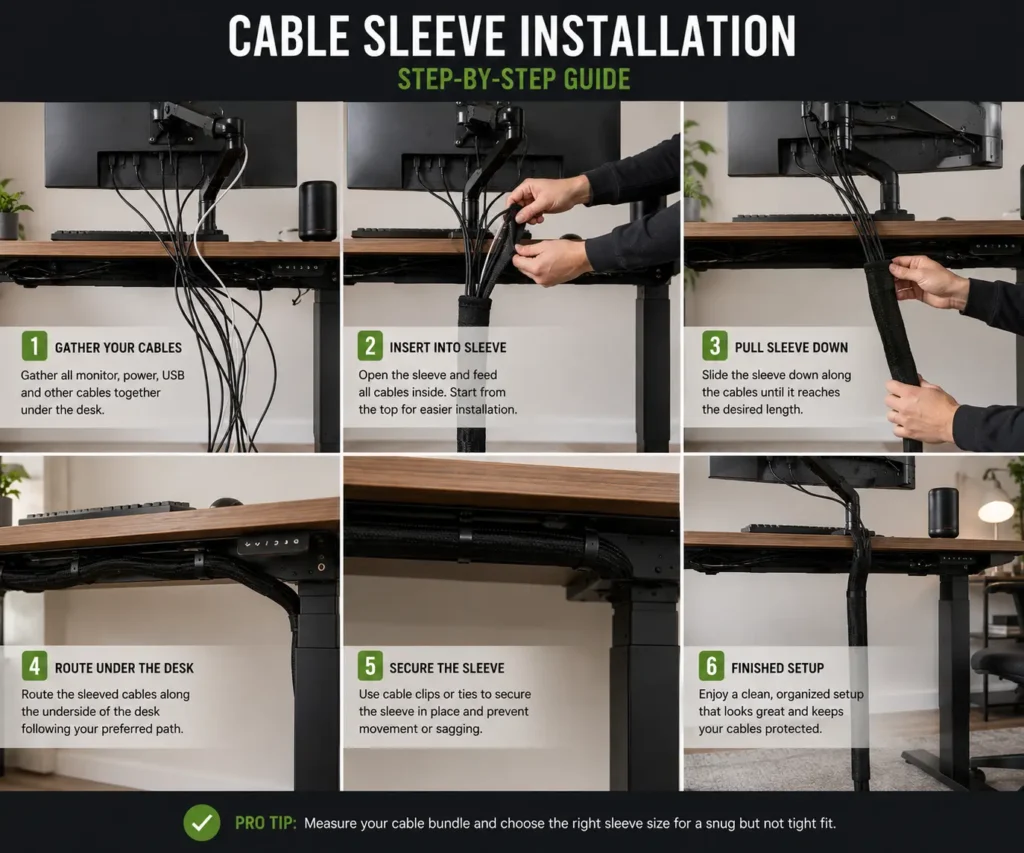
Once the cables are inside the sleeve, route them along the desired path.
Common routing locations include:
- Behind the monitor
- Along a monitor arm
- Under the desk
- Behind a PC tower
Use cable clips or Velcro ties when needed.
Try to keep the cable bundle hidden from normal viewing angles.
Test Cable Movement
This step is very important.
Move your monitor arm if you have one.
Raise and lower your standing desk if applicable.
Check that the sleeve can move freely without pulling on any cable.
If the cables feel tight, add more slack before finishing the installation.
Quick Installation Checklist
Before you finish, make sure:
- All cables are secure
- No cables are stretched
- Sleeve length is correct
- Desk movement is unrestricted
- Cable bundle looks neat
A few extra minutes here can prevent future cable problems.
Best Cable Management Sleeves for Different PC Setups
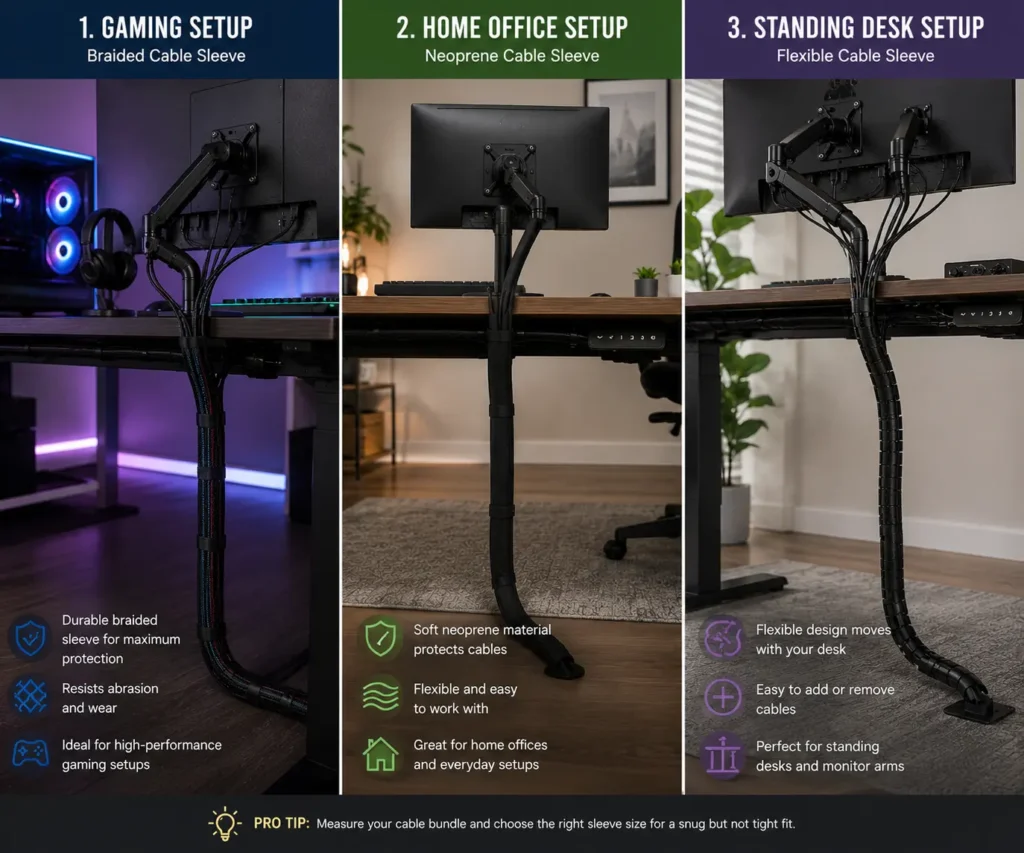
Different setups have different cable management needs.
Choosing the right sleeve can make cable organization much easier.
Single Monitor Setup
A single monitor setup usually has fewer cables.
Most users only need to manage:
- Monitor cable
- Power cable
- Keyboard cable
- Mouse cable
A small neoprene sleeve often works well.
It provides enough space without adding bulk.
Dual Monitor Setup
Dual monitor setups create more cable clutter.
You may have:
- Two display cables
- Two monitor power cables
- USB cables
- Peripheral cables
A medium-sized neoprene sleeve or zipper sleeve is often the best choice.
These sleeves can handle larger cable bundles while remaining flexible.
Triple Monitor Setup
Triple monitor workstations require more cable organization.
Cable counts can increase quickly.
For these setups, consider:
- Larger diameter sleeves
- Expandable PET sleeves
- Multiple cable sleeves
Using more than one sleeve can improve cable routing and reduce bundle thickness.
Gaming Setup
Gaming setups often include many accessories.
Examples include:
- Gaming monitor
- RGB lighting
- Speakers
- Microphone
- Webcam
- Charging cables
A braided cable sleeve is a popular choice for gaming desks because it offers a cleaner and more premium appearance.
Many gamers also combine sleeves with cable trays for better organization.
Home Office Setup
Home office users often prefer simple and practical solutions.
Neoprene sleeves are usually the best option.
They are:
- Affordable
- Easy to install
- Easy to maintain
They also work well with docking stations and laptops.
Standing Desk Setup
Standing desks need special attention.
The desk moves throughout the day. This means cables need extra flexibility.
For standing desks:
- Leave extra cable slack
- Use flexible sleeves
- Avoid tight cable bundles
- Test desk movement often
Many users combine cable management sleeves with J-channel raceways for even cleaner cable routing.
This creates a more professional appearance while keeping cables protected.
Cable Management Sleeves vs Other Cable Management Methods
Cable sleeves are useful, but they are not the only cable management solution available.
Understanding the differences can help you choose the right method.
Cable Sleeves vs Velcro Ties
Both products help organize cables.
However, they work differently.
Cable sleeves:
- Hide cables
- Protect cables
- Create a cleaner appearance
Velcro ties:
- Bundle cables together
- Allow quick adjustments
- Cost less
If appearance is your main goal, cable sleeves are usually the better choice.
If flexibility is your priority, our comparison of zip ties vs Velcro ties can help you choose the better option.
Cable Sleeves vs Cable Clips
Cable clips help route individual cables.
They hold cables in place along desks, walls, or furniture.
Cable sleeves organize multiple cables into one bundle.
Cable clips organize individual cables.
Many setups benefit from combining cable sleeves with magnetic cable clips to keep frequently used cables easy to reach.
Cable Sleeves vs Cable Trays
Cable trays are installed under a desk.
They hide power strips and excess cable length.
Cable sleeves group cables together.
Cable trays hide cables completely.
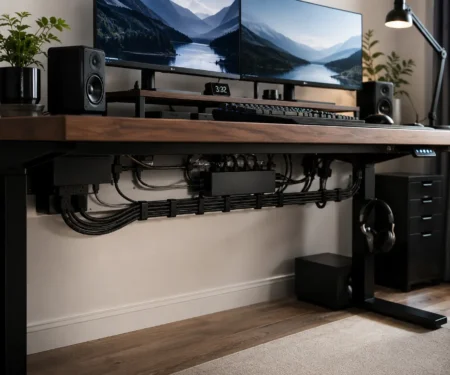
For the best results, many users combine cable sleeves with under-desk cable trays.
Cable Sleeves vs J Channel Raceways
J-channel raceways are often mounted under desks.
They provide a dedicated channel for cable routing.
Cable sleeves wrap around the cables.
J-channel raceways contain the cables.
For standing desks and large workstations, combining both solutions often creates the cleanest result.
Which Option Is Best?
The best choice depends on your goals.
For most PC setups, cable management sleeves offer the best balance between cost, appearance, and ease of installation.
Common Cable Sleeve Mistakes to Avoid
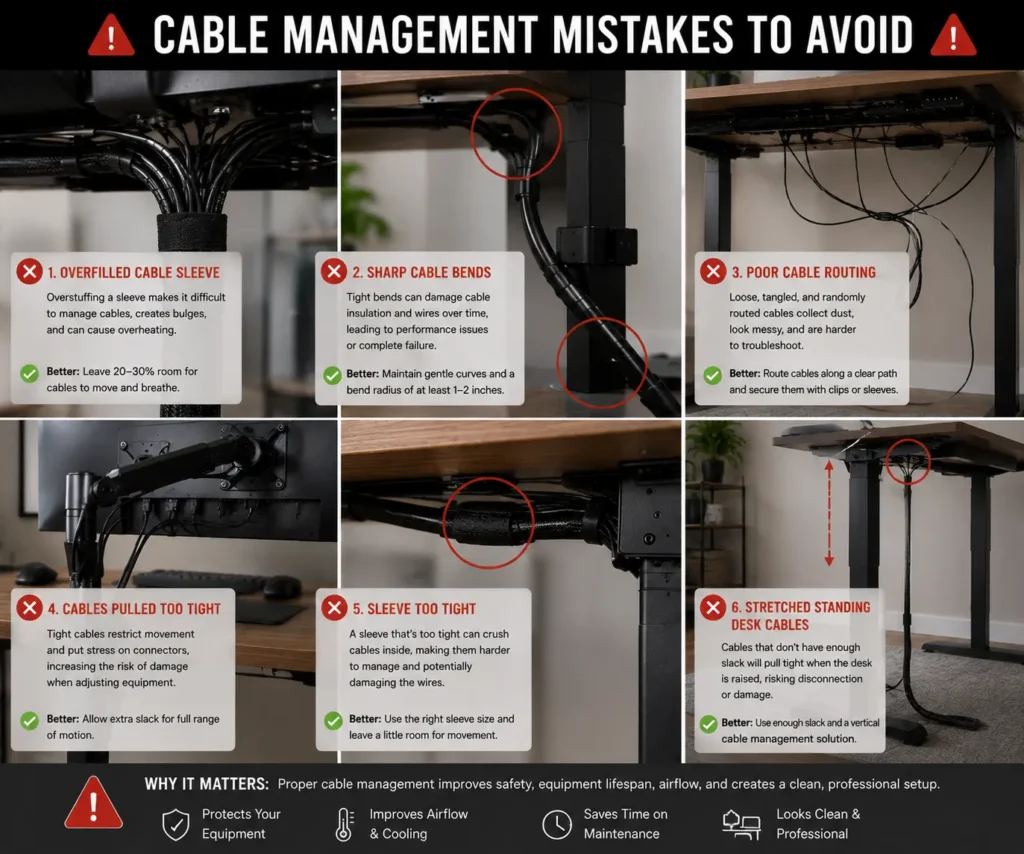
Cable management sleeves are easy to use. However, a few common mistakes can reduce their effectiveness.
Avoiding these problems will help you create a cleaner and safer setup.
Choosing the Wrong Sleeve Size
One of the biggest mistakes is choosing a sleeve that is too small or too large.
A sleeve that is too small may not fit all your cables. A sleeve that is too large can look bulky and untidy.
Always measure your cable bundle before buying a cable sleeve.
Overfilling the Sleeve
It can be tempting to place every cable into one sleeve.
However, overfilling can create several problems:
- Poor flexibility
- Difficult cable upgrades
- Increased cable stress
- Messy cable routing
If you have many cables, use multiple sleeves instead of one oversized bundle.
Mixing Too Many Cable Types
Some users place every cable into a single sleeve.
This can make troubleshooting difficult later.
For example, you may want to separate:
- Power cables
- Monitor cables
- USB cables
- Audio cables
Organizing cables by function makes future changes easier.
Ignoring Future Upgrades
Many PC setups change over time.
You may add:
- Another monitor
- New speakers
- A webcam
- Additional accessories
Leave extra room inside the sleeve whenever possible.
This can save time later.
Not Leaving Slack for Standing Desks
Standing desks require cable movement.
Without enough slack, cables can become stretched when the desk rises.
Always test desk movement after installing cable management sleeves.
Make sure the cable bundle moves freely.
Poor Cable Routing
Even the best cable sleeve cannot fix poor routing.
Try to route cables:
- Along desk frames
- Behind monitors
- Under desks
- Behind furniture
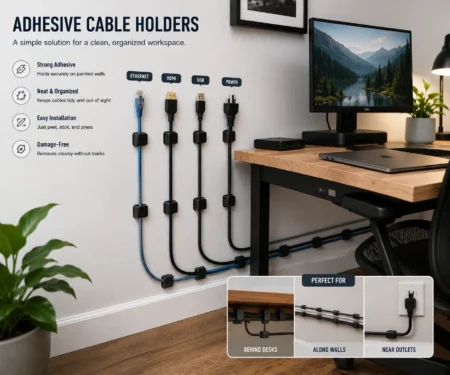
When routing cables along walls or furniture, adhesive cable holders can keep individual wires securely in place.
Do Cable Management Sleeves Improve Airflow and Safety?
Many people wonder whether cable management sleeves improve airflow or make a setup safer.
The answer depends on how the cables are organized.
Do Cable Sleeves Improve Airflow?
Cable sleeves do not directly improve airflow inside a PC case.
However, they can reduce cable clutter around desks, PC towers, and equipment, which helps maintain clearer spaces around vents and airflow paths.
Loose cables often block air movement around:
- PC towers
- Desk fans
- Ventilation areas
Organized cables create a cleaner environment and reduce clutter around airflow paths.
Do Cable Sleeves Improve Safety?
Cable sleeves can improve safety in several ways.
They help:
- Reduce trip hazards
- Prevent cable snags
- Protect cables from wear
- Keep cable bundles organized
This is especially useful in home offices and shared workspaces.
Do Cable Management Sleeves Reduce Cable Wear?
Yes. In many cases, cable management sleeves can help reduce cable wear.
Loose cables often rub against:
- Desk edges
- Furniture
- Monitor arms
- Other cables
Over time, this friction can damage cable jackets.
A cable sleeve creates a protective layer around the cable bundle.
While it cannot prevent every type of damage, it can help cables last longer when used correctly.
Can Cable Sleeves Cause Overheating?
In most PC setups, no.
Computer cables produce very little heat during normal use.
As long as cables are not damaged and the sleeve is not overfilled, overheating is rarely a concern.
Are Cable Management Sleeves Worth It?
For most PC users, cable management sleeves are worth the investment.
They are affordable, easy to install, and effective at reducing cable clutter.
However, they are not the perfect solution for every setup.
Pros
Cable management sleeves offer several advantages.
Benefits include:
- Cleaner desk appearance
- Better cable organization
- Reduced cable tangles
- Improved cable protection
- Easier cable routing
- Affordable cost
Most users notice an immediate improvement after installation.
Cons
Cable sleeves also have a few limitations.
Potential drawbacks include:
- Some sleeves are difficult to upgrade
- Large bundles can become bulky
- Premium sleeves cost more
- Poor sizing can reduce flexibility
These issues are usually easy to avoid with proper planning.
Who Should Buy Cable Management Sleeves?
Cable sleeves are a good choice for:
- Gamers
- Remote workers
- Students
- Content creators
- Office workers
- Standing desk users
If your desk has several visible cables, a cable sleeve can help.
When Alternatives Work Better
Sometimes another solution may work better.
For example:
- Cable clips are better for single cables.
- Cable trays are better for hiding power strips.
- J-channel raceways are better for structured cable routing.
- Velcro ties are better for temporary cable bundles.
Many people use several cable management products together for the best results.
Conclusion
Cable management sleeves offer a simple way to organize cables, reduce visible clutter, and create a cleaner PC setup. Choosing the right sleeve depends on your cable bundle, workspace, and how often you upgrade your equipment. Neoprene sleeves suit most everyday desks, while braided and PET sleeves are better for premium-looking builds. For the cleanest results, combine cable sleeves with cable trays, Velcro ties, monitor arm routing, or J-channel raceways to build a tidy and easy-to-maintain cable management system.
FAQs
Can cable management sleeves hold thick power adapter cables?
Yes. Larger diameter sleeves can hold thick power adapter cables along with other PC cables. Check the sleeve’s capacity before buying to avoid overfilling.
Should power cables and data cables go in the same cable sleeve?
They can, but separating them into different sleeves can make future upgrades and troubleshooting easier, especially in larger PC setups.
Do cable management sleeves work with monitor arms?
Yes. Cable sleeves work well with monitor arms by keeping display and power cables bundled together while allowing smooth movement.
Are black or white cable sleeves better?
The choice depends on your desk setup. Black sleeves blend well with dark furniture and gaming setups, while white sleeves match minimalist or light-colored workspaces.
How often should you replace cable management sleeves?
Replacement is only needed if a sleeve becomes damaged, loses flexibility, or no longer fits your growing cable bundle. A quality sleeve can last for many years with normal indoor use.