


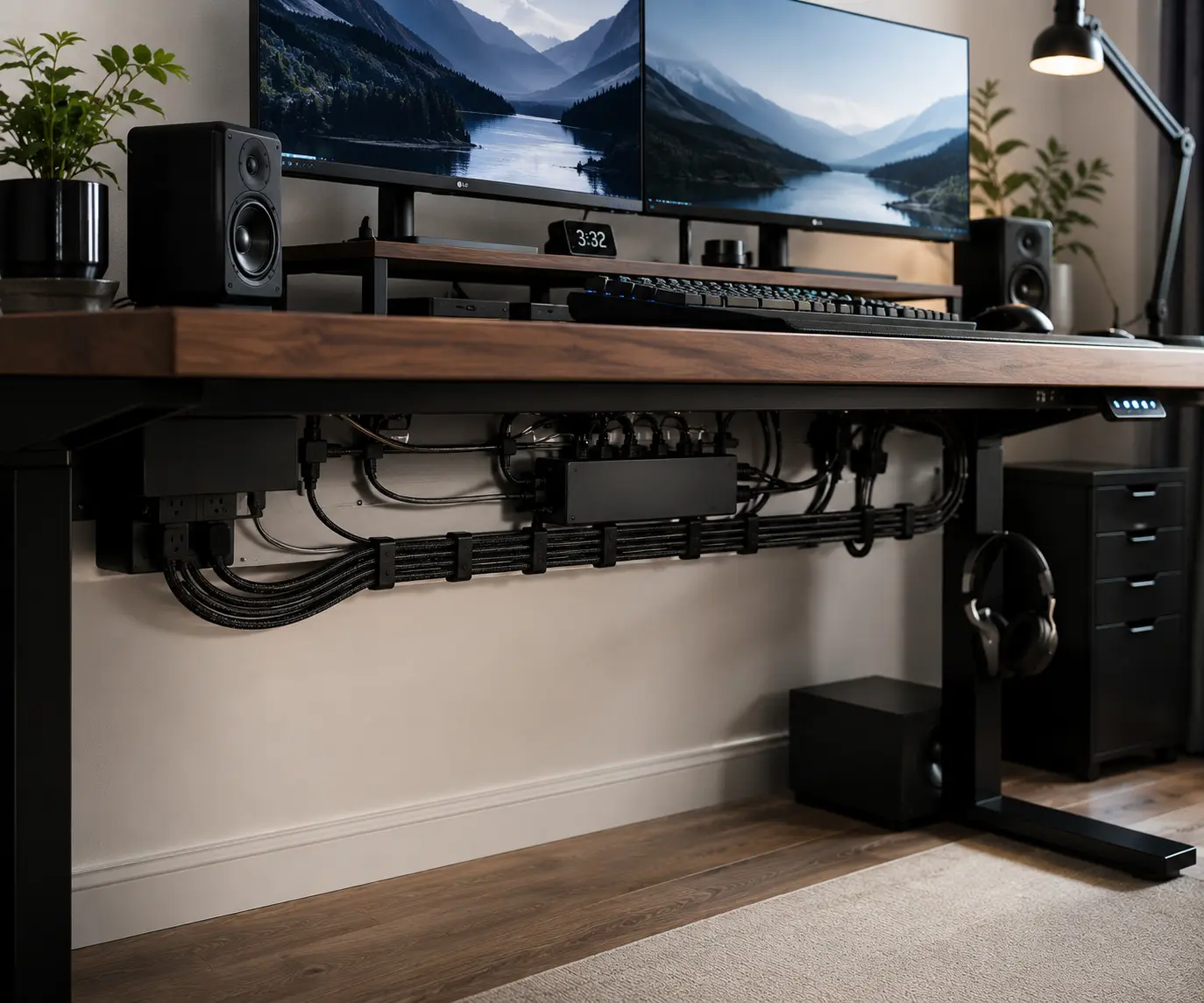
Messy cables can make even an expensive gaming setup or home office look unfinished. HDMI cables, Ethernet cables, USB cables, charging cords, and power cables often create visual clutter that distracts from monitors, keyboards, and other desk accessories. Many people upgrade their workspace but overlook the cable management that brings everything together.
Braided cable sleeves are one of the most effective cable management accessories for improving cable organization and cable routing by grouping multiple wires into one clean bundle. Whether you have a workstation, standing desk, or dual-monitor setup, they help create a tidier, more professional-looking workspace. This guide explains how to choose, install, and use braided cable sleeves for better desk aesthetics.
Quick Benefits of Braided Cable Sleeves
Braided cable sleeves offer a simple way to improve both cable management and desk aesthetics. They help organize multiple cables into one neat bundle while reducing visible cable clutter.
Key benefits of braided cable sleeves include:
- Reduce cable clutter
- Improve desk aesthetics
- Create cleaner cable routing
- Organize multiple cables
- Protect cables from daily wear
- Support gaming setups and home offices
- Improve workspace organization
- Simplify cable management
- Create a more professional appearance
- Work with cable clips, cable trays, and cable raceways
For many users, braided cable sleeves are one of the easiest upgrades for a cleaner and more organized setup.
Are Braided Cable Sleeves Worth It?
For most gaming setups, home offices, and workstations, braided cable sleeves are worth it. They organize multiple cables into one neat bundle, reduce visible cable clutter, and improve desk aesthetics without requiring major changes to your setup. They also work well with cable trays, cable clips, and cable raceways for more complete cable management.
What Are Braided Cable Sleeves?
Braided cable sleeves are flexible covers that group several cables together. They are often made from PET sleeving or nylon sleeving. These materials create a woven structure that expands when you insert cables.
Unlike loose wires spread across a desk, a braided cable sleeve creates one clean cable bundle. This makes cable routing easier and improves wire management.
If you’re comparing different sleeve materials and styles, our guide to Cable Management Sleeves for PC Setups explains when braided, neoprene, PET, zipper, split, and Velcro sleeves are the better choice.
Many people use braided cable sleeves for:
- Gaming setups
- Home office desks
- Dual monitor setups
- Standing desks
- Entertainment centers
- PC workstations
Braided sleeves come in different sizes and colors. Some are expandable, which means they can hold a few cables or a larger cable bundle.
Braided Sleeving vs Wire Loom
Both products help with cable organization, but they look different.
A wire loom usually has a plastic split design. It focuses more on protection than appearance.
A braided cable sleeve has a woven finish. It often looks cleaner and more modern. For this reason, many people choose braided sleeving when desk aesthetics matter.
Common Materials Used in Braided Cable Sleeves
Most braided cable sleeves use one of these materials:
PET Sleeving
- Lightweight
- Flexible
- Good color options
- Popular for desk setups
Nylon Sleeving
- Soft texture
- Premium appearance
- Strong abrasion resistance
- Common in custom cable projects
Both materials help improve cable protection while keeping cables organized.
Why Braided Cable Sleeves Improve Setup Aesthetics
One of the biggest reasons people buy braided cable sleeves is appearance.
Loose cables often create visual clutter. Even expensive monitors, keyboards, and accessories can look messy when cables are visible everywhere.
Braided cable sleeves solve this problem by creating a cleaner cable path.
Instead of seeing:
- HDMI cables
- Power cables
- USB cables
- Ethernet cables
You see one organized cable bundle.
This simple change can make a desk look more professional.
Key aesthetic benefits include:
- Reduced visual clutter
- Better cable organization
- Cleaner desk appearance
- Improved workspace aesthetics
- Consistent cable routing
- Better color coordination
Reducing Visual Cable Clutter
Cable clutter distracts from the rest of your setup.
When cables run in different directions, the desk feels crowded. A braided sleeve groups cables together and creates a more organized workspace.
Making Cable Bundles Look Uniform
Different cable colors can make a setup look untidy.
A braided sleeve hides those differences and creates a consistent look. This works especially well for gaming setups and home offices.
Benefits of Braided Cable Sleeves Beyond Cable Protection
Many people think braided cable sleeves are only for cable protection. While they do protect wires, they offer several other benefits.
Better Cable Organization
Braided sleeves improve cable organization by grouping multiple cables together and making cable routing easier.
Instead of managing several separate wires, you manage one organized cable bundle that follows a cleaner path through your setup.
This helps reduce cable clutter, keeps cables organized, and makes future cable management adjustments easier.
Easier Cable Routing
Braided sleeves help cables follow a cleaner route through a setup.
By keeping cables bundled together, they are easier to guide behind desks, through cable trays, and around workspace accessories.
Improved Cable Protection
Braided sleeves protect cables from:
- Scratches
- Dust
- Friction
- Daily wear
This can help cables last longer.
Flexible Design
Unlike some cable raceways, braided sleeves remain flexible.
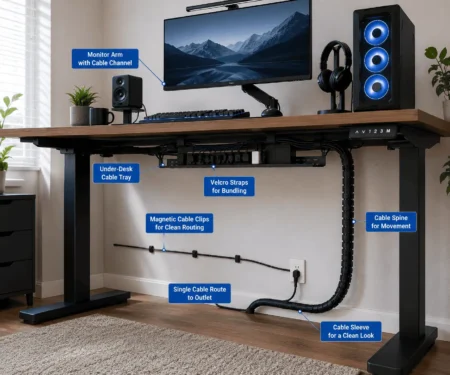
This makes them useful for standing desks and adjustable workstations where cables move often.
Before and After Using Braided Cable Sleeves
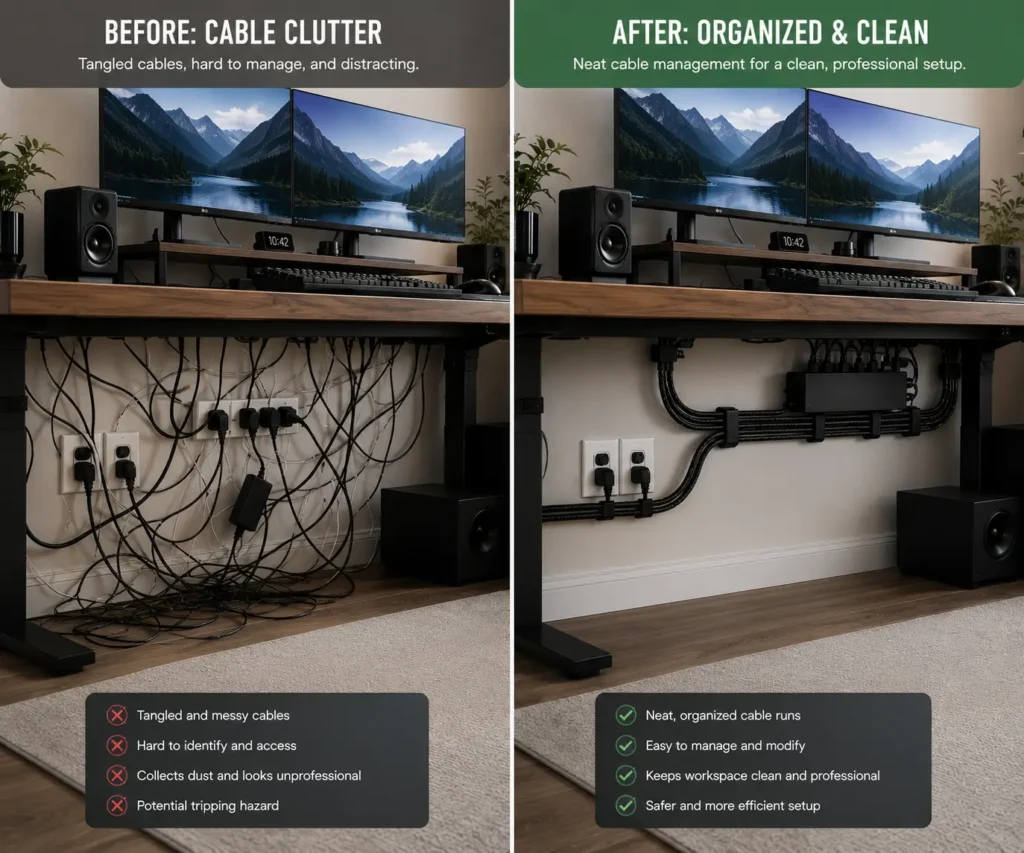
Many people do not realize how much cable clutter affects the appearance of a setup until they organize it.
Before using braided cable sleeves, a desk may have several visible cables running in different directions. Power cords may hang behind the desk. Monitor cables may cross over each other. USB cables may sit loosely on the work surface.
After installing braided cable sleeves, those same cables become one organized bundle. The setup looks cleaner, more professional, and easier to manage.
Typical Cable Clutter Problems
Common problems include:
- Tangled cables
- Visible cable bundles
- Uneven cable routing
- Mixed cable colors
- Difficult cleaning
These issues make even high-end setups look messy.
Visual Transformation Examples
Braided cable sleeves can improve:
- Gaming setup aesthetics
- Home office organization
- Dual monitor desk setups
- Streaming workstations
- Standing desk cable management
The result is often a cleaner desk, better cable organization, and a more polished workspace appearance.
Best Braided Cable Sleeve Colors for Different Setup Styles
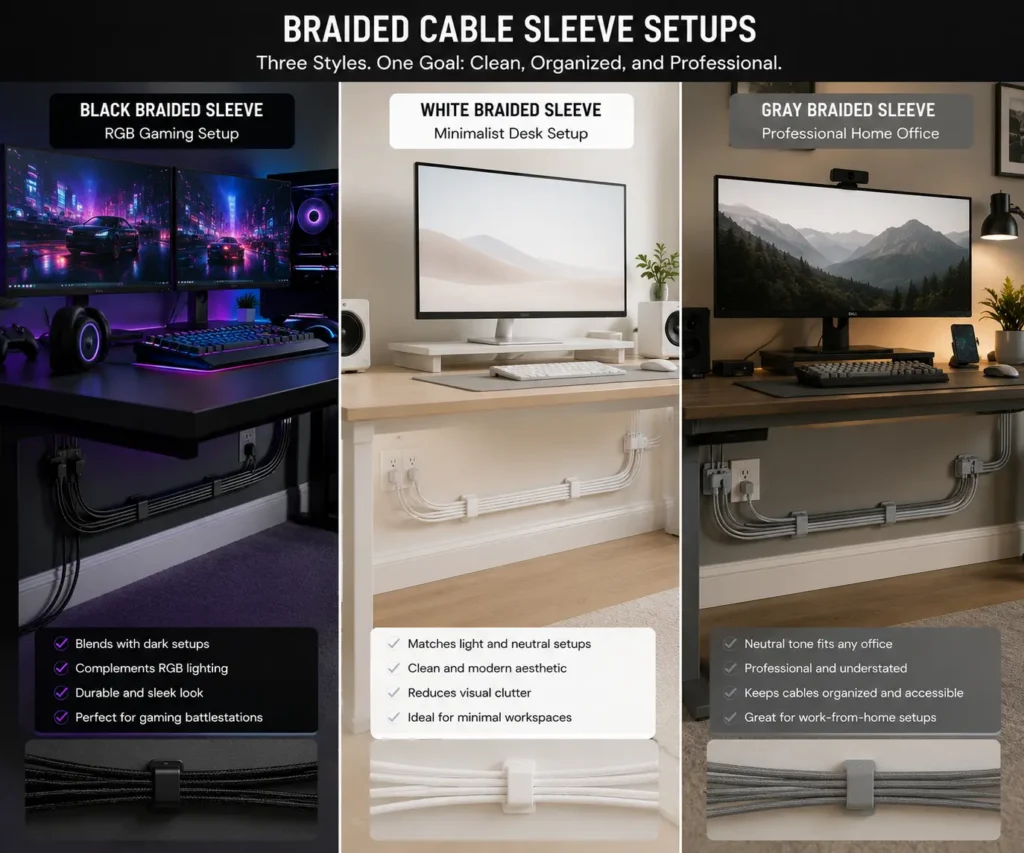
The color of a braided cable sleeve can affect the overall look of your setup. While the sleeve helps with cable management, the right color can also improve desk aesthetics.
Many people choose a color that matches their desk, PC case, monitor stand, or room design. This creates a cleaner and more consistent appearance.
Black Sleeves for Gaming Setups
Black braided cable sleeves are one of the most popular options.
They work well with:
- Gaming PCs
- RGB setups
- Black desks
- Streaming stations
- Dual monitor setups
Black sleeves hide dirt and blend into most gaming environments. They also make cable bundles less noticeable.
White Sleeves for Minimalist Desks
White braided sleeves are common in minimalist setups.
They pair well with:
- White desks
- Modern workspaces
- Apple-based setups
- Light-colored accessories
A white sleeve can make a workspace look bright and clean.
Gray Sleeves for Professional Offices
Gray braided cable sleeves create a balanced appearance.
They are often used in:
- Home offices
- Corporate workstations
- Productivity setups
Gray blends well with most desk colors and office furniture.
Color Matching RGB Setups
Some users match sleeve colors with their RGB lighting.
Popular combinations include:
- Black and red
- Black and blue
- Black and green
- Black and purple
Matching colors can make a gaming setup look more organized and visually appealing.
Should You Choose Bright Colors?
Bright colors can add personality to a setup. However, they can also draw attention to cable bundles.
For most workspaces, neutral colors such as black, gray, or white create the cleanest appearance.
Choosing the Right Braided Cable Sleeve Size
Choosing the correct sleeve size is important. A sleeve that is too small may not fit your cables. A sleeve that is too large may look bulky.
The goal is to create a neat cable bundle without making it look oversized.
Understanding Sleeve Diameter
Braided cable sleeves come in different diameters.
Common sizes include:
- 1/4 inch
- 1/2 inch
- 3/4 inch
- 1 inch
The right size depends on how many cables you need to manage.
Small Cable Bundles
Small sleeves work well for:
- Mouse cables
- Keyboard cables
- USB cables
- Audio cables
These sleeves help keep individual cables organized.
Medium Cable Bundles
Medium sleeves are ideal for:
- Monitor cables
- HDMI cables
- Ethernet cables
- USB hubs
This size is common for home office setups.
Large Cable Bundles
Large sleeves are useful for:
- Gaming setups
- Workstations
- Standing desks
- Entertainment centers
They can hold several cables while maintaining a clean appearance.
Why Oversized Sleeves Look Messy
Oversized sleeves can look bulky, reduce flexibility, and make cable routing harder. Choosing the correct sleeve size usually creates a cleaner and more professional appearance.
What to Look for When Buying Braided Cable Sleeves
Not all braided cable sleeves are the same. Choosing the right sleeve can improve both cable management and appearance.
Material
Most braided cable sleeves use PET or nylon.
PET sleeves are lightweight and affordable.
Nylon sleeves often have a softer texture and a more premium appearance.
Expansion Ratio
Expandable braided sleeving can stretch to hold more cables.
A higher expansion ratio provides greater flexibility when routing different cable bundles.
Length
Measure the cable path before buying.
Choosing the correct length helps reduce waste and improves cable organization.
Color
Choose a color that matches your setup.
Popular options include:
- Black
- White
- Gray
Matching colors often improve desk aesthetics.
Heat Resistance
Some braided sleeves offer higher heat resistance.
This may be useful for workstations, entertainment centers, and other setups with many power cables.
PET vs Nylon Braided Cable Sleeves
PET and nylon are the two most common materials used in braided cable sleeves.
Both provide cable protection and cable organization. However, they have different characteristics.
PET Braided Sleeves
PET sleeving is widely used for desk setups.
Benefits include:
- Lightweight design
- Good flexibility
- Affordable price
- Many color options
PET sleeves are often found in gaming setups and home offices.
Nylon Braided Sleeves
Nylon sleeving has a softer texture.
Benefits include:
- Premium appearance
- Strong durability
- Better abrasion resistance
- Smooth finish
Many custom PC builders choose nylon for aesthetic reasons.
Which Material Looks Better?
For most users, both materials look good.
PET sleeves provide a clean and modern appearance.
Many users prefer nylon sleeves because they have a softer texture and a premium appearance.
The best choice depends on your budget and setup style.
Braided Cable Sleeves vs Other Cable Management Solutions
Braided cable sleeves are only one part of cable management. Other solutions can also help organize cables.
Each option has strengths depending on the setup.
Braided Cable Sleeves
Best for:
- Cable bundling
- Desk aesthetics
- Flexible cable routing
- Gaming setups
- Home offices
Braided sleeves create a clean and organized cable bundle.
Cable Raceways
Best for:
- Wall-mounted cables
- Hidden cable runs
- Entertainment centers
Cable Trays
Best for:
- Under-desk cable management
- Power strips
- Surge protectors
- Large cable bundles
Cable trays help reduce visible cables beneath the desk.
Cable Clips
Best for:
- Cable routing
- Individual cable organization
- Monitor cables
- Charging cables
Cable clips keep cables positioned where you need them.
Velcro Cable Ties
Best for:
- Temporary cable bundles
- Frequent cable changes
- Adjustable cable organization
Velcro ties are easy to remove and reuse.
Split Loom Tubing
Best for:
- Basic cable protection
- Automotive applications
- Utility-focused installations
Split loom tubing protects cables well but often looks less refined than braided mesh sleeving.
For many desk setups, braided cable sleeves work best when combined with cable trays, cable clips, and Velcro cable ties.
Braided Cable Sleeves vs Cable Raceways
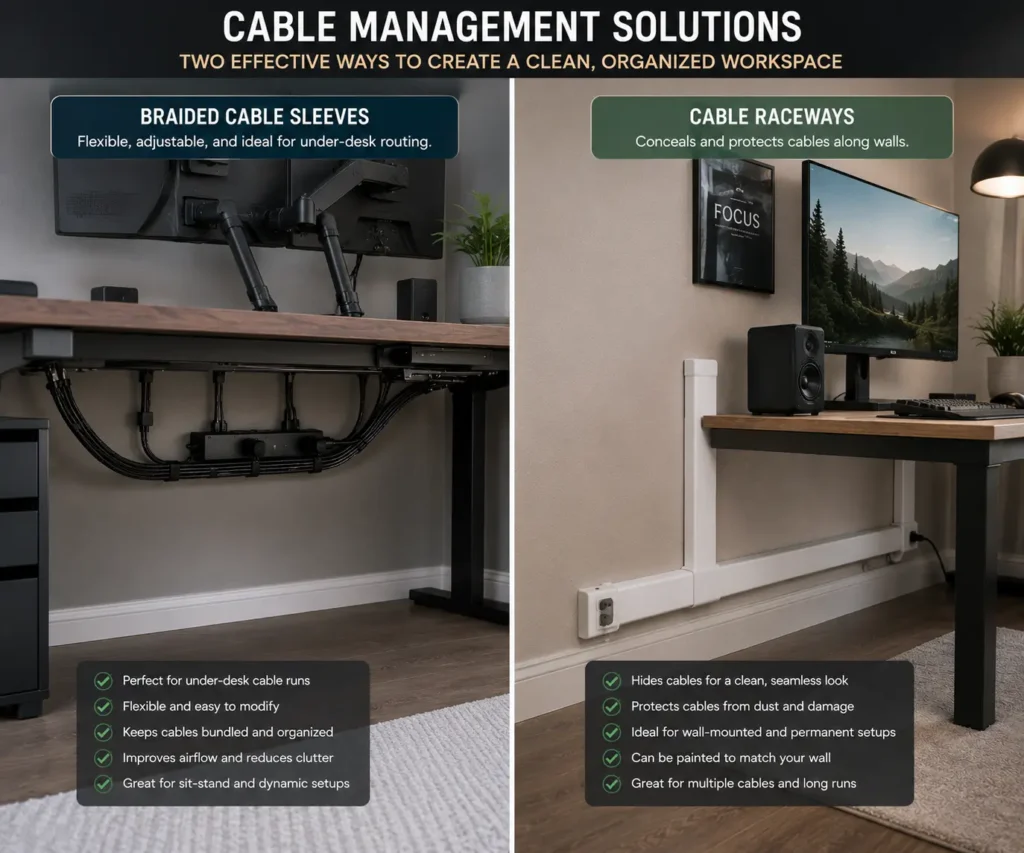
Both braided cable sleeves and cable raceways help reduce cable clutter. However, they work in different ways.
Understanding the differences can help you choose the right cable management solution.
What Is a Cable Raceway?
A cable raceway is a channel that hides cables inside a cover.
Raceways are usually attached to:
- Walls
- Desk backs
- Furniture surfaces
They completely hide cables from view.
Appearance Comparison
Braided cable sleeves organize cables into a neat bundle.
Cable raceways hide cables completely.
For visible desk areas, braided sleeves often look more natural.
For wall-mounted cables, raceways usually provide a cleaner finish.
Installation Comparison
Braided cable sleeves are easy to install.
Most require:
- Measuring cables
- Expanding the sleeve
- Inserting cables
Cable raceways often require mounting hardware or adhesive strips.
Flexibility Comparison
Braided sleeves remain flexible after installation.
This makes them useful for:
- Standing desks
- Adjustable monitor arms
- Movable workstations
Cable raceways are more rigid and work best in fixed locations.
Which Option Is Better for Desk Aesthetics?
Many people use both solutions together.
A braided cable sleeve can organize visible cables under the desk.
A cable raceway can hide cables that run along walls or furniture.
Using both products often creates the cleanest workspace.
Braided Cable Sleeves for Gaming Setups
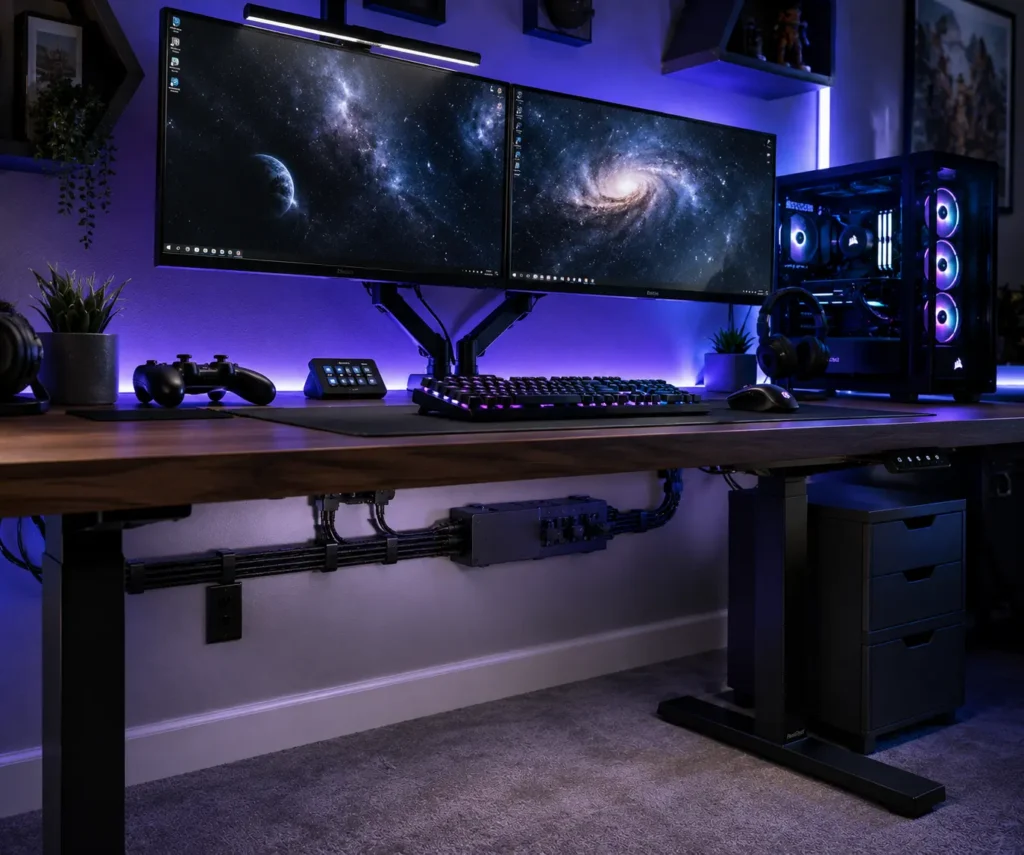
Gaming setups often include many cables.
These may include:
- Monitor cables
- Power cords
- Ethernet cables
- USB cables
- Headset cables
- Streaming equipment cables
Without cable management, these wires can quickly create visual clutter.
Cleaner RGB Setups
RGB lighting stands out more when cables are organized.
A braided cable sleeve helps reduce distractions and keeps attention on the main setup.
Better Cable Routing
Gaming desks often have several devices connected at once.
Braided sleeves help route cables in a single path. This creates a cleaner appearance behind and below the desk.
Easier Upgrades
Many gamers upgrade their hardware regularly.
Braided sleeves make it easier to manage new cables without rebuilding the entire setup.
Improved Setup Appearance
A well-organized gaming setup often looks more professional.
Cable bundles appear cleaner, and the desk feels less crowded.
This can improve both aesthetics and usability.
Braided Cable Sleeves vs Custom PC Cable Sleeving
Many PC enthusiasts compare braided cable sleeves with custom cable sleeving. While both improve appearance, they serve different purposes.
What Is Custom PC Cable Sleeving?
Custom cable sleeving involves wrapping or replacing individual power supply cables with decorative sleeves.
These cables are often used in:
- Custom PC builds
- Gaming PCs
- Showcase computers
The goal is usually appearance rather than cable bundling.
What Are Braided Cable Sleeves?
Braided cable sleeves wrap multiple cables together.
Instead of focusing on individual wires, they focus on cable organization and cable routing.
Appearance Comparison
Custom PC cable sleeving creates a premium look inside a PC case.
Braided cable sleeves improve the appearance of cables outside the PC.
Many users combine both methods for a fully organized setup.
Cost Comparison
Braided cable sleeves are usually more affordable.
Custom sleeved cables often cost significantly more because they are designed for specific power supplies.
Installation Comparison
Braided cable sleeves are simple to install.
Custom cable sleeving usually requires more time, planning, and compatibility checks.
Which Option Is Better?
The best choice depends on your goal.
If you want better desk aesthetics and cable organization, braided cable sleeves are usually the better solution.
If you want to improve the appearance inside a custom PC build, custom cable sleeving may be worth considering.
Many PC enthusiasts use both solutions to create a cleaner and more professional-looking setup.
Braided Cable Sleeves for Home Offices
Home office setups benefit greatly from cable organization.
Modern workspaces often include:
- Laptops
- Docking stations
- Monitors
- Printers
- Charging cables
Without proper cable management, these devices can create clutter.
Organizing Workstation Cables
Braided sleeves group cables together and reduce visual distractions.
This creates a more organized workspace.
Supporting Dual Monitor Setups
Dual monitor setups often require:
- Power cables
- Display cables
- USB cables
A braided cable sleeve helps keep these connections tidy.
Improving Professional Appearance
A clean workspace can leave a better impression during video meetings.
Organized cable bundles help the desk look more professional.
Helping Standing Desk Users
Standing desks move throughout the day.
Braided cable sleeves allow cables to move together while remaining organized.
This improves both cable routing and appearance.
Common Mistakes That Make Cable Management Look Messy
Even the best braided cable sleeves cannot fix poor cable management habits. Many setups still look cluttered because of simple mistakes.
Avoiding these problems can make a big difference in the appearance of your workspace.
Choosing Oversized Sleeves
A sleeve that is too large can create bulky cable bundles.
Instead of looking organized, the cables may appear oversized and uneven. A properly sized braided cable sleeve usually creates a cleaner result.
Before buying a sleeve, count your cables and choose a size that fits the bundle closely.
Overstuffing Cable Bundles
Some people try to place every cable inside one sleeve.
This often creates:
- Thick cable bundles
- Uneven shapes
- Poor flexibility
- Difficult cable routing
It is often better to use multiple sleeves for different groups of cables.
For example:
- Monitor cables in one sleeve
- Power cables in another
- Peripheral cables in a separate bundle
Exposed Sleeve Ends
Exposed sleeve ends can make an otherwise clean setup look unfinished.
Loose ends may fray over time and attract attention.
Using heat shrink tubing or cable wraps creates a more polished appearance.
Inconsistent Cable Routing
A common mistake is sending cables in different directions.
This creates visual clutter even when braided sleeves are used.
Try to keep cable paths consistent. Route cables along the same path whenever possible.
This creates a cleaner and more professional appearance.
Poor Color Coordination
Cable colors affect desk aesthetics.
Bright cables mixed with random sleeve colors can make a setup look busy.
For a clean workspace, choose sleeve colors that match:
- Desk color
- PC case color
- Monitor stands
- Room design
A consistent color scheme often looks more organized.
Ignoring Under-Desk Cable Management
Many users focus only on visible cables.
However, cables hanging beneath the desk can still create clutter.
Cable trays, cable clips, and desk grommets can help keep under-desk cables organized.
When combined with braided cable sleeves, they create a much cleaner setup.
How to Finish Braided Cable Sleeves for a Professional Look
Installing a sleeve is only part of the process. The finishing details often determine whether the setup looks average or professional.
Small improvements can greatly improve cable aesthetics.
Heat Shrink Tubing
Heat shrink tubing is one of the most popular finishing methods.
It secures the ends of the braided sleeve and prevents fraying.
Benefits include:
- Cleaner appearance
- Improved durability
- Better cable protection
Many custom PC builders use heat shrink tubing because it creates a neat finish.
Cable Wraps and Velcro Straps
Cable wraps and Velcro cable ties help secure cable bundles.
Unlike zip ties, Velcro straps can be adjusted easily when cables are added or removed.
If you’re deciding between reusable straps and permanent fasteners, our comparison of zip ties vs Velcro ties explains which option works best for different setups.
They are useful for:
- Gaming setups
- Home offices
- Workstations
- Standing desks
Cable Clips
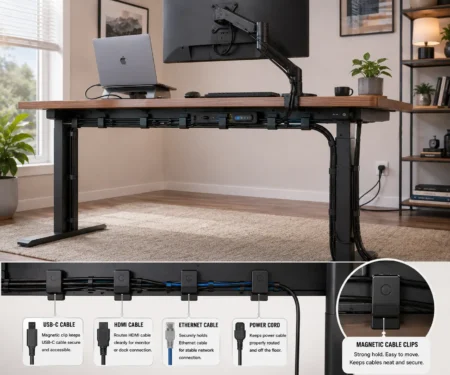
Magnetic cable clips help guide cables along steel desk frames and monitor arms while keeping them easy to reposition.
They can:
- Prevent cable movement
- Reduce cable clutter
- Improve cable organization
Cable clips work especially well near monitor arms and desk edges.
Desk Grommets
Desk grommets provide a dedicated opening for cable routing.
Instead of cables hanging over the edge of the desk, they pass through a clean opening.
This helps create a more organized workspace.
Cable Trays
An under desk cable management tray hides cable bundles, power strips, and adapters beneath the desk while braided sleeves keep visible cables organized.
When paired with braided cable sleeves, cable trays can make most cables nearly invisible.
Many users consider this combination one of the most effective cable management solutions.
How to Install Braided Cable Sleeves for the Best Appearance
Installing braided cable sleeves is simple. However, following a few basic steps can improve the final result.
Step 1: Identify the Cables
Start by deciding which cables should be grouped together.
Common cable groups include:
- Monitor cables
- HDMI cables
- Ethernet cables
- USB cables
- Power cords
Grouping related cables helps simplify cable routing.
Step 2: Measure the Cable Bundle
Measure the thickness of the cable bundle before choosing a sleeve.
A correctly sized sleeve creates a cleaner appearance and improves flexibility.
Step 3: Cut the Sleeve
Cut the braided cable sleeve to the desired length.
Leave a small amount of extra length if the cables may move frequently.
This is especially important for standing desks.
Step 4: Insert the Cables
Expand the braided sleeve and insert the cables.
Work slowly to keep the cable bundle even.
This helps create a smooth and professional look.
Step 5: Secure the Ends
Secure the sleeve ends using your preferred cable management accessory.
This prevents fraying and improves appearance.
Step 6: Route the Cables
Guide the cables along a consistent path.
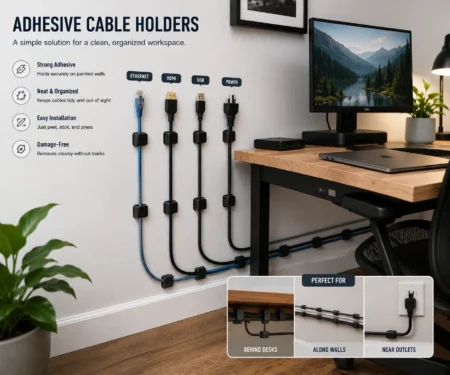
Use adhesive cable holders, desk grommets, or a cable tray to keep bundled cables following a clean path along walls, furniture, or the desk.
Proper cable routing often has a greater impact on desk aesthetics than the sleeve itself.
Conclusion
Braided cable sleeves are a simple upgrade that can make a noticeable difference to both cable management and desk aesthetics. By organizing HDMI cables, Ethernet cables, USB cables, and power cords into one neat bundle, they create cleaner cable routing and reduce visible clutter. When paired with cable clips, cable trays, or desk grommets, they help gaming setups, home offices, and workstations look more organized while making everyday cable management easier.
FAQs
Can braided cable sleeves protect cables from pets?
They can help reduce light scratching or chewing damage, but they are not designed to stop determined pets from biting through cables.
Are braided cable sleeves suitable for outdoor use?
Most standard braided cable sleeves are intended for indoor use. Outdoor environments may require UV-resistant or weatherproof sleeving.
Can braided cable sleeves be used with monitor arms?
Yes. Braided cable sleeves work well with monitor arms by keeping display and power cables bundled while allowing smooth movement.
Do braided cable sleeves help during desk cleaning?
Yes. Bundling cables into one sleeve makes it easier to wipe the desk surface and clean underneath without moving several loose wires.
Should power cables and data cables share the same braided sleeve?
For most home and office setups, they can. However, keeping them separate may be helpful for larger workstations where easier troubleshooting or cable organization is important.