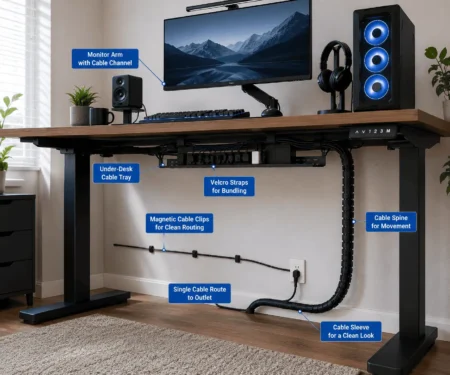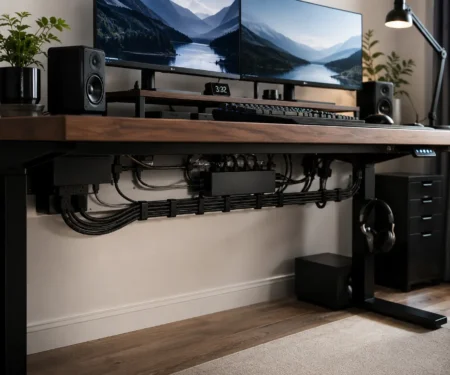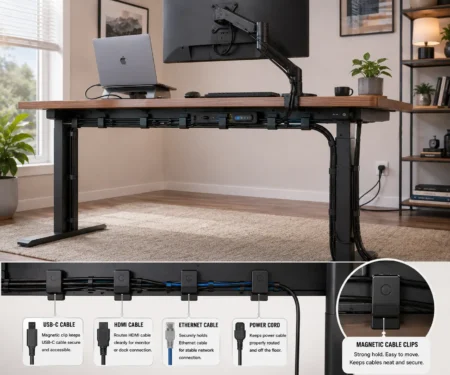



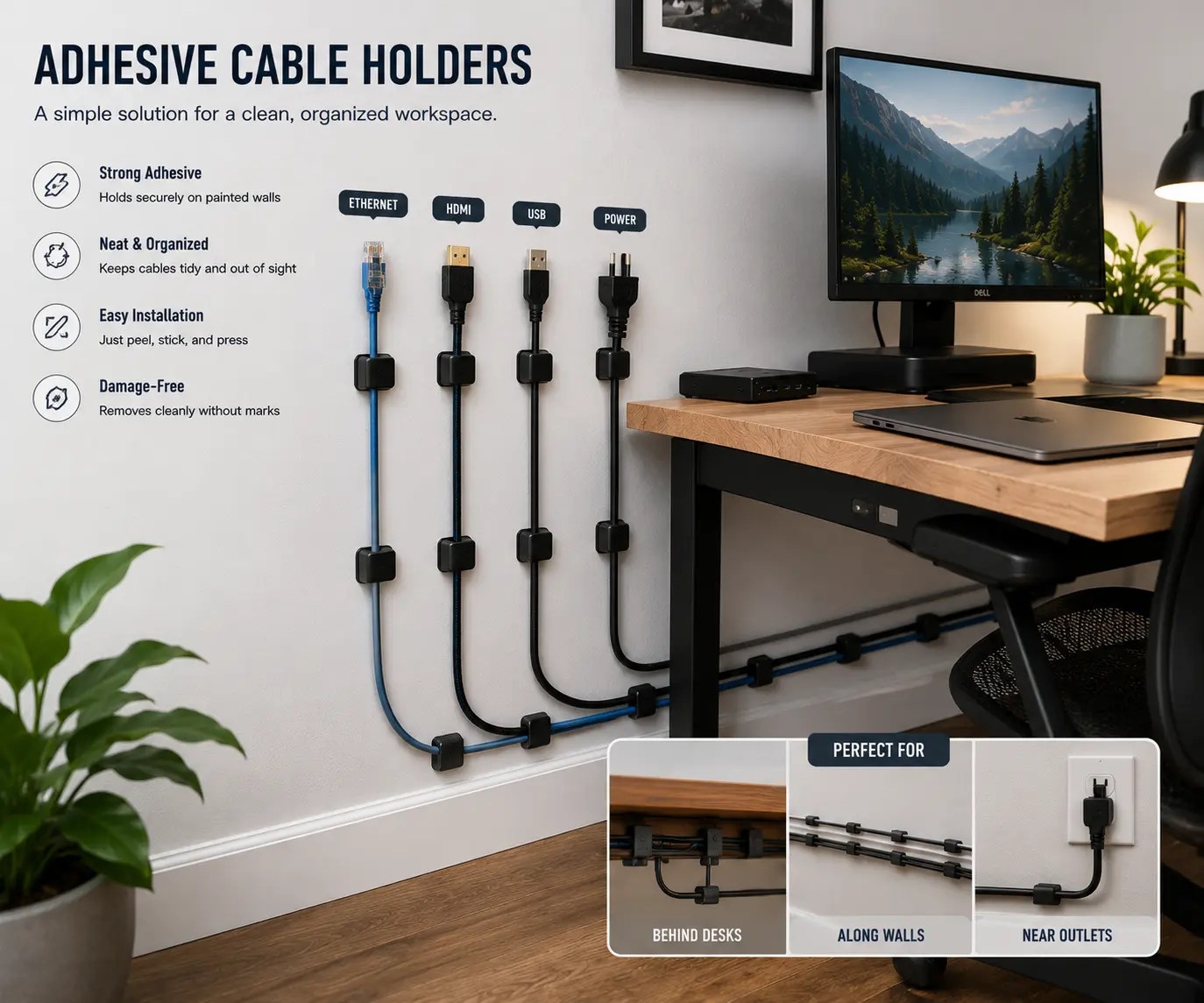
Loose Ethernet cables, HDMI cables, and power cords running across a wall can quickly make a home office, gaming setup, or TV wall mount look messy. Poor cable routing also makes cleaning harder, creates tripping hazards, and leaves cable bundles exposed.
Adhesive cable holders are one of the most practical cable management accessories for organizing cables without drilling holes or damaging walls. Whether you need to secure charging cables, network cables, or other wires, the right cable clips can create a clean cable path and improve wall-mounted cable management. This guide explains how to choose, install, and use adhesive cable holders for long-lasting results.
What Are Adhesive Cable Holders?
Adhesive cable holders are small cable clips or wire holders that attach to a surface using a peel-and-stick adhesive pad. Their main job is to guide and secure cables along a planned cable route.
Most adhesive cable holders are made from plastic or silicone. They have a slot, hook, or clip that keeps the cable in place. Once attached to a wall, desk, cabinet, or other surface, they help create a neat and organized cable run.
These holders are commonly used for:
- Charging cables
- USB cables
- Ethernet cables
- HDMI cables
- Coaxial cables
- Power cords
- LED strip wires
Because they do not require drilling, they are a popular choice for renters and homeowners who want cleaner cable management without damaging walls.
Benefits of Using Adhesive Cable Holders for Wall Routing
Adhesive cable holders offer several advantages for home and office setups.
Cleaner Cable Routing
One of the biggest benefits is improved cable routing. Instead of cables hanging loosely, the holders guide them along a planned path. This helps create a cleaner and more organized space.
A neat cable path also makes it easier to identify and manage individual cables when you need to make changes.
Easy Installation
Most adhesive cable holders can be installed in minutes. You simply clean the surface, remove the protective film from the adhesive backing, and press the holder into place.
There is no need for screws, drills, or special tools. This makes them an excellent option for quick cable organization projects.
Better Cable Protection
Loose cables can become tangled, pinched, or bent. Adhesive cable holders keep cables secure and reduce unnecessary movement.
This can help protect cable insulation and maintain a cleaner cable bundle, especially around desks, entertainment centers, and workstations.
Improved Safety
Cables that run across floors or hang from furniture can create tripping hazards. Using adhesive cable holders allows you to route cables along walls and other surfaces instead.
A properly secured power cord or network cable helps create a safer environment for children, pets, and adults.
Low-Cost Cable Management
Compared to larger solutions such as a cable raceway, adhesive cable holders are affordable and easy to use. They provide effective cable organization without requiring a large budget.
For many small cable routing projects, they offer a simple way to improve the appearance and function of a room.
Suitable for Many Setups
Adhesive cable holders work well in different environments, including:
- Home offices
- Gaming setups
- Workstations
- Entertainment centers
- TV wall mount installations
- Smart home systems
Their flexibility makes them one of the most useful tools for everyday cable management.
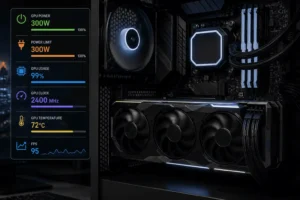
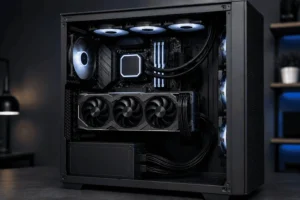
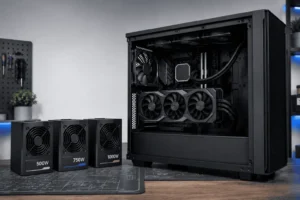
For desktop PCs with visible GPU or PSU cables, cable combs can improve the appearance of exposed wiring inside the case.
Best Wall Surfaces for Adhesive Cable Holders
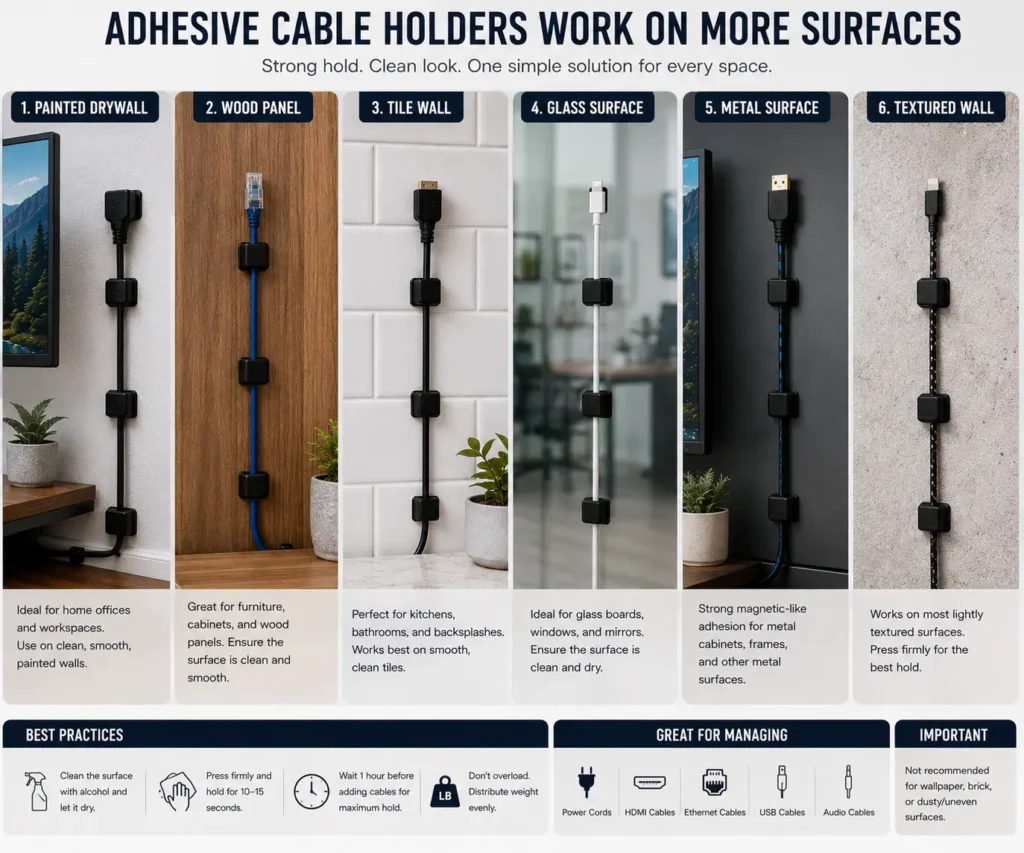
The performance of adhesive cable holders depends on the surface where they are installed. Some surfaces allow the adhesive backing to stick well, while others can reduce its holding strength.
Painted Drywall
Painted drywall is one of the best surfaces for adhesive cable holders. The smooth finish helps the adhesive create a strong bond.
Before installation, wipe the wall with a clean cloth to remove dust and dirt. A clean surface improves adhesion and helps the holder stay in place longer.
Wood Surfaces
Adhesive cable holders also work well on wood furniture, cabinets, and wall panels. Smooth wood surfaces usually provide excellent support for cable routing.
If the wood surface has a glossy finish, clean it first to remove oils or residue.
Tile Walls
Tile is another good option for wall-mounted cable management. The smooth surface allows the adhesive pad to make full contact with the wall.
Many people use adhesive cable holders in kitchens, bathrooms, and laundry rooms where tile walls are common.
Glass Surfaces
Glass provides a strong and stable surface for adhesive cable clips. This makes it easy to organize charging cables, smart home wires, and LED strip wiring around windows or glass panels.
Always clean the glass before installation for the best results.
Metal Surfaces
Metal surfaces are often found in workshops, offices, and utility areas. Adhesive cable holders usually stick very well to smooth metal.
If you’re routing cables on a steel desk or frame, magnetic cable clips are often a better choice because they can be repositioned without adhesive.
Textured Walls and Brick Walls
Textured walls, brick walls, and rough concrete surfaces can be challenging. The uneven surface reduces contact between the adhesive backing and the wall.
Some heavy-duty cable holders may still work on lightly textured walls. However, performance varies depending on the depth of the wall texture and adhesive quality.
If you need to route cables on brick or heavily textured walls, a cable raceway or screw-mounted solution may work better.
How to Install Adhesive Cable Holders on a Wall
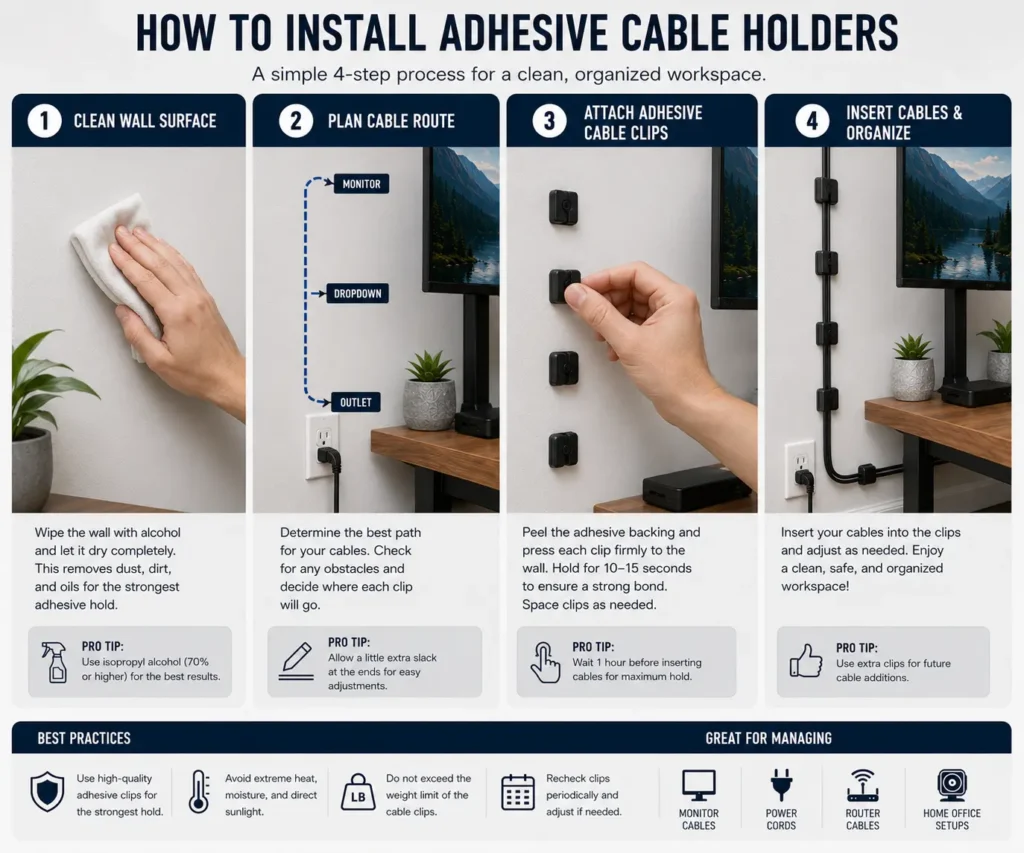
A proper installation process helps adhesive cable holders last longer and perform better.
Step 1: Clean the Surface
Surface preparation is one of the most important steps.
Use a dry cloth or a small amount of rubbing alcohol to remove:
- Dust
- Dirt
- Grease
- Moisture
A clean surface helps the adhesive create a stronger bond.
Step 2: Plan the Cable Route
Before attaching any holders, decide where the cable will run.
Look for a clean cable path that:
- Avoids doorways
- Avoids heat sources
- Follows corners when possible
- Keeps cables out of sight
Planning ahead prevents mistakes and helps create a more professional result.
Step 3: Mark Clip Locations
Use a pencil to lightly mark where each cable holder will be placed.
This step helps maintain consistent installation spacing and keeps the cable run straight.
Step 4: Attach the Cable Holders
Remove the protective film from the adhesive backing.
Press each holder firmly against the wall for several seconds.
Many manufacturers recommend waiting a few hours before placing cables inside the holders. This allows the adhesive to fully bond with the surface.
Step 5: Insert the Cables
After the adhesive has set, place the cables into the holders.
Avoid pulling the cables too tightly. A small amount of cable slack helps reduce stress on connectors and improves long-term cable protection.
How Far Apart Should Cable Holders Be Installed?
Proper spacing helps support the cable while keeping the cable route neat and secure.
The ideal spacing depends on the cable type and weight.
Factors That Affect Spacing
Several factors can change the ideal spacing between holders:
- Cable weight
- Cable thickness
- Surface type
- Number of cables in the bundle
- Direction of the cable route
Heavier cable bundles usually require more holders. Adding a few extra clips can improve support and help prevent adhesive failure over time.
What Types of Cables Can Adhesive Holders Support?
Adhesive cable holders can support many common cable types found in homes and offices. However, the size and weight of the cable will affect how well the holder performs.
USB Cables
USB cables are among the easiest cables to manage. They are lightweight and flexible, making them a perfect match for adhesive cable holders.
Many people use cable clips to organize:
- USB-A cables
- USB-C cables
- Charging cables
- Device connection cables
These cables work well in home offices, gaming setups, and workstations.
Ethernet Cables
An Ethernet cable is commonly used for internet connections. These cables are light enough for most adhesive cable holders.
Using cable holders can help create a clean cable run along walls, baseboards, and desks. This improves cable organization and reduces clutter.
HDMI Cables
HDMI cables connect TVs, monitors, projectors, and gaming consoles. They are usually thicker than Ethernet cables but still work well with many cable holders.
For longer HDMI cable runs, install holders at regular intervals to prevent sagging.
Coaxial Cables
Coaxial cables are often used for cable television and internet services. They are heavier and less flexible than many other cable types.
When routing coaxial cables, use holders with a larger opening and stronger adhesive backing.
Power Cords
Power cords are usually the heaviest cables used in home cable management.
Lightweight and medium-duty power cords can often be supported by adhesive cable holders. Heavy extension cords may require additional support or a cable raceway. However, it is important to follow the manufacturer’s load capacity recommendations.
For heavier cords, use more holders along the cable path to provide additional support.
LED Strip Wires
LED strip lighting often requires small wires to run along walls, shelves, and cabinets.
Adhesive cable holders help keep these wires hidden and organized. They also make it easier to follow corners and tight spaces.
Multiple Cable Bundles
Some cable holders are designed to hold more than one cable.
This can be useful when routing:
- HDMI cables
- Ethernet cables
- USB cables
- Power cords
Bundling cables together with cable management sleeves can create a cleaner appearance before securing the bundle with adhesive cable holders. However, avoid overloading the holder with too many cables.
How to Choose the Right Adhesive Cable Holder
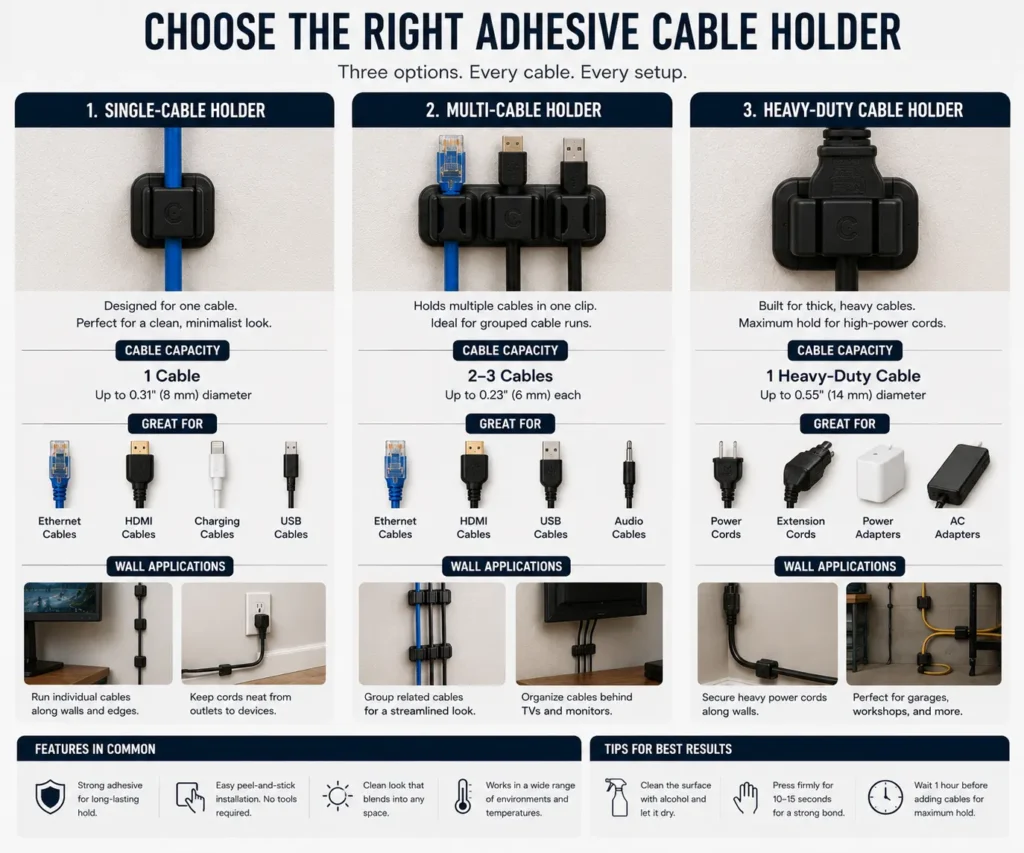
Choosing the right adhesive cable holder can make cable routing easier and improve long-term performance. The best option depends on the cable type, cable size, and mounting surface.
Single-Cable Holders
Single-cable holders are designed to secure one cable at a time. They are ideal for:
- USB cables
- Charging cables
- Ethernet cables
- Speaker wire
These holders help create a clean cable path and make individual cables easier to manage.
Multi-Cable Holders
Multi-cable holders can hold several cables in one clip. They work well for:
- Home office setups
- Entertainment centers
- TV wall mount installations
- Network cable routing
They help keep related cables together and reduce cable clutter.
Heavy-Duty Cable Holders
Heavy-duty adhesive cable holders are designed for thicker cables and larger cable bundles. They are often used for:
- Coaxial cables
- Large power cords
- Multiple cable runs
If you need extra cable support, choose a holder with a stronger adhesive backing and a wider cable opening.
Choose the Right Size
A cable holder should match the diameter of the cable. A holder that is too small may pinch the cable, while a holder that is too large may not provide proper cable retention.
Before buying, check the holder’s cable capacity and compare it with the size of your cables.
Consider the Mounting Surface
The mounting surface plays a major role in adhesive performance. Smooth surfaces such as drywall, glass, metal, and finished wood usually provide the best results.
For rough surfaces, textured walls, or brick walls, consider alternative cable fastening methods or a cable raceway for more reliable cable management.
How Much Weight Can Adhesive Cable Holders Hold?
The weight capacity of an adhesive cable holder depends on several factors.
These include:
- Adhesive quality
- Holder size
- Surface type
- Installation quality
- Cable weight
Understanding these factors can help prevent cables from falling or pulling the holder off the wall.
Factors That Affect Load Capacity
The cable itself is only one part of the equation.
Other factors can reduce holding strength:
- Dusty surfaces
- Moisture
- Extreme heat
- Poor surface preparation
- Textured walls
Even a strong adhesive can fail if the surface is not properly cleaned before installation.
How to Support Heavier Cables
If you need to route heavier cables, follow these simple tips:
- Use additional cable holders
- Reduce spacing between holders
- Avoid large cable bundles
- Choose heavy-duty holders
- Keep cables straight when possible
These steps can help extend the life of the adhesive and improve cable stability.
Common Cable Routing Mistakes to Avoid
Even good cable management products can fail if they are installed incorrectly.
Avoiding common mistakes can help create a cleaner and more reliable cable routing system.
Installing on Dirty Surfaces
This is one of the most common mistakes.
Dust, grease, and dirt prevent the adhesive backing from bonding properly. As a result, cable holders may fall off after a short time.
Always clean the surface before installation.
Using Too Few Cable Holders
Some people try to support a long cable run with only a few clips.
This often causes:
- Cable sagging
- Uneven cable paths
- Extra stress on the adhesive
Adding more cable holders usually creates a stronger and cleaner installation.
Creating Sharp Cable Bends
Many cables do not perform well when bent sharply.
Tight bends can:
- Damage cable insulation
- Reduce cable lifespan
- Affect signal quality
Instead, use gentle curves when routing cables around corners.
Routing Cables Near Heat Sources
Heat can weaken adhesive over time.
Avoid routing cables near:
- Space heaters
- Radiators
- Heating vents
- High-temperature appliances
Keeping cables away from heat sources helps preserve both the adhesive and the cable itself.
Overloading the Holder
Every cable holder has limits.
Trying to hold large cable bundles with a small clip can cause the holder to fail.
Choose a holder that matches the number and size of the cables being routed.
Pulling Cables Too Tight
A cable should never be stretched tightly between holders.
Without enough cable slack, tension builds along the cable run. This tension can pull holders off the wall and place stress on cable connectors.
Leave a small amount of slack to allow for natural movement.
Ignoring Future Changes
Many people install cable routing systems without considering future upgrades.
For cable bundles that change frequently, our comparison of zip ties vs Velcro ties explains which fastening method is easier to maintain.
This is especially useful in home offices, gaming setups, and entertainment centers where equipment changes often.
When Not to Use Adhesive Cable Holders
Adhesive cable holders work well for many cable management projects. However, there are situations where another solution may be a better choice.
Large Cable Bundles
If you need to manage a large cable bundle beneath a desk, an under desk cable management tray usually provides better support than individual cable holders.
Rough Brick Walls
Brick, concrete, and heavily textured walls often reduce adhesive performance. Screw-mounted cable anchors may work better on these surfaces.
Loose or Damaged Wallpaper
Adhesive backing can pull wallpaper away from the wall during installation or removal.
Heavy Extension Cords
Thick extension cords can place too much stress on standard cable holders. In these situations, choose heavy-duty cable support products.
Outdoor Installations Using Indoor Clips
Indoor adhesive cable clips are not designed for weather exposure. Always use products rated for outdoor installation when routing cables outside.
Why Do Adhesive Cable Holders Fall Off?
Adhesive cable holders are easy to install, but they can fail if they are not used correctly. Understanding the common causes of failure can help you build a more reliable cable management system.
Dust and Dirt on the Surface
A dirty wall is one of the biggest reasons adhesive cable holders fall off.
Dust, grease, and dirt create a barrier between the adhesive backing and the wall. As a result, the adhesive cannot form a strong bond.
Always clean the installation area before attaching cable holders.
Moisture and Humidity
Water can weaken adhesive over time.
Bathrooms, kitchens, laundry rooms, and other humid spaces may cause some cable clips to lose their grip. If you plan to install cable holders in these areas, choose products designed for higher moisture resistance.
Poor Surface Preparation
Many people skip surface preparation because it seems unnecessary.
However, even a small amount of dust can reduce adhesive performance. Taking a few minutes to clean and dry the wall can greatly improve long-term results.
Heavy Cable Bundles
Cable holders are designed to support a certain amount of weight.
When too many cables are grouped together, the load capacity may be exceeded. This extra weight can pull the holder away from the wall.
If you need to route multiple cables, use additional holders along the cable path.
Extreme Temperatures
Heat and cold can affect adhesive strength.
High temperatures may soften the adhesive, while very cold temperatures can make it less flexible. Over time, this may reduce the holder’s ability to stay attached.
Keep cable runs away from heaters, vents, and other heat-producing equipment whenever possible.
Adhesive Cable Holders vs Cable Raceways
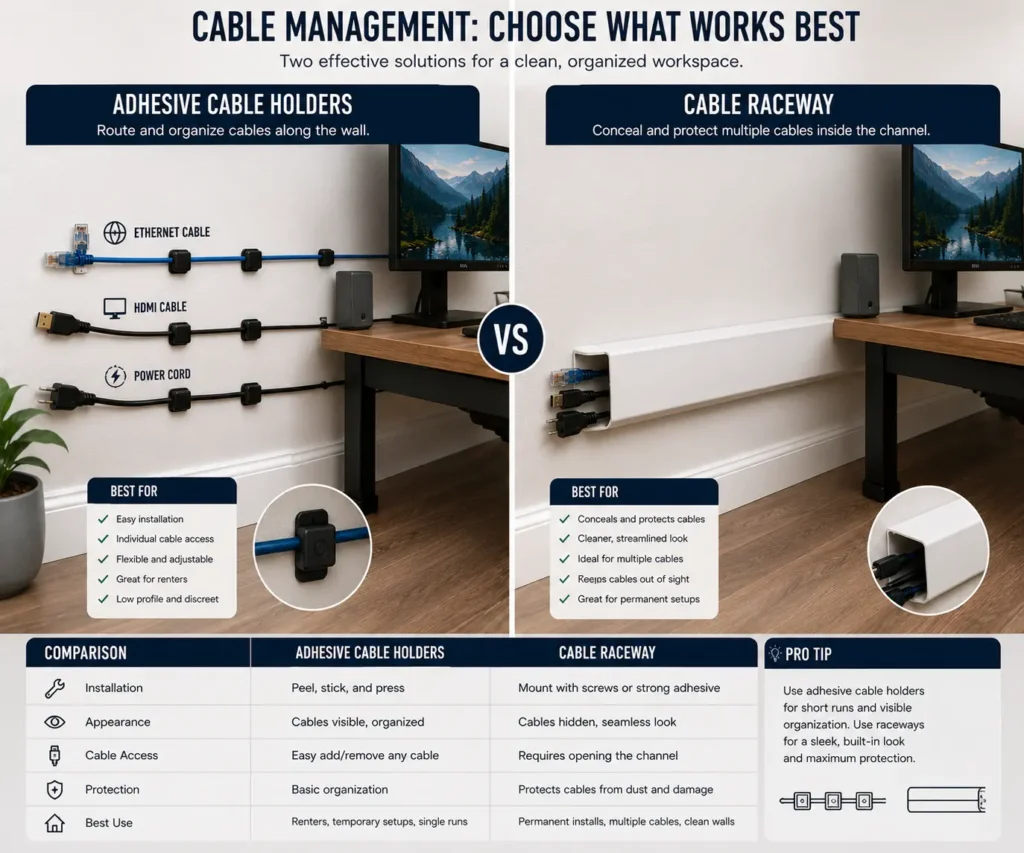
Both adhesive cable holders and cable raceways can improve cable management. However, they serve different purposes.
The right choice depends on your setup, the number of cables, and the appearance you want to achieve.
Adhesive Cable Holders
Adhesive cable holders work best when you need to manage a small number of cables.
Advantages:
- Quick installation
- Low cost
- No drilling required
- Flexible cable routing
- Easy to adjust
Limitations:
- Visible cables
- Lower cable capacity
- Limited support for heavy cable bundles
They are ideal for charging cables, Ethernet cables, HDMI cables, and simple wall routing projects.
Cable Raceways
A cable raceway is a channel that completely or partially hides cables.
Advantages:
- Better cable concealment
- Higher cable capacity
- Cleaner appearance
- Better protection for cables
Limitations:
- Higher cost
- Longer installation time
- Less flexibility after installation
Cable raceways are often used behind a TV wall mount, entertainment center, or home office workstation where multiple cables need to be hidden.
Which Option Is Better?
Choose adhesive cable holders if:
- You have only a few cables.
- You want a simple installation.
- You need an affordable solution.
- You may change your cable route later.
Choose a cable raceway if:
- You want cables hidden from view.
- You have many cables.
- You need a permanent cable management solution.
In some setups, combining both products creates the best result. A raceway can hide the main cable run, while adhesive cable holders guide individual cables to devices and cable management sleeves keep related cables bundled together.
Can Adhesive Cable Holders Be Used Outdoors?
Only holders with weather-resistant adhesive are suitable for long-term outdoor installation. However, outdoor conditions create additional challenges.
Sunlight Exposure
Direct sunlight can weaken some adhesive materials over time.
UV rays may cause the adhesive backing to dry out or lose strength. If the cable route will be exposed to sunlight, choose holders rated for outdoor use.
Rain and Moisture
Outdoor installations often face rain, humidity, and temperature changes.
Standard indoor cable clips may not provide enough protection in these conditions. Weather-resistant products are usually a better choice.
Temperature Changes
Outdoor surfaces can become very hot during the day and much cooler at night.
These constant temperature changes can affect the adhesive bond. Heavy-duty outdoor cable holders are designed to handle these conditions more effectively.
Outdoor Installation Tips
For better results:
- Clean the surface thoroughly.
- Use weather-resistant holders.
- Avoid overloaded cable bundles.
- Reduce spacing between holders.
- Inspect the installation regularly.
These simple steps can improve the lifespan of outdoor cable routing projects.
How to Remove Adhesive Cable Holders Without Damaging Walls
There may come a time when you need to remove adhesive cable holders. Fortunately, this can usually be done without damaging the wall.
Use a Hair Dryer
A hair dryer is one of the safest removal methods.
Hold the dryer a few inches from the holder and apply warm air for about 30 to 60 seconds.
The heat softens the adhesive, making it easier to remove.
Peel Slowly
After warming the adhesive, gently pull the holder away from the wall.
Avoid using excessive force. Slow and steady pressure reduces the risk of damaging paint or drywall.
Remove Adhesive Residue
Sometimes a small amount of adhesive residue remains on the wall.
You can remove it with:
- Warm soapy water
- Adhesive remover
- Rubbing alcohol
Always test cleaning products on a small area first.
Use a Plastic Scraper
If residue remains, a plastic scraper can help remove it.
Avoid metal tools because they may scratch painted surfaces or damage drywall.
Check the Surface
After removal, inspect the wall for any remaining residue.
Cleaning the area completely prepares the surface for future cable management products or a new cable route.
Conclusion
Adhesive cable holders are an affordable solution for keeping Ethernet cables, HDMI cables, charging cables, and power cords organized along walls. Choosing the right holder, preparing the surface properly, and following the correct installation steps can improve cable routing and reduce clutter. While they are ideal for most everyday cable management projects, heavier cable bundles or permanent installations may be better suited to a cable raceway. With the right approach, you can create a cleaner, safer, and more organized space.
FAQs
Can Adhesive Cable Holders Be Used on Ceilings?
Yes, they can be used on smooth ceilings if the adhesive is rated for overhead use and the cables are lightweight.
Do Adhesive Cable Holders Leave Sticky Residue?
Some may leave a small amount of residue, but it can usually be removed with rubbing alcohol or an adhesive remover.
Can I Cut Adhesive Cable Holders to Fit Smaller Spaces?
No. Cutting the holder may weaken its structure and reduce its ability to hold cables securely.
Can Adhesive Cable Holders Hold Fiber Optic Cables?
Yes, as long as the holder matches the cable size and the cable is not bent beyond its recommended bend radius.
Should Cables Be Tight Inside the Holder?
No. Leave a little slack so the cable is not under constant tension, which helps reduce stress on both the holder and the cable.