


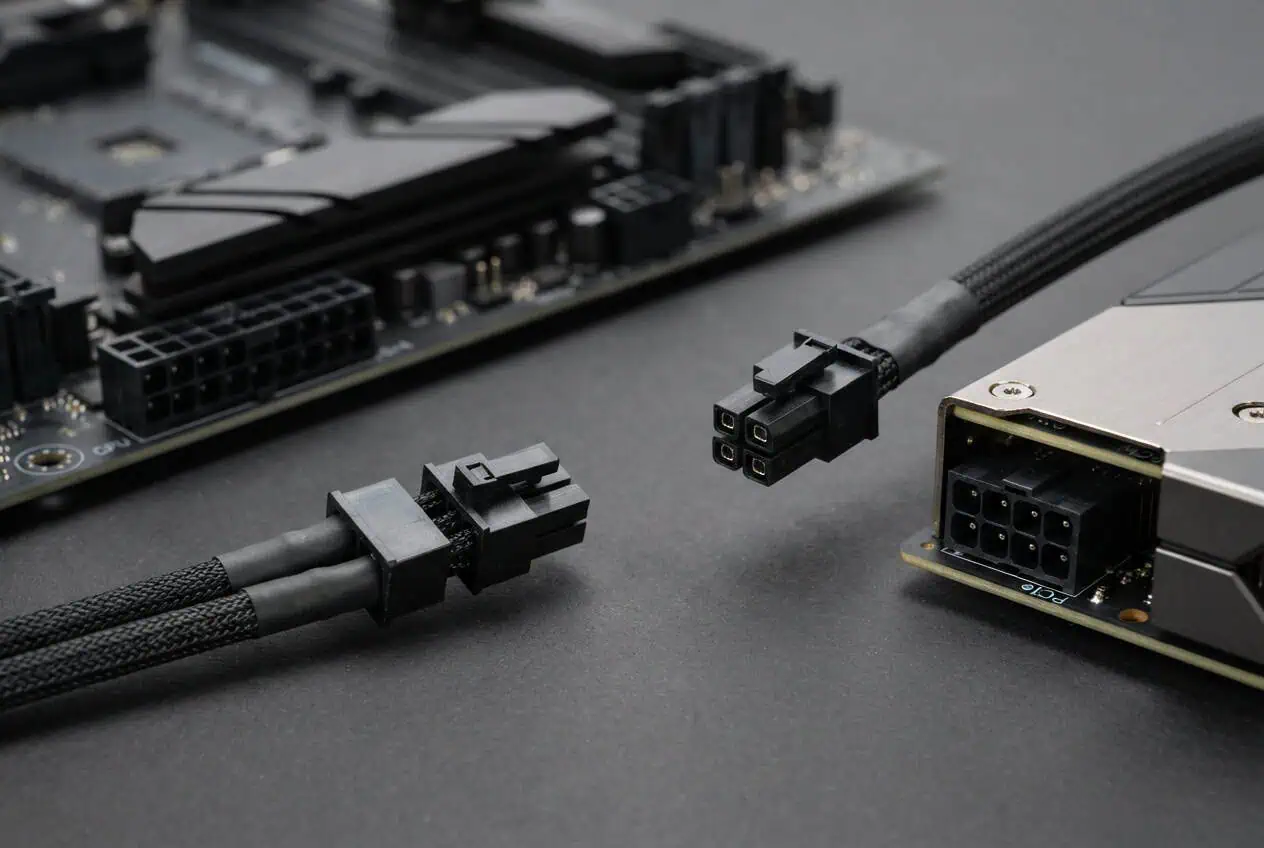
Use the correct cable for the correct PC component. A CPU/EPS cable connects the PSU to the motherboard CPU power socket, while a PCIe/GPU cable connects the PSU to a compatible graphics card.
The confusion starts because both cables can look like 8-pin connectors. A 4+4 CPU cable and a 6+2 PCIe cable are different, even when they look similar. Knowing the connector type, label, and pin layout helps you choose the right cable before connecting your PC.
CPU and GPU power cables are different and should not be swapped.
- CPU/EPS cable: Connects the PSU to the motherboard CPU power socket.
- PCIe/VGA cable: Connects the PSU to a compatible GPU power socket.
- 4+4 connector: Commonly used for CPU power.
- 6+2 connector: Commonly used for GPU power.
- 12V-2×6: Used by some newer graphics cards.
CPU vs GPU Power Cable: The Main Difference
The main difference is where each cable connects and how its pins are arranged. A CPU/EPS cable is made for the motherboard CPU power socket, while a PCIe/GPU cable is made for a graphics card.
Both cable types can carry 12V power, but their pin assignments and connector designs are different. This means an 8-pin CPU connector is not the same as an 8-pin GPU connector.
The basic rule is:
- CPU/EPS → motherboard CPU power socket
- PCIe/VGA → GPU power socket
- 12V-2×6 → compatible GPU with a 12V-2×6 socket
Do not choose a PSU cable based on the number of pins alone.
What Is a CPU/EPS Power Cable?
A CPU power cable is also called an EPS or EPS12V cable. It connects the PSU to the CPU power socket on the motherboard.
A common CPU connector is a 4+4-pin plug. The two four-pin sections can join to form an 8-pin CPU power connector.
You may see labels such as:
- CPU
- EPS
- EPS12V
The motherboard CPU power socket is usually near the top edge of the board, close to the CPU socket.
The CPU/EPS cable is made specifically for the motherboard CPU power socket.
What Is a GPU/PCIe Power Cable?
A GPU power cable is commonly called a PCIe cable. It connects the PSU to a graphics card that needs extra power.
A common PCIe connector is a 6+2-pin plug. The two-pin section can join the six-pin section to form an 8-pin PCIe connector for a compatible GPU.
You may see labels such as:
- PCIe
- PCI-E
- VGA
Some graphics cards have more than one power socket. The required cable setup depends on the GPU and PSU, so follow the connection requirements for your hardware.
CPU/EPS vs PCIe: Connector and Pin Differences

The biggest difference between CPU and GPU power cables is their connector design and pin layout.
A CPU/EPS cable commonly uses a 4+4-pin connector. A GPU/PCIe cable commonly uses a 6+2-pin connector.
Both can look like 8-pin connectors when assembled, but they are not the same cable.
4+4 CPU vs 6+2 GPU Connector
A 4+4 EPS connector has two four-pin sections. These sections join together to form an 8-pin CPU power connector.
A 6+2 PCIe connector has a six-pin section and a separate two-pin section. Together, they can form an 8-pin PCIe connector for a compatible graphics card.
So, an 8-pin-looking connector does not automatically mean it is an 8-pin GPU cable.
The connector type matters.
CPU 8-Pin vs GPU 8-Pin
An 8-pin CPU connector and an 8-pin GPU connector should not be treated as the same cable.
The contacts have different electrical roles and pin assignments. Their connector keying also helps match each cable to its intended socket.
This is why you should identify a cable as CPU/EPS or PCIe/VGA instead of simply calling it an 8-pin cable.
Why the Pin Layout Matters
A power connector does more than carry electricity. Each contact has a defined role.
If the pin layout does not match the socket, power can reach the wrong contacts. This is why CPU/EPS and PCIe cables should be used only with their intended connections.
What Does 6+2 Mean on a GPU Power Cable?
A 6+2 PCIe connector is a common GPU power connector. It has a six-pin section and a separate two-pin section.
When the two sections are joined, they form an 8-pin PCIe connector for a compatible graphics card.
This is different from a 4+4 CPU/EPS connector. A 4+4 cable is made for the motherboard CPU power socket, while a 6+2 cable is made for a compatible GPU PCIe power socket.
Do not assume that every 6-pin or 8-pin GPU socket can use any combination of pins. Follow the connector requirement listed for your graphics card.
How to Identify a CPU or GPU Power Cable

You can usually identify a PSU cable by checking its label, connector layout, and intended socket.
How to Identify a CPU/EPS Cable
Look for labels such as:
- CPU
- EPS
- EPS12V
A common CPU connector is 4+4-pin. The two four-pin sections join together for an 8-pin CPU power socket on the motherboard.
How to Identify a PCIe/GPU Cable
Look for labels such as:
- PCIe
- PCI-E
- VGA
A common GPU cable uses a 6+2-pin PCIe connector. The six-pin and two-pin sections can join together for a compatible 8-pin GPU socket.
Do not identify a cable by pin count alone. The label and connector type give you a better indication of its intended use.
Can You Use a CPU Power Cable for a GPU?
No. Use a PCIe/VGA cable for a graphics card that has a PCIe power socket.
A CPU/EPS cable has a different pin layout from a PCIe cable. Using the wrong cable can send voltage to the wrong contact.
Do not force a connector into a socket. If the plug does not match easily, stop and check the cable type.
Can You Use a PCIe Cable for CPU Power?
No. The motherboard CPU power socket needs the correct CPU/EPS cable.
A PCIe cable is made for a graphics card or another compatible PCIe device. Its pin layout is different from an EPS cable.
The fact that both connectors may have eight pins does not make them interchangeable.
For a CPU socket, use the EPS/CPU cable supplied with the compatible PSU.
What If Your GPU Has Two or Three Power Connectors?
Some graphics cards have two or more power sockets. The required number and cable setup depend on the specific GPU and PSU.
Check the GPU documentation for the required power connections. If the PSU provides multiple PCIe cables, use the connection method recommended for that hardware.
Do not assume that one cable setup works for every graphics card. Follow the requirements for your specific GPU and PSU.
What About 12V-2×6?
12V-2×6 is a newer PCIe auxiliary power connector used by some graphics cards.
It is different from both the CPU/EPS connector and the traditional 6+2 PCIe connector.
If your GPU has a 12V-2×6 socket, use the cable specified for that GPU and confirmed as compatible with your PSU.
Are CPU and GPU Cables Universal on a Modular PSU?

No. Modular PSU cables are not automatically interchangeable.
The PSU-side connector and its pinout can differ between PSU models. A cable that physically fits the PSU does not mean it has the correct wiring.
Use the modular cables supplied with your PSU, or a replacement cable confirmed for that exact PSU model.
This is separate from the component-side connection. The GPU still needs the correct PCIe/VGA cable, while the motherboard CPU socket needs the correct CPU/EPS cable.
For a deeper explanation, link this section to your dedicated modular PSU cable compatibility article.
What If a CPU Cable Seems to Fit a GPU?
Do not use a CPU/EPS cable on a GPU just because the connector seems to fit.
Check the cable label and connector type first. CPU/EPS and PCIe/VGA cables have different pin assignments.
If you are unsure, check your PSU and GPU manuals before connecting the cable.
CPU vs GPU Power Cable: Which One Should You Use?
The choice is based on the connector type and device socket, not just the number of pins.
Use a CPU/EPS cable for the motherboard CPU power socket. Use a PCIe/VGA cable for a compatible GPU PCIe power socket. If your graphics card uses 12V-2×6, use the correct cable for that connector and your PSU.
With a modular PSU, always use cables confirmed for the exact PSU model.
Conclusion
CPU/EPS and PCIe/GPU cables may look similar, but they are made for different connections. Use the CPU/EPS cable for the motherboard CPU power socket and the PCIe/VGA cable for a compatible GPU socket. A 4+4 CPU connector is different from a 6+2 PCIe connector, even though both can look like 8-pin connectors. For a GPU with 12V-2×6, use the correct cable for that connector and your PSU.
FAQs
Can a GPU run without a power cable?
Some low-power GPUs can get enough power from the PCIe slot, while higher-power GPUs need an additional PSU connection.
Does every GPU use an 8-pin power connector?
No. GPUs can use 6-pin, 8-pin, 6+2-pin, 12V-2×6, or no extra connector at all, depending on the model.
Can a PSU power both a CPU and GPU at the same time?
Yes. A PSU can provide power to both components through their separate CPU/EPS and PCIe connections.
Do CPU and GPU power cables have the same wire size?
Not always. Cable construction can vary by PSU, cable design, and required current, so wire size alone should not be used to identify a cable.
Can an extension cable be used for CPU or GPU power?
Yes, if it is made for the correct CPU/EPS or PCIe connector and is rated for the required load. Use a quality extension that matches the connection you need.
Does a higher-wattage PSU need different CPU and GPU cables?
Not necessarily. Cable type depends on the connector and component, while PSU wattage determines how much total power the PSU can provide.