


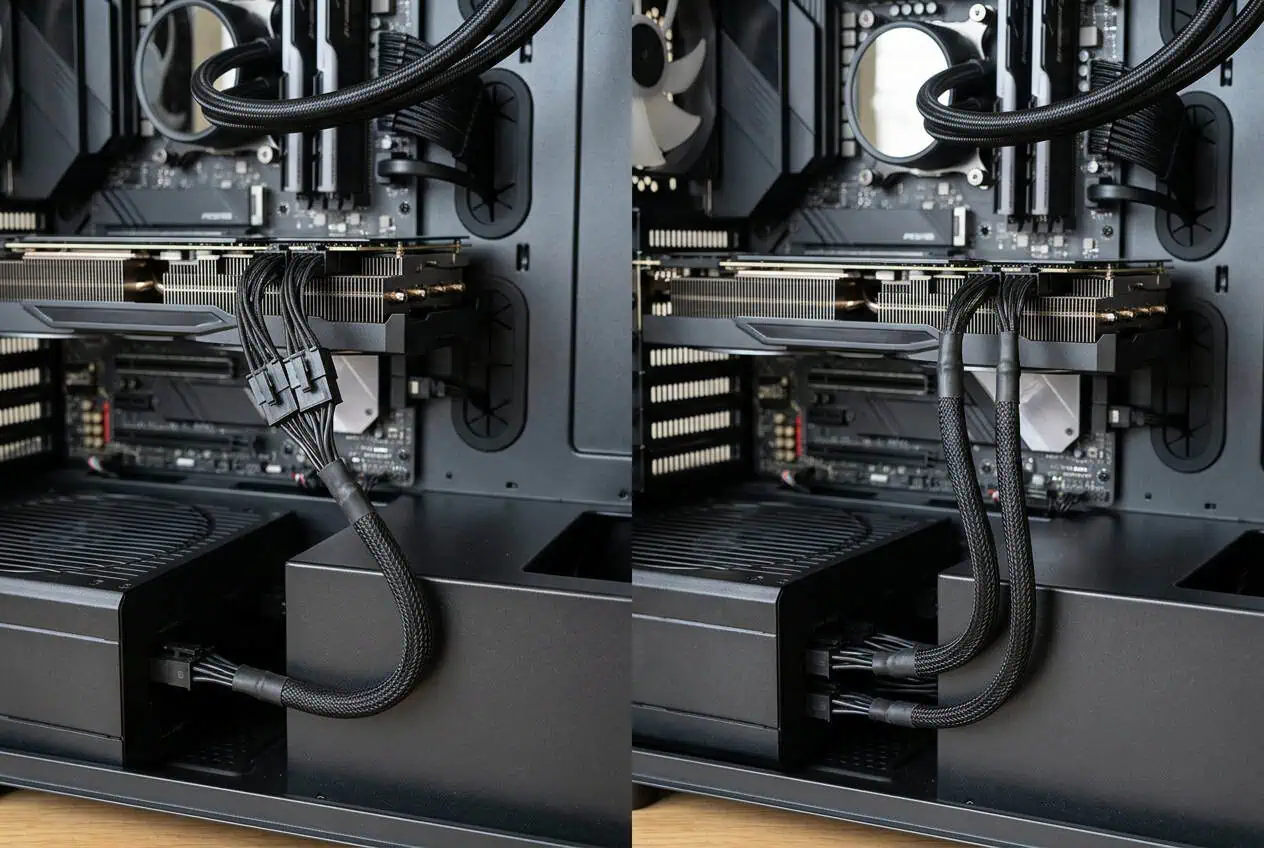
If your GPU has two or three 8-pin PCIe connectors, you may be unsure which cables to use. Your PSU may have a PCIe cable with two connectors, but you may also have separate cables.
For most multi-connector GPUs, separate PCIe cables are often the preferred choice when the PSU supports them. A daisy-chain cable can also be suitable in some setups, so check your GPU and PSU instructions before connecting the cables.
If your GPU has multiple 8-pin PCIe connectors, separate PCIe cables are often the preferred setup when your PSU supports them. A daisy-chain cable can also be suitable for some GPU and PSU combinations. Check the GPU and PSU instructions before connecting the cables.
Daisy Chain vs Separate PCIe Cables for GPU
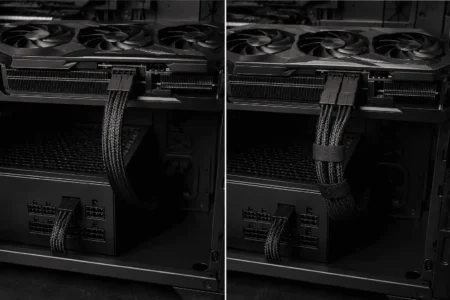
For a GPU with multiple 8-pin connectors, you have two common options. You can use one PCIe cable with multiple GPU-side connectors, or use a separate PCIe cable for each GPU connector.
A daisy-chain setup uses one cable run from the PSU. A separate-cable setup uses two or more cable runs.
The better choice depends on the GPU power requirement, PSU design, cable rating, and manufacturer guidance.
Do not use a simple rule such as every GPU must use a daisy chain or every GPU must use separate cables.
What Is a Daisy-Chain PCIe Cable?
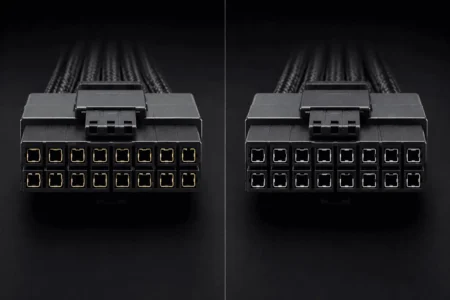
A daisy-chain PCIe cable has more than one connector on the GPU end. You may also hear it called a pigtail PCIe cable.
For example, one cable may leave the PSU and end in two 6+2-pin PCIe connectors. Both connectors are part of the same cable assembly.
A common setup looks like this:
PSU → one PCIe cable → connector 1 + connector 2 → GPU
This lets one PCIe cable connect to a GPU with two 8-pin power sockets.
What Does Pigtail Mean on a PCIe Cable?
Pigtail means the cable splits near the GPU end and provides another connector.
A pigtail PCIe cable may have two 6+2-pin connectors. The second connector does not mean you have two separate cables from the PSU.
This is why a pigtail cable is often called a daisy-chain cable in PC builds.
How Does a GPU Daisy Chain Work?

A GPU daisy chain uses one PCIe cable to connect more than one GPU power connector.
For a GPU with two 8-pin sockets, you can connect both sockets using the two connectors on one PCIe pigtail cable.
The setup looks like this:
PSU → PCIe cable → 8-pin connector → 8-pin connector → GPU
Both GPU-side connectors are part of the same cable assembly back to the PSU.
This matters because the cable section before the split carries the combined load from both connected GPU connectors. A separate-cable setup gives each connector its own cable run.
The amount of GPU power draw and the cable rating therefore matter when choosing between the two setups.
What Are Separate PCIe Cables for a GPU?
Separate PCIe cables use individual cable runs for the GPU’s power connectors.
For a GPU with two 8-pin sockets:
PSU → PCIe cable 1 → GPU connector 1
PSU → PCIe cable 2 → GPU connector 2
This setup may be preferred for higher-power GPUs when the PSU or GPU manufacturer recommends it.
PSU → PCIe cable 2 → GPU connector 2
Daisy Chain vs Separate PCIe Cables: Main Differences
The main difference is how the GPU power connectors are supplied.
A daisy chain uses one PCIe cable with multiple GPU-side connectors. Separate PCIe cables use an individual cable run for each GPU connector.
One Cable vs Separate Cable Runs
With a daisy chain, one PCIe cable runs from the PSU and splits into two or more GPU-side connectors.
With separate cables, each GPU connector uses its own cable run from the PSU.
For example:
Daisy chain
PSU → one PCIe cable → two GPU connectors
Separate cables
PSU → PCIe cable 1 → GPU connector 1
PSU → PCIe cable 2 → GPU connector 2
Why the Shared Cable Matters
The cable section before the pigtail split carries the combined load from the connected GPU connectors.
Separate PCIe cables divide the connection across separate cable runs.
This is why GPU power draw and cable rating matter. A higher-power GPU can place more load on a shared cable run.
Some PSU makers give specific guidance for this. Corsair, for example, does not recommend using one split PCIe cable for a two-connector graphics card that consumes more than 288W. This is a Corsair-specific guideline, not a universal 288W rule for every PSU.
Cable Count
A daisy chain uses fewer cable runs.
Separate PCIe cables use more cable runs, but they may be the preferred setup when the PSU or GPU manufacturer recommends them.
Cable appearance should not decide the setup. Your GPU and PSU requirements should.
Is Daisy Chaining PCIe Cables Bad for a GPU?
No. A PCIe daisy-chain cable is not automatically bad for a GPU.
The problem comes from treating every GPU and PSU as if they have the same power needs.
A GPU with two 8-pin connectors does not always have the same power requirement as another GPU with two 8-pin connectors. PSU designs and cable ratings can also differ.
This is why the blanket rule of never use a daisy chain is too broad.
A better approach is to check the GPU requirements and the PSU instructions first. If the manufacturer supports the daisy-chain setup, it may be suitable.
If the PSU maker recommends separate PCIe cables for your GPU, use separate cables.
Should You Use Two Separate PCIe Cables for Your GPU?
If your GPU has two 8-pin connectors, check the PSU and GPU instructions before choosing the cable setup.
If separate PCIe cables are supported and recommended, use one cable for each GPU connector:
PSU → PCIe cable 1 → GPU connector 1
PSU → PCIe cable 2 → GPU connector 2
This gives each connector its own cable run instead of using both connectors on one pigtail cable.
For a higher-power GPU, separate cables may be preferred because the load is spread across two cable runs.
However, do not assume every two-connector GPU requires separate cables. Some GPU and PSU combinations may support a daisy-chain setup.
One PCIe Cable With Two Connectors
A pigtail PCIe cable can connect both GPU sockets:
PSU → one PCIe cable → two GPU connectors
This may be supported for some GPU and PSU combinations.
The two connectors are part of the same cable assembly. They are not two separate cable runs from the PSU.
Two Separate PCIe Cables
With separate cables, each GPU connector has its own cable run:
PSU → cable 1 → GPU connector 1
PSU → cable 2 → GPU connector 2
If your PSU and GPU support this setup and recommend it, this is the configuration to use.
What About a GPU With Three 8-Pin Connectors?

A GPU with three 8-pin connectors needs closer attention to the cable setup.
Your PSU may have three separate PCIe cables, or it may have cables with multiple GPU-side connectors.
If the PSU supports three separate PCIe cables and the manufacturer recommends them, use one cable for each GPU connector.
PSU → cable 1 → GPU connector 1
PSU → cable 2 → GPU connector 2
PSU → cable 3 → GPU connector 3
Do not assume that a pigtail cable can replace a separate cable just because the connector fits.
Check the GPU and PSU instructions for the supported setup, especially with a higher-power GPU.
Can You Use a Daisy-Chain PCIe Cable With a GPU Adapter?
If your GPU uses a power adapter with two, three, or more 8-pin PCIe inputs, do not assume that one pigtail cable can supply multiple adapter inputs.
Check the GPU manufacturer’s instructions for the required number of PCIe cables. Some high-power GPU adapters require separate PCIe cables for their inputs.
If the instructions call for three separate PCIe cables, do not replace them with one daisy-chain cable just because the connectors fit.
The adapter’s required cable setup is part of the GPU’s power connection. Follow the instructions for your specific GPU and PSU.
Why Do PCIe Cables Have Two GPU Connectors?
A PCIe cable may have two GPU-side connectors because different graphics cards need different power setups.
A pigtail gives the PSU flexibility to support GPUs with one or more compatible connectors without requiring a separate cable for every connector.
However, two connectors on one cable do not mean they are two independent cable runs.
Whether you should use both depends on the GPU, PSU, cable rating, and manufacturer’s instructions.
Common Daisy-Chain PCIe Cable Mistakes
Assuming Every GPU Can Use a Daisy Chain
GPU power requirements vary. A setup that works for one graphics card may not be the recommended setup for another.
Assuming Every GPU Needs Separate Cables
The opposite rule is also too broad. Some GPU and PSU combinations may support a daisy-chain cable.
Treating a Pigtail as Two Separate Cables
Two connectors at the GPU end do not mean you have two separate PSU cable runs.
Both connectors are part of the same cable assembly.
Ignoring PSU or GPU Instructions
Check the manuals before choosing a cable setup.
The manufacturer may specify whether to use separate PCIe cables or a supported pigtail configuration.
Using a Daisy Chain Because the Connectors Fit
A connector fitting into the GPU does not prove that the cable setup is correct.
The cable rating and power requirements must also match the hardware.
How to Choose Between a Daisy Chain and Separate PCIe Cables
Start with your GPU.
Check how many PCIe power connectors it has and what cable setup the GPU manufacturer recommends.
Next, check your PSU manual. Look at the available PCIe outputs and the supported cable configuration.
Use separate PCIe cables if the PSU or GPU manufacturer recommends them.
Use a daisy-chain cable only when the GPU and PSU support that configuration.
Do not choose based on connector count alone. The correct setup depends on the GPU power requirement, PSU design, cable rating, and manufacturer instructions.
- Use separate PCIe cables when your PSU or GPU manufacturer recommends them.
- Use a daisy-chain cable when the GPU and PSU support that configuration.
- For a higher-power GPU: pay closer attention to the PSU manufacturer’s cable guidance.
- Do not decide by connector count alone. Check the GPU, PSU, and cable requirements.
CONCLUSION
For GPUs with multiple 8-pin connectors, separate PCIe cables are often the preferred choice when the PSU supports them. A daisy-chain cable can also be suitable for some GPU and PSU combinations. Check the GPU power requirements and PSU instructions before connecting the cables. If separate cables are recommended, use them. If a daisy-chain setup is supported, follow the manufacturer’s instructions for that setup.
FAQs
Can I use one PCIe cable for two 8-pin GPU connectors?
It depends on the GPU and PSU. Check the manufacturer’s cable guidance before using both connectors on one pigtail cable.
Does a daisy-chain PCIe cable reduce GPU performance?
No. The cable setup does not directly reduce GPU performance when the connection is properly supported and provides the required power.
Can I mix PCIe cables from different PSU brands?
No. Modular PSU cables are not universal. Use cables approved for your exact PSU model.
Does a longer PCIe cable affect GPU power delivery?
Cable length can affect electrical resistance, but a properly rated cable of a suitable length should work as specified by the manufacturer.
Can I add a PCIe cable splitter to get more GPU connectors?
Avoid adding an unapproved splitter. Use the PCIe cables and adapters specified by your GPU and PSU manufacturer.
Do all modular PSUs include separate PCIe cables?
No. Cable bundles vary by PSU model. Check the included cables and the PSU specifications before connecting your GPU.