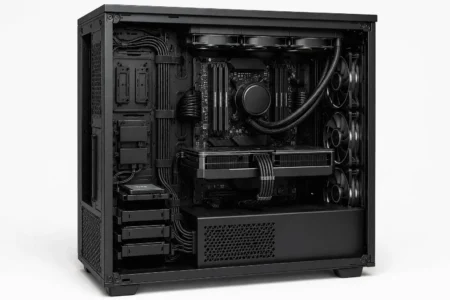



If your PC runs hotter than expected, cable management may be one of the first things you wonder about. Many PC builders spend money on better fans or CPU coolers but overlook messy cables blocking the airflow path. This often raises an important question: does cable management improve airflow, or is it simply a way to make a build look cleaner?
The answer depends on your setup. In compact cases or systems with heavy cable clutter, organized cables can help air move more freely and support better cooling. In larger airflow-focused cases, the difference is usually smaller. This guide explains how cable management affects airflow, when it matters most, and the simple steps you can take to improve cooling performance.
Does Cable Management Improve Airflow?
Yes, cable management can improve airflow by removing obstacles that block air movement inside a PC case, server rack, or cabinet. The biggest benefits occur when cables obstruct intake fans, exhaust fans, or GPU cooling areas.
In modern airflow-focused cases, the difference may be small. However, in compact or cluttered systems, proper cable routing can improve cooling efficiency and reduce heat buildup.
Understanding Airflow and Cooling
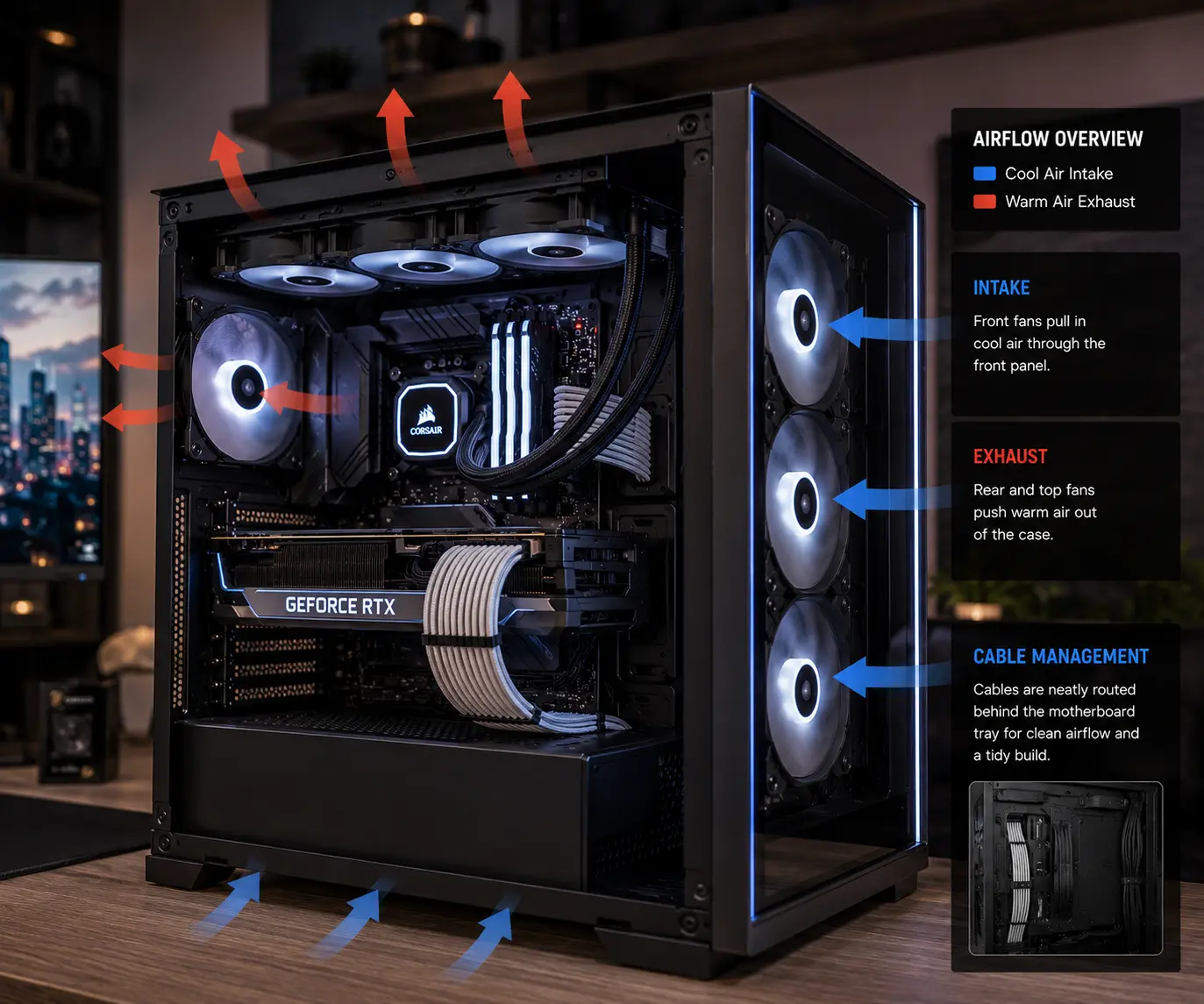
Airflow is the movement of air through a computer case. The goal is simple. Cool air enters the case, absorbs heat from components, and warm air leaves the system.
Most PCs follow a basic airflow path:
- Intake fans pull cool air into the case.
- Air moves across the CPU, GPU, motherboard, and storage drives.
- Exhaust fans remove warm air.
When this airflow path stays clear, cooling systems work more efficiently. Better airflow helps maintain lower temperatures and reduces the chance of thermal throttling during demanding tasks.
How Cable Management and Airflow Management Work Together
Cable management and airflow management are closely connected.
Cable management focuses on organizing and routing cables. Airflow management focuses on moving air efficiently through the system.
When cables are organized, air can travel more freely from intake fans to exhaust fans. When cables are messy, they can block airflow paths and reduce cooling performance.
This is why many modern PC cases include cable pathways, routing channels, and dedicated space behind the motherboard tray.
How Cables Affect Airflow
Cables can affect airflow in several ways.
Physical Airflow Blockage
Large cable bundles can block airflow channels. This prevents cool air from reaching important components.
Restricted Ventilation Zones
When cables are crowded into one area, airflow may struggle to reach nearby hardware. This can create localized hot spots.
Heat Accumulation
Poor cable routing can trap warm air around the CPU, GPU, storage drives, and motherboard components.
How Cables Disrupt Airflow
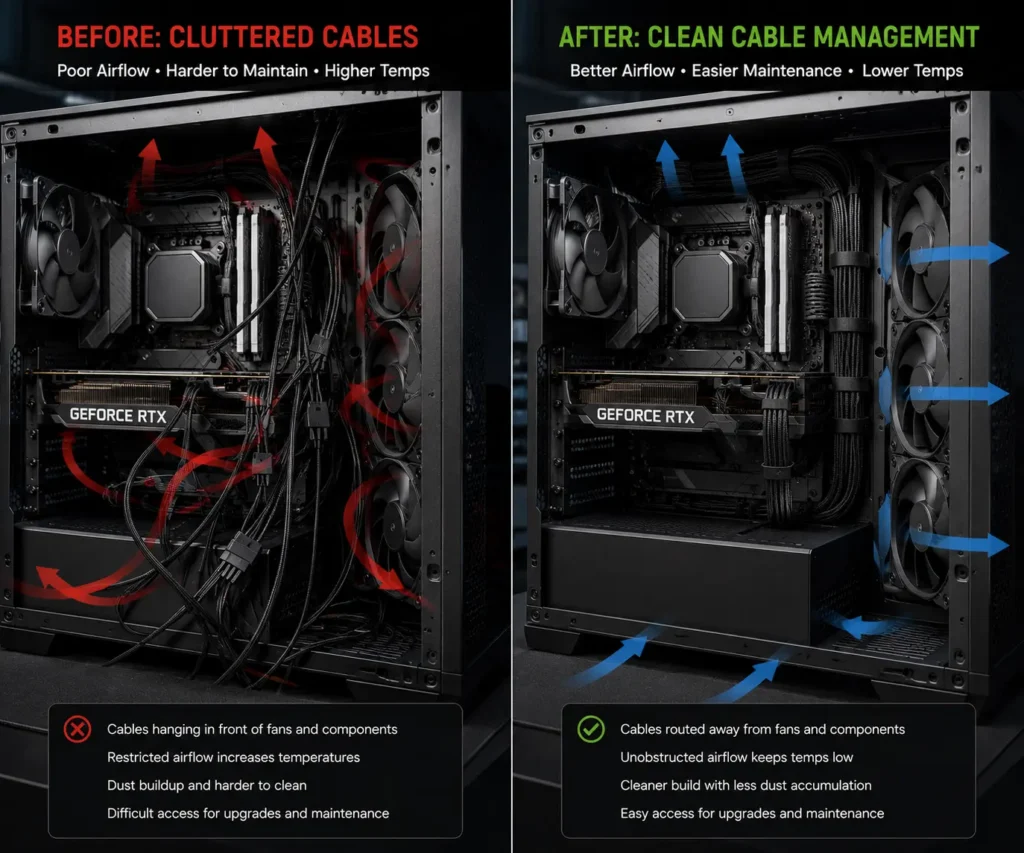
Many people think only large cable bundles affect airflow. In reality, even a few poorly placed cables can reduce cooling efficiency.
When cables hang in front of intake fans or block ventilation areas, they disrupt the smooth movement of air. This creates turbulence inside the case. Instead of flowing directly across components, air changes direction and loses some of its cooling effectiveness.
The more restricted the airflow path becomes, the harder fans must work to move air through the system.
Does Cable Management Improve PC Cooling?
Yes. Cable management can improve PC cooling by helping air move more efficiently through the case.
CPU Cooling
The CPU generates heat during gaming, streaming, and productivity tasks. Better airflow helps CPU coolers receive a steady supply of fresh air.
GPU Cooling
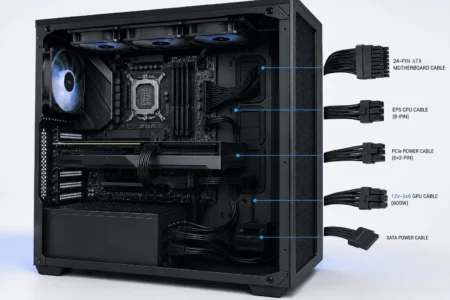
Modern graphics cards depend heavily on airflow. If PCIe power cables hang in front of GPU fans, airflow can become restricted. Proper cable routing helps the GPU pull in cool air more effectively.
Motherboard Cooling
Motherboard components such as voltage regulator modules (VRMs) also benefit from proper airflow. Better air circulation helps prevent excess heat buildup.
Storage Drive Cooling
Solid-state drives and hard drives can become warm during heavy use. Good airflow helps maintain safer operating temperatures.
Air Pressure and Cable Management
PC cooling systems often use positive pressure, negative pressure, or balanced airflow.
- Positive pressure means more air enters than exits.
- Negative pressure means more air exits than enters.
- Balanced airflow keeps intake and exhaust levels similar.
No matter which setup you use, cables should not block intake fans or exhaust fans. Poor cable routing can reduce the effectiveness of your airflow design and limit overall cooling performance.
How Much Temperature Difference Can Cable Management Make?
The temperature difference depends on the design of the system and how much airflow is being restricted.
In many modern PC cases with good airflow, cable management may only provide a small improvement. In compact systems or builds with significant cable clutter, the impact can be more noticeable.
The biggest gains usually occur when cables block intake fans, GPU fans, exhaust fans, or important airflow channels. In these situations, removing airflow restrictions can help cooling systems operate more efficiently.
When Cable Management Matters Most
Cable management is helpful in almost every setup, but some systems benefit more than others.
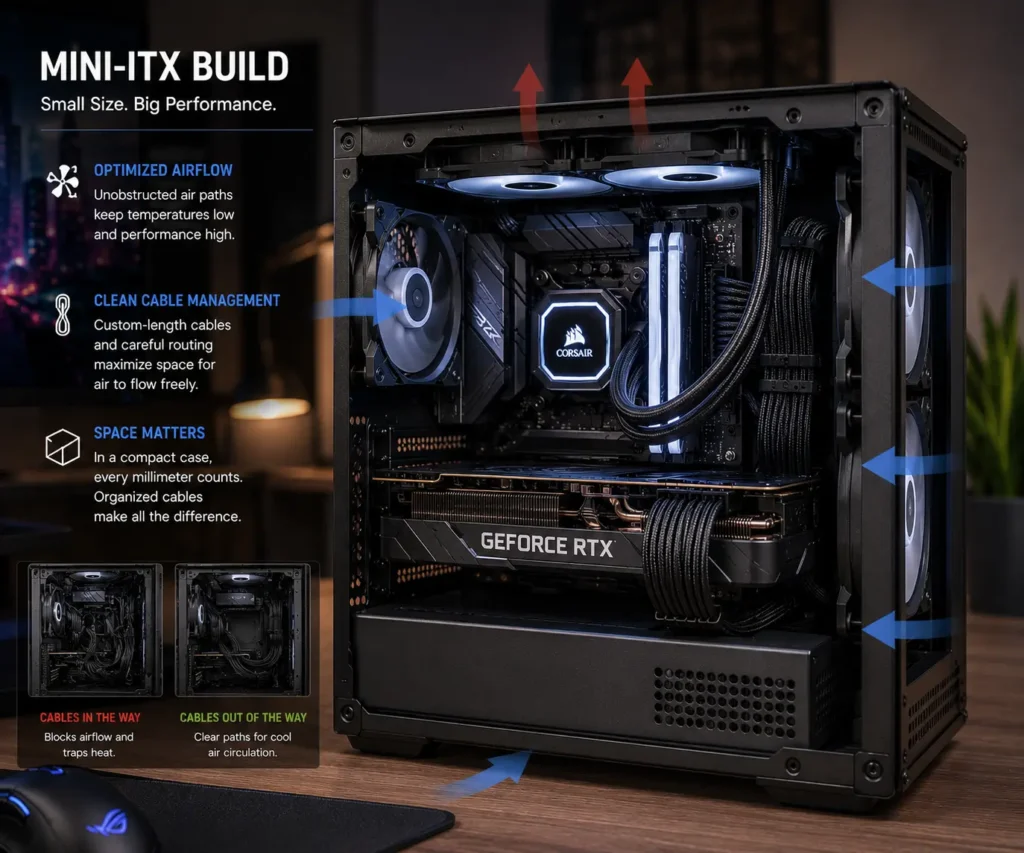
Small Form Factor PCs
Small form factor PCs have very limited space. Cables can easily block airflow channels and reduce cooling performance.
Because components are packed closely together, even a small airflow restriction can affect temperatures.
High-End Gaming PCs
Gaming PCs often contain powerful CPUs and GPUs that generate significant heat.
Proper cable routing helps maintain a clear airflow path and allows cooling systems to work more efficiently during long gaming sessions.
Workstations
Workstations used for video editing, 3D rendering, and other demanding tasks often run at high loads for extended periods.
Good airflow helps maintain stable temperatures and reliable performance.
Server Racks
Servers produce a large amount of heat. Organized cabling helps maintain airflow between equipment and cooling systems.
Network Cabinets
Network switches, routers, and other equipment also benefit from proper cable management. Keeping cables organized helps reduce airflow restrictions and supports cooling efficiency.
When Does Cable Management Help the Most?
The greatest improvements occur when cables interfere with the natural airflow path between intake and exhaust fans.
When Cable Management Has Little Effect
While cable management is helpful, there are situations where the impact on airflow is smaller.
Large Mesh Cases
Many modern PC cases are designed with excellent ventilation and multiple airflow paths. In these systems, cable management may have a smaller effect on temperatures.
Minimal Hardware Builds
Systems with fewer components usually generate less heat. As a result, airflow restrictions become less noticeable.
Open-Air Test Benches
Open-air test benches allow unrestricted air movement around components. Cable placement has very little impact on airflow in these setups.
Already Optimized Systems
If a PC already has excellent airflow, quality fans, and proper cooling hardware, cable management may provide only a minor improvement.
Common Cable Routing Mistakes That Hurt Airflow
Poor cable routing can reduce cooling efficiency and create unnecessary airflow restrictions.
Blocking Front Intake Fans
Front intake fans need a clear path to bring cool air into the case. Avoid routing cables directly in front of these fans.
Hanging Cables Near GPU Fans
Loose cables near graphics cards can interfere with airflow and reduce GPU cooling performance.
Overcrowding Cable Chambers
Stuffing too many cables into a small area can create airflow restrictions and make future maintenance more difficult.
Ignoring Fan Clearance
Cables should never touch fan blades or sit too close to moving fans. This can affect airflow and create unwanted noise.
Leaving Excess PSU Cables Inside the Case
Non-modular power supplies often leave unused cables inside the system. These extra cables can create clutter and block airflow.
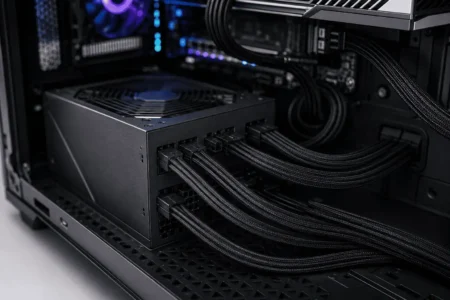
A modular PSU can help reduce unnecessary cable clutter and simplify cable routing.
Best Cable Management Practices for Better Airflow
Good cable management does not have to be complicated.
Following a few simple practices can help keep airflow paths clear and improve system organization.
Route Cables Behind the Motherboard Tray
Most modern PC cases include space behind the motherboard tray for cable routing.
This keeps cables away from the main airflow path.
Use Cable Sleeves
Cable sleeves combine multiple cables into a single organized bundle. They improve cable organization and create a cleaner appearance.
Secure Cables with Velcro Straps
Velcro ties make it easy to organize cables while allowing future adjustments.
They are often preferred over zip ties because they can be reused.
Use Zip Ties for Permanent Cable Routing
Zip ties provide a secure way to hold cables in place. They are useful when the cable layout is unlikely to change.
Keep Air Channels Open
Maintain a clear path between intake fans and exhaust fans.
Avoid routing cables across major airflow channels.
Use Cable Combs for Custom Sleeved Cables
Cable combs help keep individual wires aligned and organized. They improve cable presentation and help prevent cables from spreading into airflow paths.
Does Cable Management Reduce Dust Buildup?
Cable management does not stop dust from entering a PC. However, it can help reduce dust-related problems.
Organized cables allow air to move more smoothly through the system. This reduces areas where dust can collect and makes airflow more predictable.
Cable management also makes cleaning easier because components are easier to access.
While proper cable routing will not eliminate dust, it can simplify maintenance and help keep the system cleaner over time.
Is Cable Management Worth It for Cooling Alone?
For most users, cable management should not be viewed as a cooling upgrade by itself.
Better case fans, improved airflow-focused PC cases, and high-quality CPU coolers usually have a larger effect on temperatures.
However, cable management supports all of these cooling upgrades. A clear airflow path allows cooling hardware to perform at its best.
It also improves maintenance, simplifies upgrades, reduces cable clutter, and creates a cleaner-looking PC build.
Can Cables Block Airflow in a PC?
Yes, cables can block airflow when they sit in front of intake fans, GPU fans, or major ventilation areas.
A single cable may have little effect. However, multiple cables bundled across airflow channels can restrict air circulation.
This becomes more important in gaming PCs, compact builds, and small form factor systems where space is limited.
For the best cooling performance, cables should be routed away from major airflow paths whenever possible.
Cable Management in Data Centers and Server Rooms

Cable management is important in large IT environments as well as personal computers.
Data centers, server rooms, and network cabinets contain large amounts of equipment that generate heat around the clock. In these environments, airflow management and cable management work together to support cooling efficiency and system reliability.
Poor cable organization can block ventilation paths, restrict airflow, and make thermal management more difficult. As cable density increases, airflow restrictions become more likely.
To prevent these issues, many facilities use structured cabling systems, cable pathways, cable trays, and rack cable management solutions.
These methods help:
- Maintain clear airflow paths
- Improve cooling efficiency
- Reduce heat buildup
- Simplify maintenance
- Support easier troubleshooting
Proper rack cable management also helps cooling systems move air through server racks more effectively. This reduces the risk of hot spots and improves overall system efficiency.
Although data centers operate on a much larger scale than home PCs, the same principle applies. Air moves more efficiently when cables are organized and kept out of important airflow channels.
Cable Management Benefits Beyond Airflow
Many people focus on airflow when discussing cable management. However, organized cables provide several additional benefits.
Easier Maintenance
Neatly routed cables make it easier to clean a PC, replace components, and perform upgrades.
When cables are organized, you can quickly identify connections without tracing wires through a cluttered case.
Improved System Appearance
A clean cable layout creates a more professional-looking setup.
This is especially important for gaming PCs with tempered glass side panels where internal components remain visible.
Better Accessibility
Organized cables provide easier access to storage drives, expansion cards, fans, and other hardware.
This can save time during future upgrades or repairs.
Reduced Risk of Cable Damage
Loose cables may become pinched, bent, or caught in moving fans.
Proper cable routing helps protect cables from unnecessary wear and tear.
Better Long-Term Organization
Using cable sleeves, Velcro ties, zip ties, cable combs, and routing channels creates a cleaner system that remains easier to manage over time.
Common Tools Used for Cable Management
Several accessories can help create a cleaner and more organized cable layout.
Cable Sleeves
Cable sleeves bundle multiple cables together and improve cable organization.
Velcro Ties
Velcro ties allow cables to be adjusted and reused when upgrades are needed.
Zip Ties
Zip ties provide a secure solution for permanent cable routing.
Cable Combs
Help align custom sleeved cables and improve cable presentation.
Cable Clips
This help guide cables along specific pathways and prevent unnecessary movement.
Modular Power Supplies
A modular PSU allows users to install only the cables they need. This reduces cable clutter and simplifies airflow management.
Conclusion
Cable management can improve airflow, but it works best as part of an overall cooling strategy rather than a standalone fix. Keeping cables away from intake and exhaust fans helps air move more freely, supports cooling performance, and makes future maintenance easier. Whether you are building a gaming PC or upgrading an existing system, a clear airflow path and organized cables are simple improvements that can help your hardware run more efficiently. If you’re ready to put these cable management practices into action, it’s also worth exploring PC component cable management for practical routing tips for every major PC component.
FAQs
Can cable management make a PC quieter?
Yes. Better airflow can help fans maintain lower speeds in some situations, which may reduce overall fan noise.
How often should you reorganize PC cables?
Most users only need to check cable routing when cleaning the PC or installing new hardware.
Can RGB cables affect airflow differently from regular cables?
No. RGB cables affect airflow the same way as other cables. Their placement matters more than the cable type.
Should fan cables be hidden behind the motherboard tray?
Yes, whenever possible. Routing fan cables behind the motherboard tray helps keep the main airflow path clear.
Is cable management harder with a non-modular power supply?
Yes. Non-modular power supplies include unused cables that require extra planning to keep them out of airflow paths.