


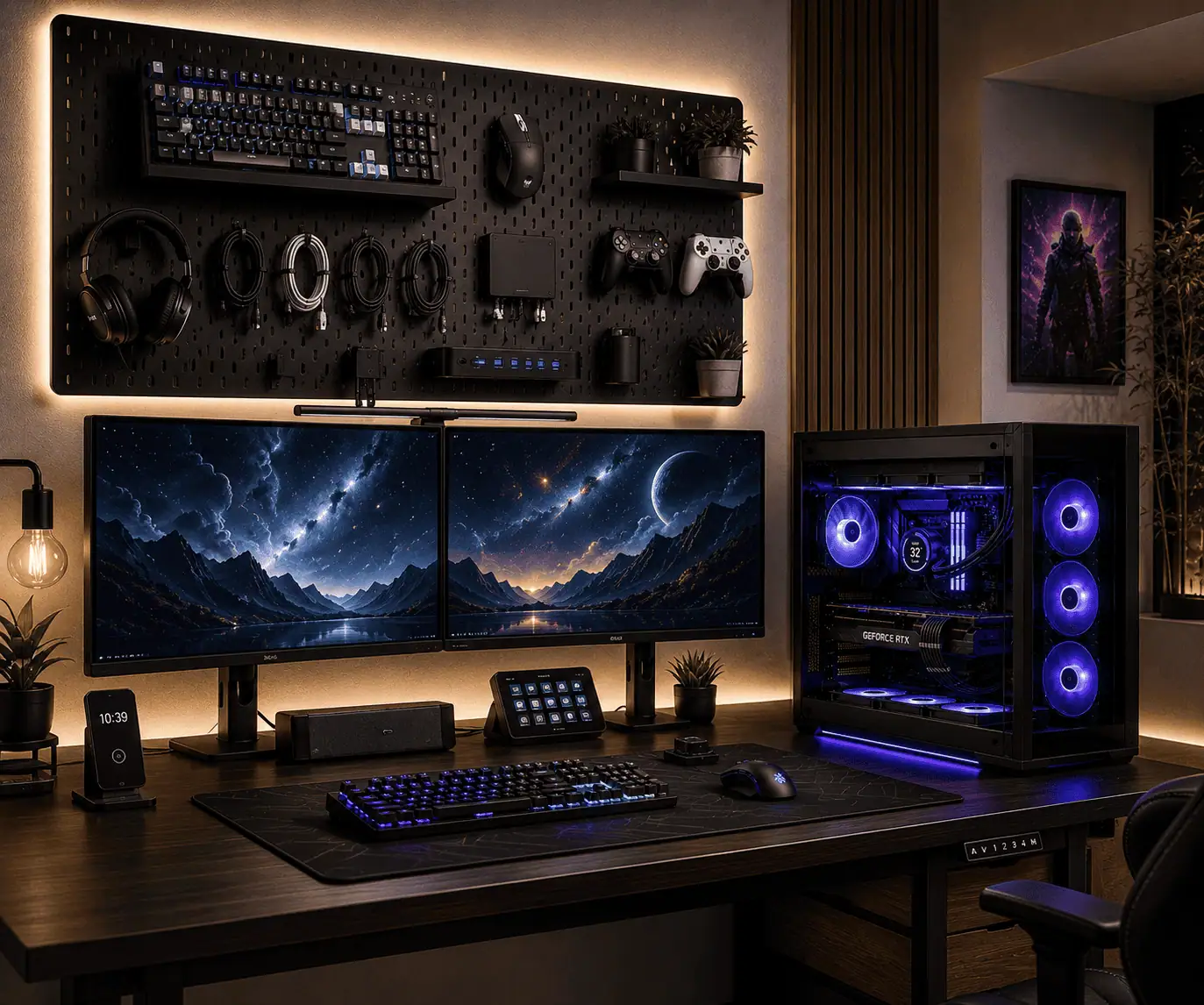
A cluttered desk can make even the best PC setup feel cramped. Headsets, controllers, keyboards, charging cables, USB hubs, webcams, and other accessories quickly take over valuable desk space, making it harder to stay organized and productive.
A pegboard turns unused wall space into practical storage for your PC peripherals. With the right hooks, shelves, baskets, and cable management accessories, you can keep everyday items within reach, reduce cable clutter, and create a cleaner setup for gaming, work, streaming, or everyday computer use.
What Is a Pegboard for PC Peripheral Organization?
A pegboard is a wall-mounted organizer that uses hooks, shelves, baskets, and holders to store accessories. While pegboards are often used in workshops, they have become popular in gaming setups and home offices because they provide flexible storage without taking up desk space.
For PC users, a pegboard can hold:
- Gaming headsets
- Mechanical keyboards
- Controllers
- Webcams
- USB hubs
- Charging cables
- External SSDs
- Microphones
The biggest advantage is flexibility. You can move hooks and shelves whenever your setup changes.
Using a pegboard is one part of effective desk cable management. Moving accessories off your desk makes cable routing easier and helps create a cleaner, more organized workspace.
Choosing the Right Pegboard for Your Setup
Not all pegboards are the same. Choosing the right one can make a big difference in how well your setup stays organized.
Pegboard Materials
Pegboards are commonly available in metal, plastic, and wood.
Metal pegboards are often the most durable option. They can support heavier accessories and are popular in gaming setups and home offices.
Plastic pegboards are lightweight and easy to install. They work well for smaller peripherals and accessories.
Wooden pegboards offer a more decorative look and can fit well in modern workspaces. However, they may not support as much weight as metal models.
Choosing the Right Size
The size of the pegboard should match your desk and available wall space.
Small pegboards work well for compact desks and basic accessory storage. Larger pegboards provide more room for multiple peripherals, charging stations, and cable management accessories.
Before buying, measure the wall space above or beside your desk to avoid overcrowding the area.
Consider Weight Capacity
Different pegboards support different amounts of weight.
If you plan to store keyboards, headsets, microphones, or other heavier accessories, check the manufacturer’s weight recommendations before installation.
Choosing a pegboard that supports your peripherals helps create a safer and more reliable setup.
Popular Pegboard Options
Many PC enthusiasts use wall-mounted organizers such as the IKEA SKADIS system because it offers a wide range of compatible hooks, shelves, baskets, and storage accessories.
The best pegboard is the one that fits your workspace, storage needs, and future upgrades.
Benefits of Using a Pegboard for PC Accessories
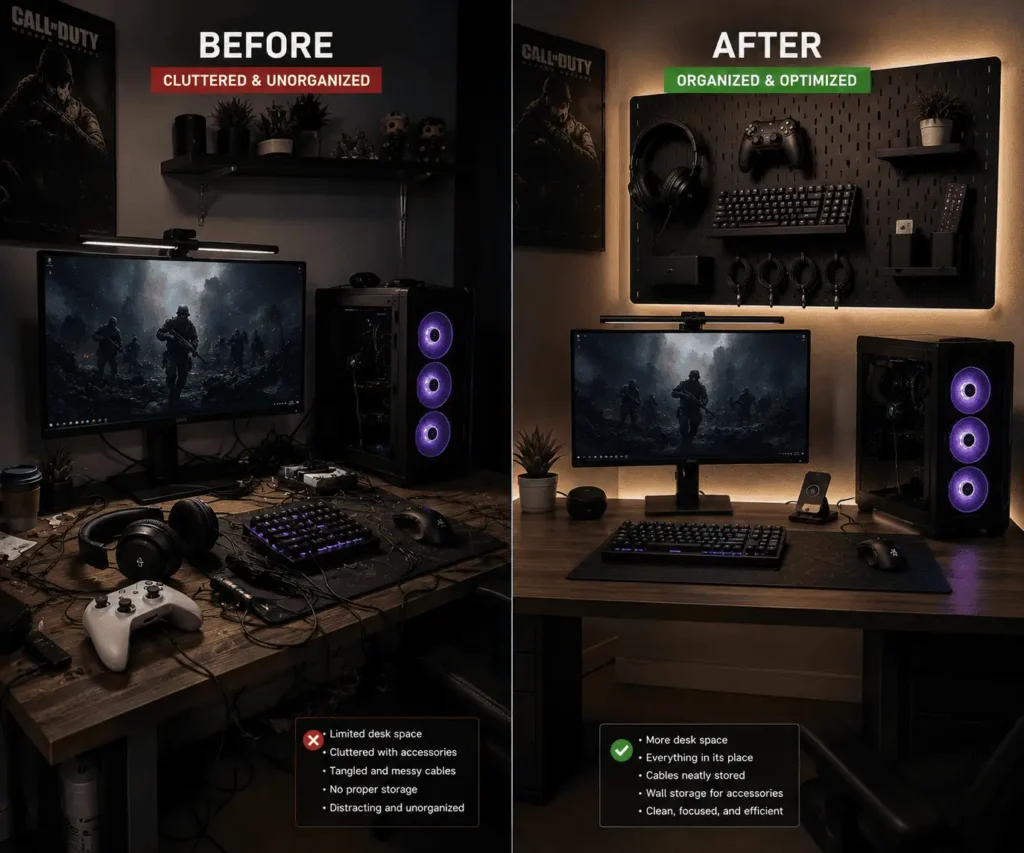
Creates More Desk Space
Many peripherals spend most of their time sitting unused on the desk. Moving them onto a pegboard frees up valuable workspace.
This is especially useful for small desks where every inch matters.
Why Pegboards Work Well for Small Gaming Setups
Many gamers use compact desks where space is limited. In these setups, even a few accessories can create noticeable clutter.
A pegboard helps move peripherals off the desk and onto the wall. This also leaves more room for keyboard and mouse cable routing, making the desktop easier to keep organized.
For users with apartment setups, dorm rooms, or compact battlestations, vertical storage is often one of the easiest ways to maximize available space without buying a larger desk.
Keeps Accessories Within Reach
A pegboard keeps important accessories visible and easy to access.
Instead of searching through drawers, you can quickly grab your headset, controller, or charging cable whenever you need it.
Reduces Cable Clutter
Charging cables and USB cables often become tangled on a desk.
A pegboard gives you a dedicated place to route and organize cables, helping your setup look cleaner and more professional.
Improves Workspace Appearance
An organized pegboard creates structure and visual balance. It’s also one of the easiest ways to create a minimalist desk setup without sacrificing easy access to your accessories.
Makes Cleaning Easier
With fewer items on the desk, wiping surfaces and removing dust becomes much easier.
Best PC Peripherals to Store on a Pegboard
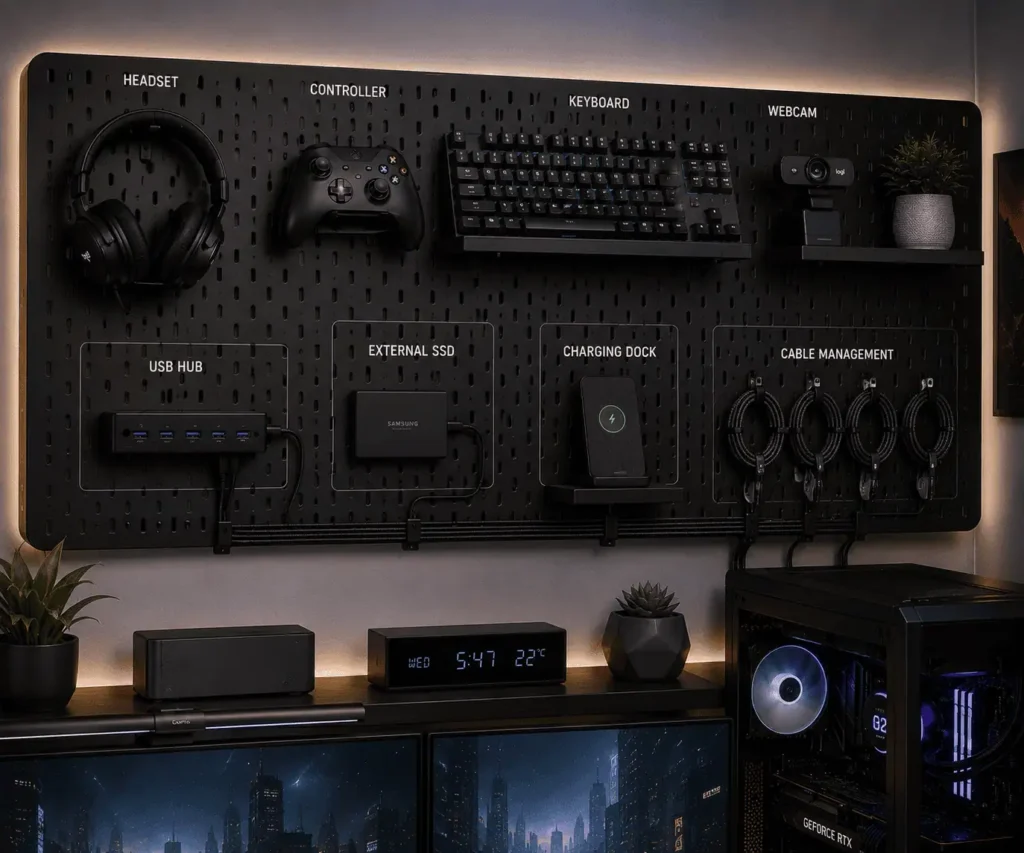
Not every accessory belongs on a pegboard. Some users also replace frequently used wired accessories with wireless alternatives to reduce desk clutter even further.
By moving these peripherals onto a pegboard, you can free up desk space while keeping everything within easy reach.
Gaming Headsets
Headsets are one of the easiest peripherals to organize.
A dedicated hook keeps them protected, easy to access, and off your workspace. It also prevents the headset from being placed on top of your keyboard or monitor when not in use.
Mechanical Keyboards
Many PC enthusiasts own more than one keyboard.
A pegboard provides a convenient place to store spare keyboards using shelves or strong hooks. This keeps them visible and protected while reducing desk clutter.
Gaming Controllers
Controllers often end up scattered around the desk.
A pegboard keeps them organized and ready for use. Dedicated controller holders can also make your setup look cleaner and more professional.
Webcams and Streaming Gear
Webcams, microphones, and streaming accessories can quickly crowd a workspace.
Small shelves and baskets provide a safe place to store these items when they are not being used.
If your setup also includes desktop speakers, hiding speaker wires can further reduce visible cable clutter around the desk.
Organizing Streaming Equipment on a Pegboard
Content creators and streamers often use more accessories than the average PC user. Microphones, webcams, audio interfaces, stream controllers, and charging cables can quickly take over a workspace.
A pegboard provides a dedicated storage area for these accessories when they are not being used. Small shelves can hold webcams and audio gear, while baskets can organize adapters and spare cables.
Keeping streaming equipment organized makes setup changes faster and helps maintain a cleaner workspace.
USB Hubs and Charging Devices
USB hubs and charging docks often become the center of cable clutter.
A pegboard shelf can create a dedicated area for these devices while helping keep cables organized.
External SSDs and Small Accessories
External drives, adapters, USB drives, memory cards, and card readers are easy to lose.
Storage baskets help keep these smaller accessories organized and easy to find whenever you need them.
Quick Reference: Best Peripherals to Store on a Pegboard
| Peripheral | Recommended Storage Method |
|---|---|
| Gaming Headset | Hook or Headphone Holder |
| Controller | Controller Holder or Hook |
| Mechanical Keyboard | Shelf |
| Webcam | Small Shelf |
| USB Hub | Shelf |
| External SSD | Basket or Shelf |
| Charging Cables | Cable Clips |
| Microphone Accessories | Basket |
| Adapters and USB Drives | Storage Basket |
Essential Pegboard Accessories for Better Organization
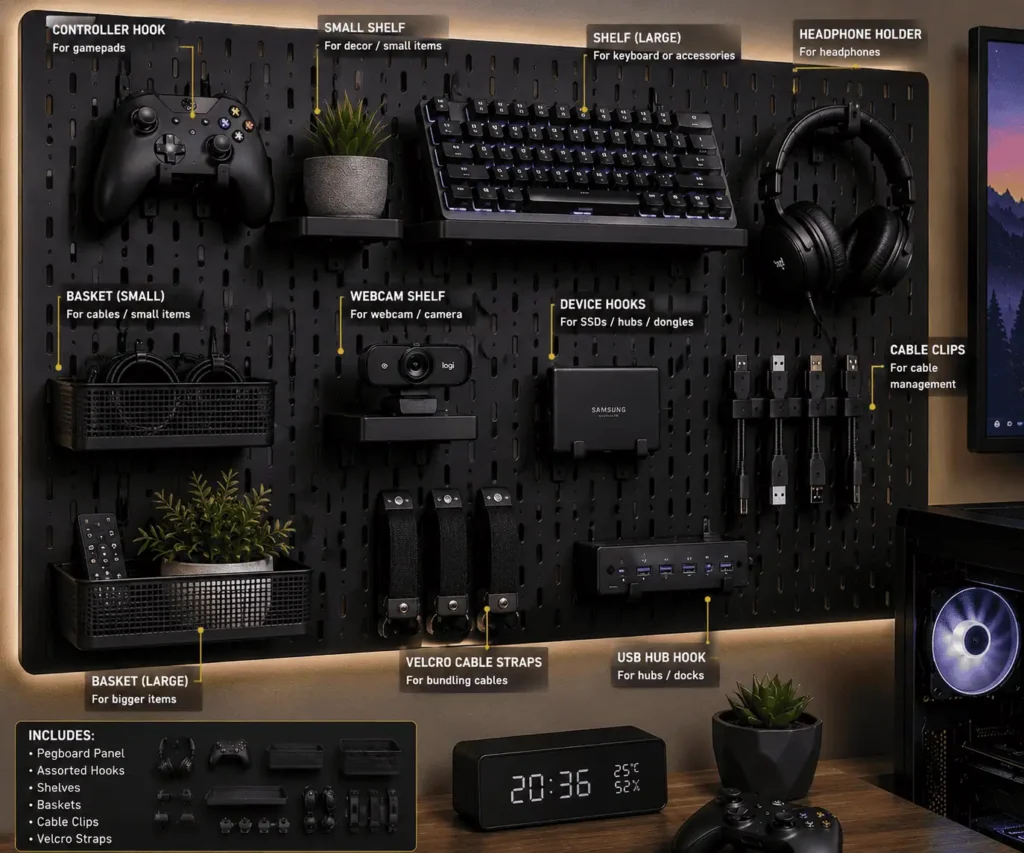
The right accessories can make a pegboard far more useful. A simple pegboard becomes a complete organization system when paired with practical storage solutions.
Hooks
Hooks work well for headsets, controllers, charging cables, and lightweight accessories.
Because hooks are easy to move, they allow you to adjust the layout whenever your setup changes.
Shelves
Shelves provide flat storage for accessories that cannot hang from hooks.
They work well for webcams, USB hubs, charging docks, small speakers, and external drives.
Storage Baskets
Storage baskets are ideal for small accessories that are easy to lose.
You can use them for:
- USB drives
- Adapters
- Spare cables
- Batteries
- Cleaning supplies
Keeping these items together helps reduce clutter and saves time.
Headphone Holders
Dedicated headphone holders offer better support than standard hooks.
They help protect headset padding while giving your headphones a permanent storage location.
Cable Clips
Cable clips guide charging cables and USB cables along the pegboard.
They help prevent tangles and keep wires organized.
Velcro Straps
Velcro straps are one of the easiest ways to manage excess cable length.
Unlike zip ties, they are reusable and easy to adjust whenever your setup changes.
Pegboard Accessories for Gaming Setups vs Work Setups
The accessories you store on a pegboard often depend on how you use your computer. A gaming setup usually has different storage needs than a work-focused setup.
The table below shows how pegboard organization can vary between the two.
| Gaming Setup | Work Setup |
|---|---|
| Gaming Headset | Conference Headset |
| Controller | Notebook |
| Charging Dock | Document Holder |
| RGB Accessories | Office Supplies |
| Gaming Mouse Accessories | Webcam |
| Stream Deck | External SSD |
| Microphone Accessories | USB Hub |
Storage Ideas for Hybrid Work and Gaming Setups
Many people use the same desk for work during the day and gaming at night.
A pegboard can help support both activities by creating dedicated storage zones. Work accessories such as notebooks, webcams, and USB hubs can occupy one section, while gaming peripherals such as controllers, headsets, and charging docks can occupy another.
This separation keeps the workspace organized and makes it easier to switch between productivity and entertainment.
Many people use their desks for both gaming and work. In that case, creating separate zones on the pegboard can help keep accessories organized while making it easier to switch between activities.
How to Organize PC Peripherals Efficiently
Installing a pegboard is only part of the process. A smart layout makes the system easier to use.
The goal is simple: keep frequently used accessories easy to reach while maintaining a clean and organized workspace.
Group Similar Accessories Together
Store related peripherals in the same area.
For example:
- Gaming Zone
- Work Zone
- Charging Zone
- Storage Zone
Grouping similar items makes accessories easier to find and creates a cleaner layout.
Keep Daily-Use Items at Eye Level
Your most-used accessories should always be easy to reach.
Headsets, controllers, webcams, and charging cables should be placed in the most accessible area of the pegboard.
This helps improve workflow and reduces the time spent searching for accessories.
Store Rarely Used Accessories Higher Up
Not every accessory needs prime storage space.
Backup cables, spare controllers, adapters, and cleaning supplies can be stored on upper shelves or in less accessible areas.
This keeps your main workspace focused on the items you use every day.
Leave Some Empty Space
One of the most common mistakes is trying to fill every section of the pegboard.
A little empty space improves visibility and makes the setup feel more organized.
It also leaves room for future upgrades.
Many PC users eventually add new accessories, and extra space makes those additions easier to manage.
Adjust the Layout as Your Setup Changes
Your setup will likely change over time.
You may buy a new headset, add another controller, upgrade your webcam, or purchase additional storage devices.
One of the biggest advantages of a pegboard is flexibility. Hooks, shelves, and baskets can be moved whenever your needs change.
A layout that evolves with your setup will remain useful for years.
Pegboard Layout Ideas for Different Desk Sizes
The best pegboard layout depends on your desk size and the number of peripherals you use. A layout that works on a large gaming desk may not be practical for a compact workstation.
Before mounting a pegboard, think about your available wall space and which accessories you need most often.
Small Desk Setup
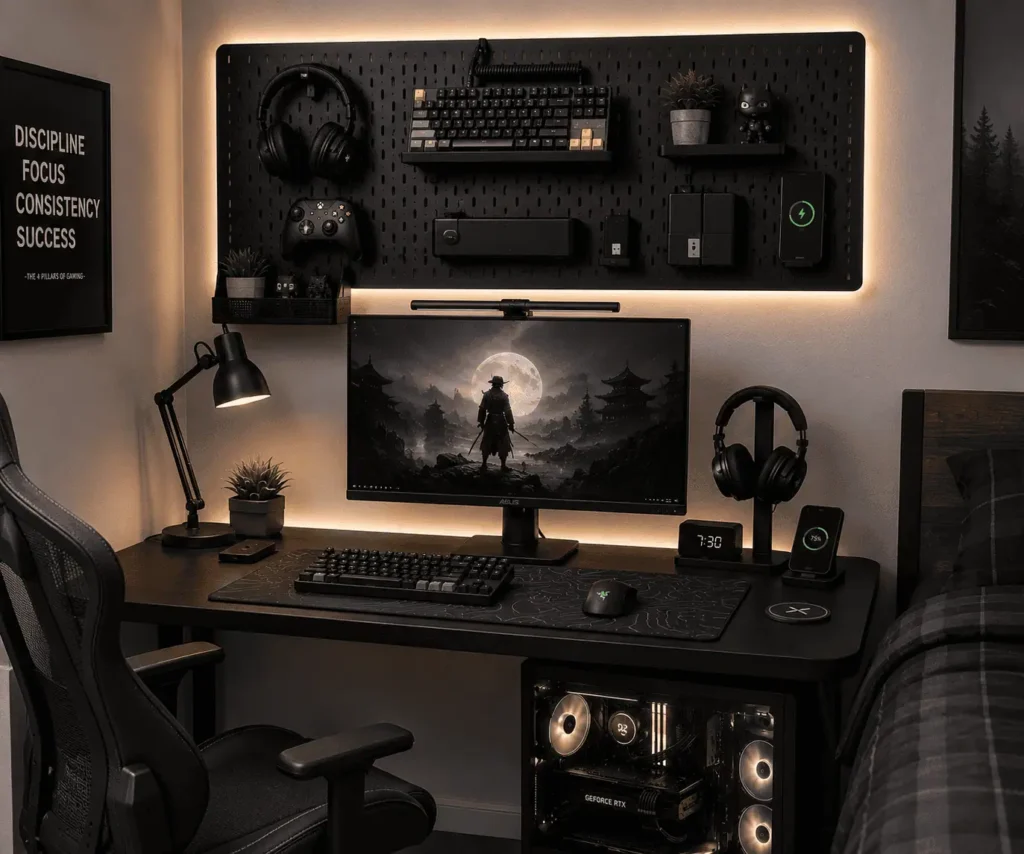
A pegboard can have the biggest impact on a small desk setup. When desk space is limited, moving accessories onto the wall creates more room for daily tasks.
This approach works especially well for apartment setups, dorm rooms, compact gaming desks, and small home offices.
Focus on storing frequently used peripherals such as a headset, controller, charging cable, and webcam. A simple layout often works better than trying to store everything on the pegboard.
By keeping only essential accessories within reach, even a small workspace can feel organized and efficient.
Medium Desk Setup
A medium-sized desk offers more flexibility.
You can dedicate separate sections of the pegboard to gaming accessories, work tools, and charging devices. This creates a balanced layout that is both practical and visually organized.
A combination of hooks, shelves, and baskets usually works best for medium-sized setups.
Large Gaming Desk Setup
A large desk allows you to create multiple storage zones.
For example, you can dedicate one section to gaming peripherals, another to streaming equipment, and another to charging accessories and storage devices.
This approach helps prevent clutter while keeping a large number of accessories organized.
Corner Desk Setup
Corner desks often have unused wall space that can be turned into valuable storage.
Installing a pegboard above or beside the desk helps keep accessories within reach without affecting your primary work area.
This layout works particularly well for users who need additional storage but want to maintain a clean desktop.
Cable Management Tips for Pegboard Setups
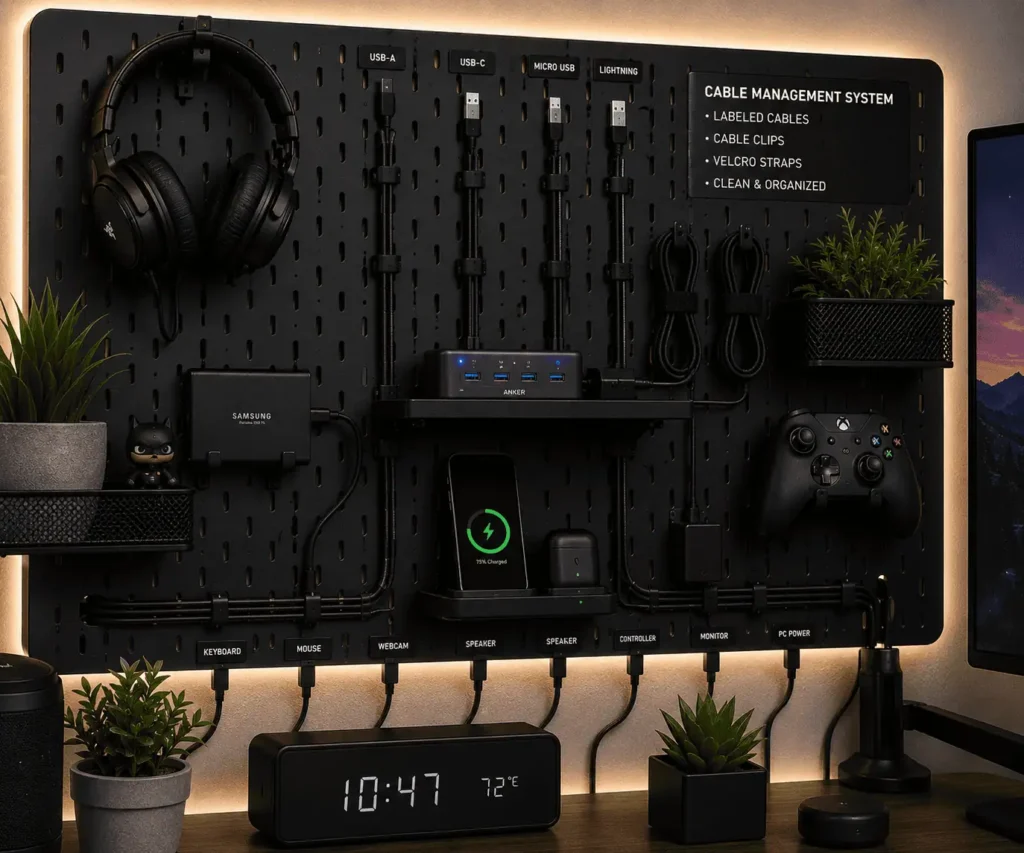
Cable management is one of the biggest advantages of using a pegboard.
Without proper cable organization, even the cleanest setup can look messy. A few simple cable management practices can make a significant difference.
Route Cables Behind the Pegboard
Whenever possible, guide cables behind the pegboard instead of allowing them to hang across the front.
This reduces visual clutter and creates a cleaner appearance.
If your pegboard uses wall spacers, you may already have enough room to route cables neatly behind it.
Use Cable Clips and Sleeves
Cable clips help guide individual wires along a planned path.
Cable sleeves bundle multiple wires together, creating a cleaner and more organized appearance.
Using both products together can dramatically improve cable organization.
This approach is especially helpful for multi-monitor setups, where several display cables need to follow a clean and organized path.
Position USB Hubs Carefully
USB hubs often become a central connection point for multiple peripherals.
Place the hub close to the devices it serves. Shorter cable runs are easier to manage and help reduce clutter.
A small pegboard shelf can be an ideal location for a USB hub.
Prevent Cable Slack
Excess cable length is one of the most common causes of clutter.
Use Velcro straps to secure extra cable and prevent loose wires from hanging around the desk.
This keeps the setup looking tidy while making future adjustments easier.
Create a Dedicated Charging Area
A pegboard can also function as a charging station.
Many users dedicate a small section of the pegboard to charging devices such as:
- Wireless mice
- Gaming controllers
- Headsets
- Smartphones
- Tablets
Keeping charging accessories together reduces clutter and makes devices easier to locate.
If your setup includes a laptop dock, organizing docking station cables can help keep the charging area neat and reduce cable clutter.
Label Important Cables
Simple cable labels can save time when connecting devices or troubleshooting problems.
Labels are especially useful if you use multiple USB devices, external drives, webcams, or charging cables.
A clearly labeled setup is easier to maintain and upgrade.
Common Pegboard Organization Mistakes to Avoid
Even a well-designed pegboard can become cluttered if it is not used correctly.
Avoiding these common mistakes can help keep your setup functional and organized.
Mounting the Pegboard Too High
A pegboard should make accessories easier to reach.
If it is mounted too high, you may need to stretch every time you need a headset, controller, or charging cable.
Keep frequently used accessories within comfortable reach while sitting at your desk.
Overloading Hooks and Shelves
Every hook and shelf has a weight limit.
Adding too many heavy accessories can reduce stability and increase wear over time.
Spread weight evenly across the pegboard and use accessories designed for heavier peripherals.
Ignoring Cable Management
Many users focus on organizing peripherals but forget about cables.
Unmanaged cables can quickly undo the clean appearance of an otherwise organized setup.
Always include cable management as part of your pegboard layout plan.
Blocking Monitor Arms
Monitor arms require room to move.
Before mounting a pegboard, make sure it will not interfere with monitor adjustments, speakers, desk lamps, or other accessories.
Planning ahead can prevent unnecessary changes later.
Overcrowding the Pegboard
A pegboard does not need to hold every accessory you own.
Trying to fill every available space often creates visual clutter and makes the layout harder to use.
A simple and organized pegboard is usually more effective than a crowded one.
Conclusion
A pegboard is a practical way to organize PC peripherals while making better use of the space around your desk. Whether you want to store headsets, controllers, keyboards, charging cables, USB hubs, or streaming accessories, a well-planned layout can reduce clutter and improve cable management without making your workspace feel crowded. Start with the accessories you use most often, keep the layout simple, and adjust it as your setup changes to create a workspace that stays organized over time.
FAQs
Can a pegboard damage my wall?
When installed correctly using the recommended mounting hardware, a pegboard should not damage the wall beyond the normal screw holes required for installation.
How often should I reorganize a pegboard?
Review your pegboard whenever you add or remove PC accessories. Updating the layout occasionally helps keep frequently used peripherals easy to reach.
Can I use a pegboard with a standing desk?
Yes. Mount the pegboard at a height that remains comfortable when the desk is in both sitting and standing positions.
Are pegboards suitable for rented apartments?
Yes, as long as your landlord allows wall mounting. If drilling is not permitted, consider removable wall systems or freestanding pegboard panels.
How much wall space do I need for a pegboard?
The required space depends on the number of peripherals you own. A small pegboard is often enough for a headset, controller, charging cables, and a few everyday accessories, while larger setups may benefit from a wider panel.